
Quick Summary
- Understand PCI DSS requirements and protect cardholder data across online payment systems.
- Identify your SAQ type based on checkout flow and payment processing methods.
- Follow 12 PCI requirements to secure your eCommerce store payments.
- Maintain compliance through regular scans, reviews, documentation, and security updates.
Every online store that accepts card payments must follow the Payment Card Industry Data Security Standard (PCI DSS), whether it handles card data itself or outsources it. What you need to do depends on how your checkout treats card data. A store that redirects shoppers to a hosted payment page answers far fewer requirements than one that takes card numbers on its own server.
This eCommerce PCI compliance checklist covers the 12 requirements, the self-assessment you file to prove compliance, and the payment page script rules that apply to online stores.
What eCommerce PCI Compliance Means
eCommerce PCI compliance means protecting cardholder data wherever your store stores, processes, or transmits it and proving that protection to your acquirer every year. The requirements apply to your cardholder data environment (CDE), which covers every system, person, and process that touches card data or can affect its security.
Who Must Comply?
Any business that accepts card payments must comply. Outsourcing payment processing reduces your scope, but it does not remove your compliance responsibility. A store on a hosted platform still validates compliance, with fewer requirements.
The standard protects two kinds of data:
- Cardholder data: the primary account number (PAN), plus the cardholder name, expiration date, or service code when stored with it. You may store it if you protect it.
- Sensitive authentication data: full magnetic stripe data, card verification codes (CVV), and PINs. This data may never be stored after authorization.
What Changed in PCI DSS 4.0.1
PCI DSS 4.0.1 is a limited revision of v4.0, published in June 2024. It adds no requirements. v4.0 retired on December 31, 2024, which left v4.0.1 as the only active version.
Of the 64 new requirements in v4.0, 13 applied immediately and 51 became mandatory on March 31, 2025. Any assessment you complete in 2026 covers all of them.
The standard now treats compliance as continuous. You need evidence that controls ran throughout the year, not a clean result on assessment day.
Two changes matter most for online stores: script protection on payment pages (Requirements 6.4.3 and 11.6.1) and multifactor authentication for all non-console access into the CDE (Requirement 8.4.2). Both are covered in the checklist below.
Who Enforces PCI DSS
The PCI Security Standards Council (PCI SSC) writes the standard but does not enforce it or issue fines. Card brands such as Visa, Mastercard, JCB, and American Express enforce it. Their rules reach you through your acquiring bank or payment processor, which asks for your proof of compliance.
PCI DSS is an industry standard, not a law.
Which SAQ Applies to Your Online Store
Your Self-Assessment Questionnaire (SAQ) depends on how card data reaches your payment processor. If shoppers pay on a provider’s hosted page, you likely file SAQ A. If your website’s code can affect the payment form, you file SAQ A-EP. If card numbers touch your servers, you file SAQ D. Your acquirer has the final say.
SAQ A
SAQ A fits card-not-present merchants that fully outsource all account data functions to a PCI DSS compliant third-party service provider (TPSP). No card data is stored, processed, or transmitted on your systems. This covers PCI compliance for hosted checkout pages, whether shoppers are redirected to the provider or pay through the provider’s embedded iframe.
Since January 2025, SAQ A carries an eligibility criterion instead of Requirements 6.4.3 and 11.6.1. You must confirm your site is not susceptible to script attacks that could affect your payment page. PCI SSC accepts either of two proofs:
- You apply script controls such as those in Requirements 6.4.3 and 11.6.1.
- Your provider confirms in writing that its embedded payment form protects against script attacks when you implement it as instructed.
The criterion mainly concerns embedded forms. Merchants that fully redirect to the provider’s page are generally not affected by it.
SAQ A is short but not empty. It still includes quarterly ASV (Approved Scanning Vendor) scans of your website and stricter password rules.
SAQ A-EP
SAQ A-EP fits merchants that outsource payment processing, but their website still affects transaction security. Common cases are a payment form built with provider JavaScript on your page, a direct post to the processor, or a redirect controlled by your own code.
Card data never reaches your server, but an attacker who alters your page can steal it. That is why SAQ A-EP covers far more than SAQ A, including secure development, vulnerability scanning, penetration testing, and payment page script controls.
SAQ D
SAQ D applies when your systems store, process, or transmit card data, or when you do not meet the criteria for any other SAQ. A custom payment form that posts to your own server is the typical case. It covers all applicable PCI DSS requirements and is the heaviest validation for a merchant.
How Your Checkout Type Sets Your SAQ
| Checkout type | How card data flows | Likely SAQ | Your main burden |
|---|---|---|---|
| Redirect to provider’s hosted page | Shopper leaves your site to pay | SAQ A | Scans, access control, provider due diligence |
| Provider iframe embedded on your page | Card fields load from the provider | SAQ A | Same as above, plus script protection confirmation |
| Provider JavaScript or direct post | Your page builds the form, card data goes straight to the processor | SAQ A-EP | Secure development, testing, script controls |
| Custom form or stored card data | Card data reaches your servers | SAQ D | Every applicable requirement |
Confirm the result with your acquirer or payment provider before you start any remediation.
PCI Merchant Levels and Validation Requirements
The merchant level sets how you prove compliance, not which requirements apply. Card brands assign levels by annual transaction volume. Level 1 merchants validate through an on-site assessment by a Qualified Security Assessor (QSA). Levels 2 to 4 usually file a Self-Assessment Questionnaire (SAQ) and run quarterly scans. Your acquirer confirms your level.
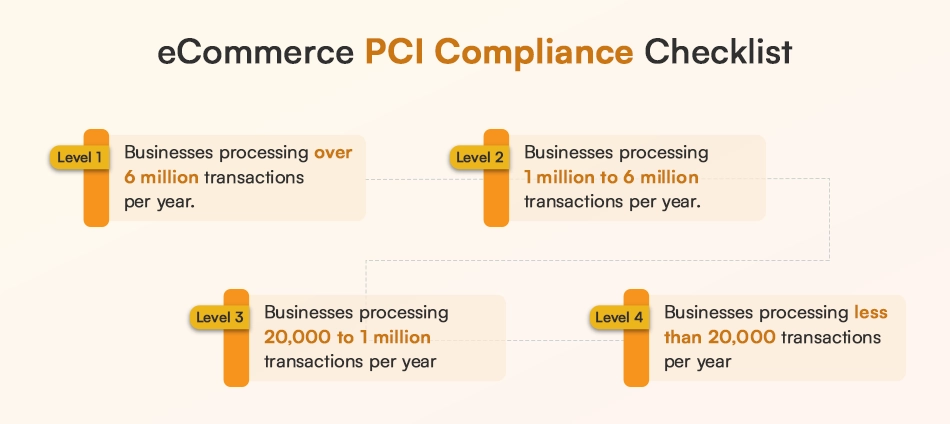
Levels 1 to 4
| Level | Who falls here | How you validate |
|---|---|---|
| 1 | More than 6 million transactions a year, or any merchant a card brand designates Level 1 | Annual Report on Compliance (ROC) by a QSA or Internal Security Assessor (ISA), quarterly ASV scans, AOC |
| 2 | 1 to 6 million transactions a year | Annual SAQ, quarterly ASV scans, AOC |
| 3 | 20,000 to 1 million e-commerce transactions a year | Annual SAQ, quarterly ASV scans, AOC |
| 4 | Fewer than 20,000 e-commerce transactions, and all other merchants below the Level 3 threshold | Annual SAQ, ASV scans where external systems are in scope, AOC |
Three points change how you read the table:
- Acquirers can ask for more. Some Level 2 merchants must have a QSA or ISA validate their SAQ, and some acquirers ask for a full ROC. At Level 4, card brands may not require you to file, but acquirers usually do.
- Thresholds differ by brand. American Express, for example, sets Level 1 at 2.5 million transactions.
- Your level does not change your SAQ. A Level 3 store on a hosted payment page still files SAQ A. The SAQ follows your checkout setup, not your volume.
Why Your Level Can Differ by Brand and Change Over Time
Each card brand defines its own levels and counts your volume on that brand across all channels, online and in person. Not every brand uses all four levels, so the same store can sit at different levels with different brands.
A level is not fixed. A data breach can move you to Level 1, and so can ongoing non-compliance. Acquirers can also place you above the published thresholds. Recheck your level with your acquirer as your transaction volume grows.
The eCommerce PCI Compliance Checklist: 12 Requirements
The eCommerce PCI compliance checklist follows the 12 requirements of PCI DSS 4.0.1. You answer only the ones your SAQ includes. SAQ A covers Requirements 2, 3, 6, 8, 9, 11, and 12 with reduced scope. SAQ A-EP and SAQ D cover all 12. Each item below states what the requirement demands and the control to put in place.
Requirement 1: Install and Maintain Network Security Controls
Applies to: SAQ A-EP and SAQ D
Network security controls, such as firewalls and cloud security groups, decide what traffic can reach your payment systems. Limit inbound and outbound traffic to the CDE to what is necessary and deny everything else. Keep a current network diagram and data-flow diagram, and review your rulesets every six months.
Action: List every open port with its business reason, then close the rest.
Requirement 2: Apply Secure Configurations to All System Components
Applies to: All SAQs. In SAQ A, it covers vendor default accounts on the web server that links to your provider.
Vendor defaults are the easiest way into a system. Change or remove every default account and password, disable services you do not use, and encrypt all non-console administrative access, including browser-based admin panels and APIs (2.2.7).
Action: Build a hardening checklist for your web server and admin panels, and apply it to every new system before launch.
Requirement 3: Protect Stored Account Data
Applies to: All SAQs. In SAQ A, it covers paper records only.
Store the least data you can. Set retention limits and verify at least every three months that expired data is deleted (3.2.1). Never store sensitive authentication data after authorization, even encrypted (3.3.1).
Where you must keep the primary account number (PAN), mask it on screens and receipts and render it unreadable in storage with strong cryptography, truncation, or tokens. Payment tokenization removes the PAN from your systems entirely.
Action: Use your provider’s tokens for repeat purchases instead of stored card numbers.
Requirement 4: Protect Cardholder Data in Transit
Applies to: SAQ A-EP and SAQ D. In SAQ A-EP, it covers payment data you send to your provider.
Use strong cryptography whenever card data crosses public networks. Accept only trusted keys and certificates, confirm they are valid and not expired or revoked, and block fallback to insecure protocol versions. In practice, that means TLS 1.2 or higher on checkout pages, APIs, and gateway connections. Do not send card numbers by email or chat. If you must, protect them with strong cryptography (4.2.2).
Action: Run a certificate and protocol check on every domain and API endpoint that carries payment data.
Requirement 5: Protect All Systems and Networks from Malicious Software
Applies to: SAQ A-EP and SAQ D
Deploy anti-malware on all systems, except those you have documented as not at risk, and re-evaluate periodically (5.2.3). Keep it updated automatically, run periodic scans or continuous behavioral analysis, and stop users from disabling it. Since March 31, 2025, you also need automated anti-phishing protection for staff who can reach payment systems (5.4.1).
Action: Enable phishing filtering on the email accounts of everyone with admin access to your store.
Requirement 6: Develop and Maintain Secure Systems and Software
Applies to: All SAQs. In SAQ A, it covers the web server that hosts the page linking to your provider.
Rank vulnerabilities by risk, install critical patches within one month of release (6.3.3), and keep an inventory of custom code and the third-party components inside it (6.3.2). Public-facing web applications need an automated solution, such as a web application firewall (WAF), to detect and block attacks (6.4.2).
For PCI compliance on Magento, WooCommerce, or any self-hosted platform, this covers core files, themes, and every extension. Payment page script rules (6.4.3) have their own section below.
Action: Set a monthly patch window for your platform, themes, and extensions, and log each update.
Requirement 7: Restrict Access by Business Need to Know
Applies to: SAQ A-EP and SAQ D
Give each person the least access their job needs. Role-based access control (RBAC) makes this manageable: define roles such as support, finance, and developer, then assign users to roles. Get documented approval for each privilege level (7.2.3). Review all accounts, including agency and vendor accounts, at least every six months (7.2.4). Apply the same rules to application and system accounts (7.2.5).
Action: Run a six-month access review and remove admin rights from anyone who no longer needs them.
Requirement 8: Identify Users and Authenticate Access
Applies to: All SAQs. In SAQ A, it covers the web server that hosts the page linking to your provider.
Every user needs a unique ID (8.2.1). Shared accounts are allowed only as a documented, time-limited exception (8.2.2). Revoke access for departing staff immediately (8.2.5) and disable accounts inactive for 90 days (8.2.6). Passwords need at least 12 characters with letters and numbers, and users cannot reuse their last four (8.3.6, 8.3.7). Lock accounts for at least 30 minutes after no more than 10 failed attempts (8.3.4).
Multifactor authentication (MFA) is required for all non-console access into the CDE (8.4.2) and all remote access from outside your network (8.4.3). Accounts that use only phishing-resistant factors are exempt.
Action: Turn on MFA for your admin panel, hosting account, and payment provider dashboard, then retire shared logins.
Requirement 9: Restrict Physical Access to Cardholder Data
Applies to: All SAQs. In SAQ A and SAQ A-EP, the media rules (9.4) apply only if you hold paper records with card data.
For an online-only store on cloud hosting, this requirement is small. Your host handles physical server security, so collect its Attestation of Compliance. If you keep paper records, store them in locked containers and destroy them by cross-cut shredding, incineration, or pulping when no longer needed (9.4.6). SAQ A-EP also covers facility entry controls for systems in your CDE (9.2.1).
Action: If you never print or store card data, mark 9.4 as not applicable and write down why.
Requirement 10: Log and Monitor All Access
Applies to: SAQ A-EP and SAQ D
Turn on audit logs for every system component. Capture individual access to card data, admin actions, invalid login attempts, and credential changes. Record the user, event type, time, success or failure, origin, and affected resource for each event (10.2.2). Back up logs to a central server that is hard to alter (10.3.3).
Review security event logs daily with automated mechanisms (10.4.1, 10.4.1.1). Keep 12 months of history, with the latest three months ready for analysis (10.5.1). Synchronize system clocks (10.6).
Action: Send logs from your web server, WAF, and admin panel to one central service with alerts.
Requirement 11: Test Security of Systems and Networks Regularly
Applies to: All SAQs, with different scope for each
- SAQ A: quarterly external vulnerability scans by an ASV.
- SAQ A-EP: the same, plus external penetration testing at least every 12 months.
- SAQ D: adds internal scans and internal penetration testing.
Run external scans at least every three months and after significant changes (11.3.2, 11.3.2.1). Every scan must pass under the ASV Program Guide, and you must rescan after fixes. For your first assessment, you do not need four passing scans in a row if the latest scan passed, you have a written policy requiring quarterly scans, and you fixed the findings. From your second year on, you need a passing scan every quarter.
Penetration tests run at least every 12 months and after significant changes. Change and tamper detection on payment pages (11.6.1) is covered in the payment page section.
Action: Book an ASV, schedule four scans a year, and keep every passing report.
Requirement 12: Support Security with Policies and Programs
Applies to: All SAQs, scaled to your size
Write an information security policy and review it at least once a year. A small merchant’s policy can be short, but every person with access must receive it. If you have no employees, you acknowledge your own responsibility.
- Training: provide security awareness training at hire and every 12 months, covering phishing and social engineering (12.6.3.1). Collect a yearly acknowledgment from each person.
- Providers: keep a list of every provider that touches card data or could affect it. Hold a written agreement with each (12.8.1, 12.8.2). Do due diligence before you sign (12.8.3). Check each provider’s PCI status at least every 12 months (12.8.4). Record which requirements you manage and which they manage (12.8.5).
- Scope: confirm your CDE scope at least once a year (12.5.2).
- Incident response: keep a plan that names roles, containment steps, recovery steps, and the notification of card brands and your acquirer (12.10.1).
Action: List every provider connected to your checkout and file each one’s Attestation of Compliance and contract.
Evidence to Keep for Each Requirement
PCI DSS 4.0.1 expects proof that controls ran all year. Keep these records:
| Requirement | Evidence |
|---|---|
| 1. Network security controls | Ruleset with business reasons for each port, network and data-flow diagrams, six-month review records |
| 2. Secure configurations | Hardening standard, proof that default accounts are removed or changed |
| 3. Stored account data | Retention policy, quarterly deletion checks, documentation of how PANs are stored or tokenized |
| 4. Data in transit | Certificate inventory, protocol scan results |
| 5. Malware protection | Anti-malware configuration and update logs, phishing protection settings |
| 6. Secure software | Patch log, component inventory, WAF configuration and logs |
| 7. Access by need to know | Role list, approval records, signed six-month access reviews |
| 8. Authentication | User list, MFA configuration, password policy settings |
| 9. Physical access | Host’s Attestation of Compliance, or paper handling procedure and destruction records, or a written not-applicable explanation |
| 10. Logging | Log configuration, daily review records, retention settings |
| 11. Testing | Passing ASV reports, penetration test report, rescan proof |
| 12. Policies and programs | Dated policy, training and acknowledgment records, provider list with agreements and AOCs, incident response plan |
Payment Page and Script Security
Requirements 6.4.3 and 11.6.1 protect your payment page from malicious scripts. Requirement 6.4.3 makes you authorize, verify, and justify every script on the page. Requirement 11.6.1 makes you detect unauthorized changes to the page and its HTTP headers.
Both have been mandatory since March 31, 2025. They apply directly if you validate with SAQ A-EP or SAQ D. SAQ A merchants meet the script criterion covered in the SAQ section above.
Why E-skimming is the Main Risk for Online Stores
E-skimming, often called a Magecart-style attack, injects malicious JavaScript into a checkout page. The script copies card details as shoppers type them, so the attacker never needs to breach your database. Any script on the page can be the entry point, including analytics tags, chat widgets, and code loaded by a tag manager.
These attacks can run for short windows or target specific visitors, which makes them hard to spot without monitoring. This gap in online transaction security is what the two requirements close.
What 6.4.3 and 11.6.1 Require
Requirement 6.4.3 covers every script that loads and runs in the shopper’s browser on your payment page. For each script you must:
- Confirm it is authorized.
- Assure its integrity.
- Keep it in an inventory with a written business or technical justification.
It covers scripts from your own environment and from third and fourth parties. Scripts inside a provider’s embedded iframe are the provider’s responsibility.
Requirement 11.6.1 requires a change and tamper detection mechanism. It must alert your team to unauthorized changes, additions, or deletions to the page contents and HTTP headers as the shopper’s browser receives them. It runs at least every seven days, or at the frequency set in your targeted risk analysis. You do not install anything on shoppers’ devices.
How to Meet Them in Practice
- Inventory every script: List each script on the payment page, including the third-party scripts your tag manager loads. Record who owns it and why it is there.
- Remove what you do not need: Every script you drop is one less to authorize, verify, and monitor.
- Authorize with a Content Security Policy (CSP): Allow only listed script sources. Start in report-only mode to see what breaks, then enforce.
- Verify integrity with Subresource Integrity (SRI): Add hashes to static scripts so the browser rejects any altered file. PCI SSC lists SRI and CSP as example mechanisms.
- Monitor for change: Use a tamper-detection tool that watches the delivered page and headers and alerts a named person. CSP and SRI alone are not enough. CSP controls where scripts come from, not what they do. SRI cannot cover scripts that change by design. A stripped CSP header switches the policy off.
PCI SSC’s information supplement, Payment Page Security and Preventing E-Skimming, is the guidance to follow for your evidence.
PCI Compliance by Platform and Business Model
PCI responsibilities depend on how your store handles payments and which systems you control. Hosted platforms reduce your PCI scope by managing payment infrastructure, while self-hosted stores require merchants to manage more security controls. Your checkout method and business model decide the level of compliance work required.
Shopify and BigCommerce (Hosted Platforms)
Shopify and BigCommerce handle the core payment environment for their standard checkout flows. Merchants still need to complete the required SAQ, secure admin access, review installed apps, and manage any custom scripts added to the storefront.
For Shopify PCI compliance and BigCommerce PCI compliance, using the platform’s default checkout generally reduces the systems included in your PCI scope.
Stripe and Hosted Payment Pages
Hosted payment pages keep card data on the payment provider’s systems instead of your website. Redirect-based checkout usually has a smaller scope than embedded payment forms because your site does not control the payment fields.
Payment tokenization further reduces exposure by replacing card numbers with tokens. However, merchants must still follow the validation requirements defined by their payment flow.
Magento and WooCommerce (Self-Hosted Platforms)
Self-hosted stores control more of the payment environment and carry more security responsibility. A reliable eCommerce development service should account for hosting, patches, extensions, custom code, access controls, and security monitoring during implementation.
For PCI compliance Magento and WooCommerce stores, keeping the platform and third-party components updated is essential to reduce vulnerabilities.
Subscription and Recurring Payment Businesses
Subscription stores should avoid storing card numbers directly. Using a payment provider’s vault and tokenization system helps protect stored payment credentials while supporting recurring charges.
Recurring payment security depends on how you manage payment tokens, access permissions, and future transactions.
Small Businesses and Startups
The simplest way to reduce PCI complexity is to use a PCI-compliant payment gateway with hosted checkout. For B2B stores with complex workflows, a B2B eCommerce development service can help build secure payment flows, integrations, and access controls while keeping compliance requirements in mind.
A practical PCI compliance checklist for small businesses starts with limiting the systems that handle payment data.
How to Validate PCI DSS Compliance (5 Steps)
PCI DSS compliance validation means proving that your payment environment follows the required security controls. The process starts with understanding your payment flow, selecting the correct validation method, fixing gaps, completing the required documents, and submitting proof to your acquirer.
Step 1: Identify Your Cardholder Data Environment and Payment Flows
Map how cardholder data enters, moves through, and leaves your systems. Identify every system, service provider, and integration that stores, processes, or transmits payment data.
This helps define your cardholder data environment (CDE) and keeps unnecessary systems out of your PCI scope.
Step 2: Determine Your Applicable Self-Assessment Questionnaire (SAQ)
Choose the SAQ based on your checkout setup and how payment data is handled. A hosted checkout may qualify for SAQ A, while custom payment flows may require SAQ A-EP or SAQ D.
Confirm the applicable SAQ with your acquirer before starting the assessment.
Step 3: Remediate Security Gaps and Validate Controls
Review your environment against the applicable PCI DSS requirements and fix any gaps. This may include updating software, improving access controls, securing payment pages, or completing required vulnerability scans.
Keep evidence of completed fixes and security controls throughout the year.
Step 4: Complete the Required Assessment and Attestation of Compliance
Complete your SAQ or other required assessment method and document your compliance status in the Attestation of Compliance (AOC).
Large merchants may need a Report on Compliance (ROC) completed by a Qualified Security Assessor (QSA).
Step 5: Submit Documentation to Your Acquirer or Payment Provider
Submit the required validation documents to your acquiring bank or payment provider, following their process. Requirements can vary based on your merchant level, card brand, and payment setup.
PCI DSS 4.0.1 expects continuous evidence of compliance, so keep records of security activities, scans, reviews, and policy updates throughout the year.
How to Maintain PCI Compliance for an Online Store
PCI compliance is not a one-time assessment. Merchants must continue monitoring security controls, reviewing access, testing systems, and updating documentation throughout the year. PCI DSS 4.0.1 focuses on maintaining evidence that controls operate consistently, not just passing an annual assessment.
| Frequency | Task |
|---|---|
| Quarterly | Run internal and Approved Scanning Vendor (ASV) scans, review payment page scripts, and check plugins and third-party components. |
| Every six months | Review user access, remove unnecessary permissions, and verify that accounts still match business needs. |
| Annually | Complete SAQ and AOC, review security policies, conduct penetration testing where required, provide staff training, review PCI scope, and test the incident response plan. |
| After any change | Recheck PCI scope, review payment flows, and rescan systems after major updates or integrations. |
Keeping these records throughout the year helps demonstrate ongoing PCI DSS compliance during validation.
PCI Non-Compliance Penalties and Costs
PCI non-compliance does not create a government fine because PCI DSS is an industry standard, not a law. Instead, consequences come through card brands, acquiring banks, and payment processors. The actual impact depends on your merchant agreement, the type of violation, and whether a data breach occurs.
What Penalties Look Like
A merchant that fails to maintain PCI compliance may face additional fees from its acquirer, higher processing costs, restrictions on card acceptance, and breach-related expenses. If card data is compromised, costs can include forensic investigations, fraud losses, card replacement expenses, and remediation work.
Reported PCI penalty ranges, such as monthly charges between thousands and tens of thousands of dollars, are industry estimates and not universal published fines. Card brands define their enforcement programs, while the amount passed to a merchant depends on agreements with the acquirer or payment provider.
Maintaining PCI compliance helps prevent data breaches and keeps payment processing secure without unexpected compliance issues.
What Compliance Costs
PCI compliance costs vary based on your payment setup, merchant level, and required controls. A hosted checkout with limited PCI scope usually costs less than a self-hosted environment that requires security testing, assessments, and ongoing monitoring.
| Business Type | Typical PCI Activities | Cost Factors |
|---|---|---|
| Small store using hosted checkout | SAQ completion, basic security reviews, required scans | Payment provider setup, ASV scans, internal processes |
| Growing eCommerce store | SAQ, vulnerability scans, security tools, policy updates | Platform complexity, integrations, staff access management |
| Large or self-hosted enterprise store | QSA assessment, penetration testing, extensive security controls | CDE size, custom applications, compliance scope |
There is no fixed PCI compliance price because costs depend on your environment and validation requirements. The fastest way to reduce expenses is usually to limit how much cardholder data your own systems handle through hosted payment pages and tokenization.
For any store, maintaining security controls is generally easier to manage than responding to a payment data breach.
Common PCI Compliance Mistakes
Avoiding common mistakes helps you maintain PCI compliance and prevent unnecessary security gaps.
- Assuming a PCI-compliant payment gateway removes all merchant responsibilities.
- Storing card data when tokenization or a hosted checkout can avoid it.
- Ignoring third-party scripts that run on payment pages.
- Treating PCI compliance as an annual task instead of ongoing security work.
- Choosing the wrong SAQ without confirming your payment flow with the acquirer.
Review these areas regularly to keep your payment environment secure and compliant.
Next Steps
Following an eCommerce PCI Compliance Checklist helps you identify your responsibilities, reduce payment risks, and maintain secure payment processing. Review your checkout flow, confirm your PCI scope, and keep evidence of your controls throughout the year.
Need help navigating PCI requirements? Get expert eCommerce consulting to review your payment flow, compliance scope, and security approach.
FAQs on eCommerce PCI Compliance
1. What is an eCommerce PCI compliance checklist?

An eCommerce PCI compliance checklist is a set of steps that helps online stores meet PCI DSS requirements. It covers areas such as protecting cardholder data, securing payment systems, managing access, testing security controls, and maintaining compliance records.
2. Is PCI DSS compliance mandatory for online stores?
Any business that accepts, stores, processes, or transmits cardholder data must follow PCI DSS requirements. It is an industry standard enforced through card brands, payment processors, and acquiring banks rather than a government regulation.
3. Does a small eCommerce business need to be PCI compliant?
Yes. Small businesses must maintain PCI compliance if they accept card payments. Using a hosted payment provider can reduce the scope of compliance, but merchants still need to complete the required validation steps.
4. Does using Shopify or Stripe make my store PCI compliant?
Shopify and Stripe handle parts of the payment security process, but they do not remove all merchant responsibilities. You still need to follow the applicable SAQ requirements and secure areas you control, such as accounts, apps, and custom scripts.
5. How often does an online store need to validate PCI compliance?
Most merchants validate PCI compliance annually by completing the required SAQ and Attestation of Compliance (AOC). Some controls, such as vulnerability scans, access reviews, and security monitoring, must be performed more frequently.
6. Is there a PCI certification for merchants?
No. Merchants do not receive a PCI certification. Compliance is validated through methods such as a Self-Assessment Questionnaire (SAQ) or Report on Compliance (ROC), along with an Attestation of Compliance (AOC).
7. Can an eCommerce business avoid storing cardholder data?
Yes. Many businesses avoid storing card data by using hosted payment pages, payment gateways, and tokenization. This reduces the amount of cardholder data within the merchant’s environment and lowers PCI scope.
8. What happens if my online store fails a PCI compliance assessment?
A failed assessment means you need to fix the identified gaps before validation can be completed. Continued non-compliance may lead to additional fees, higher processing costs, restrictions, or increased liability after a data breach.
9. How much does eCommerce PCI compliance cost?
The cost depends on your payment setup, merchant level, and required security controls. Hosted checkout solutions usually have fewer compliance costs, while self-hosted stores may require additional testing, tools, and security assessments.
10. Does Requirement 6.4.3 apply to me if I use a hosted checkout?
It depends on how the hosted checkout is implemented. A fully redirected payment page usually reduces your responsibility, while embedded payment forms may require confirmation that script-related security requirements are addressed. Always confirm the applicable scope with your acquirer.