
Quick Summary
- Hyvä Theme offers a lightweight, performance-first frontend for Magento, replacing bloated legacy stacks.
- It uses Tailwind CSS and Alpine.js, making development faster and more maintainable.
- Integration requires a valid license, Magento, and a basic setup using Composer and Git.
- Hyvä significantly improves speed, SEO, and user experience while simplifying the developer workflow.
Many Magento stores struggle with performance due to outdated frontend code. But there is a solution: Hyvä Theme. It changes everything by replacing heavy, bloated code with a clean, modern setup that loads in under a second.
After implementation, your store loads faster, and users stay on your website longer. Further, even your search rankings improve.
This guide shows you exactly how to integrate Hyvä into your Magento store. You will learn what makes it different, how to set it up step by step, and why it is the smart choice for better performance.
Let’s get your store running the way it should.
What is the Hyvä Theme in Magento?
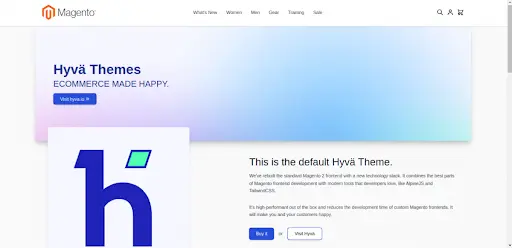
Hyvä is a modern Magento 2 frontend that replaces the Luma stack with a lightweight setup based on Alpine.js and Tailwind CSS. It keeps the Magento backend and business logic intact while simplifying the frontend code. This also reduces reliance on heavy JavaScript and CSS.
Moreover, it eliminates the dependency on Knockout.js, RequireJS, and multiple bundled libraries. Instead, Hyvä uses a single lightweight JavaScript library and small, utility-first CSS. This shift removes much of the default Magento frontend, making development simple and fast.
Basically, for merchants, Hyvä is like a theme upgrade that changes performance and UX without a platform migration. For developers, it is like working with a modern stack that reduces coding issues and speeds up delivery.
Why Choose Hyvä Theme?
Again, Hyvä is designed with simplicity and speed at its core. It addresses many pain points developers face. Here’s why it is quickly becoming the go-to choice for Magento stores:
- Lightning-Fast Performance: Hyvä drastically improves Core Web Vitals and Lighthouse scores. With no bloated JavaScript and minimal DOM, pages load faster and respond smoothly even on mobile devices.
- Better Developer Experience: No more dealing with Knockout.js or RequireJS. Hyvä replaces them with modern, intuitive tools, making the codebase easier to read, debug, and extend.
- Built with Tailwind CSS: Hyvä uses utility-first styling with Tailwind CSS. With this, you can design beautiful interfaces faster, with fewer stylesheets and more control.
- Minimal Dependencies: Forget the pile of JavaScript libraries. Hyvä uses only what is needed, resulting in fewer conflicts and easier customization.
Understanding the Hyvä Stack, Theme, License, and Access
Hyvä modernizes the Magento frontend by using:
- Tailwind CSS: A utility-first CSS framework that makes UI development fast and consistent.
- Alpine.js: A lightweight JavaScript framework for adding interactivity like modals, toggles, and tabs.
- Clean HTML Templates: Simple, semantic templates that are easy to read and customize.
Together, these tools replace the legacy frontend stack. They come with a smoother, faster, and more maintainable development workflow.
Next, as Hyvä is a premium theme and requires a one-time purchase to access its codebase and support. Once you buy a license from hyva.io, you gain:
- Access to the private GitLab repository containing the theme and compatibility modules.
- Detailed documentation to help with setup and customization.
- Access to the active Slack community for support and collaboration.
- Updates and improvements are included with the license.
The license is valid per project/domain. It is ideal for merchants and agencies seeking both performance and simplicity in Magento development. If you need help regarding license access, hire Magento developers from BrainSpate today!
Prerequisites and System Requirements for Hyvä Theme
Before you begin integrating Hyvä, make sure your development environment meets the following requirements:
- Magento 2.4.x or later.
- PHP 7.4 or 8.1+ (recommended for performance and compatibility).
- Node.js and npm or Yarn for frontend tooling.
- A working Magento setup (local or staging).
- Composer installed and configured.
With these basics in place, you are ready to install and build with Hyvä smoothly.
How to Integrate Hyva Theme in Your Magento Store?
Now that you understand why Hyvä is the perfect solution for your Magento store, let’s see how to implement it. In this section, we will explain to you the entire process of integrating Hyvä into your store. These simple steps will have you up and running in no time.
Step 1: Clone the Hyvä Theme
After purchasing, clone the theme into your Magento installation:
git clone https://repo.hyva.io/magento2-default-theme.git app/design/frontend/Hyva/default
Step 2: Register and Apply the Theme
Run Magento setup commands:
php bin/magento setup:upgrade
php bin/magento setup:static-content:deploy -f
php bin/magento cache:flush
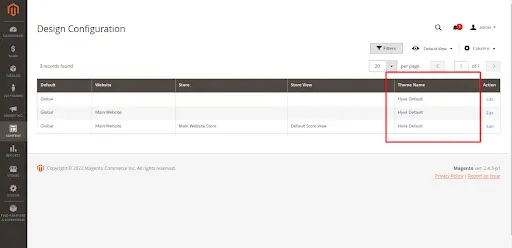
Set the theme via Admin → Content → Design → Configuration, or via CLI:
php bin/magento config:set design/theme/theme_id <theme_id>
Step 3: Setup Tailwind CSS
Install dependencies:
cd app/design/frontend/Hyva/default
npm install
Run Tailwind watcher:
npm run watch
Customize tailwind.config.js as needed and start styling your components using utility classes.
Step 4: Add Interactivity with Alpine.js
Here’s a basic example using Alpine.js:
<div x-data="{ open: false }">
  <button @click="open = !open">Toggle Info</button>
  <div x-show="open">Hello from Alpine.js!</div>
</div>
This enables reactive, declarative UI behavior without heavy JavaScript.
Step 5: Check 3rd-Party Module Compatibility
Some older modules rely on Knockout.js and RequireJS, which have been removed from Hyvä. Solutions include:
- Using Hyvä-compatible alternatives
- Rebuilding frontend templates manually
- Installing Hyvä Compatibility Modules
Step 6: Create a Child Theme (Optional but Recommended)
Avoid modifying the core Hyvä theme directly. Instead, create a child theme:
<theme xmlns_xsi="http://www.w3.org/2001/XMLSchema-instance" xsi_noNamespaceSchemaLocation="urn:magento:framework:Config/etc/theme.xsd">
    <title>Hyva Child</title>
    <parent>Hyva/default</parent>
    <media>
        <preview_image>media/preview.jpg</preview_image>
    </media>
</theme>
Place this in:
app/design/frontend/Vendor/hyva-child/theme.xml
By following these steps, you should now have Hyvä fully integrated into your Magento store. With improved performance, easier customization, and a cleaner development environment, you’re all set to create an amazing storefront. In the next sections, we’ll look into performance testing, best practices, and common troubleshooting tips to ensure everything runs smoothly.
Performance After Hyvä Theme Integration
Use Magento integration services to add Hyvä, and you will see clear improvements in speed and metrics. Page load times typically drop because unused JS/CSS is gone, and the frontend payload is much smaller.
- Before (Luma theme): Core Web Vitals and Lighthouse scores typically range between 50 and 60 (depending on site complexity), with slow loading times and sluggish interactivity.
- After (Hyvä theme): Hyvä’s performance scores above 90+, ensuring quick Time to First Byte (TTFB) and First Contentful Paint (FCP). Pages load faster, even on mobile devices, and interactive elements respond smoothly.
Over time, these performance gains support better engagement and higher conversion rates, especially on mobile, where slow Luma themes often struggle. You also spend less time on performance hacks because the Hyvä architecture is optimized from the start.
As performance improvements start influencing different parts of the store, from user experience to backend processes, it also becomes important to understand how various systems and tools stay connected and function together in this updated setup, which is covered in our Magento integration strategy guide.
Hyvä vs Other Magento Frontends
When planning a frontend upgrade, most Magento merchants compare Hyvä with Luma, Breeze, and PWA solutions. Here is a focused view on where each fits.
Hyvä vs Luma vs Breeze vs PWA
| Aspect | Hyvä Theme | Luma (Default) | Breeze | PWA Frontends |
|---|---|---|---|---|
| Tech stack | Alpine.js + Tailwind CSS, minimal JS/CSS. | Knockout.js, RequireJS, heavy CSS/JS. | Optimized Luma stack, keeps Knockout/RequireJS. | React/Vue-based SPA frameworks. |
| Performance | High speed, excellent Core Web Vitals. | Slow by default; often requires significant tuning. | Faster than Luma but below Hyvä. | Can be very fast, but depends on the build quality. |
| Development effort | Medium initial setup, simpler ongoing work. | High effort for deep customization. | Lower migration effort from Luma. | High complexity, multi-layer architecture. |
| Extension compatibility | Many modules need Hyvä compatibility or adapters. | Broadest compatibility (Magento default). | Strong compatibility with Luma-based modules. | Requires PWA-ready APIs or custom integration. |
| Target audience | Stores want long-term performance and modern UX. | Legacy stores, small projects with minimal changes. | Budget-conscious stores need quick speed gains. | Enterprises chasing headless and omni-channel. |
| ROI horizon | Strong long-term ROI via speed. | Weak unless heavily optimized. | Good short-term improvement, modest long-term gains. | High potential ROI but also high upfront costs. |
Breeze is a practical option if you already use Luma and want faster pages without extensive code changes. Hyvä, in contrast, is more future-proof because it removes frontend layers, giving you a simpler stack.
PWA frontends are powerful, too, but for many mid-sized merchants, Hyvä strikes the right balance among performance, cost, and implementation speed.
SEO Benefits of Hyvä Theme Integration in Magento
Hyvä offers SEO benefits primarily through speed, clean code, and mobile optimization. Lightweight HTML, reduced JS execution, and better CLS help search engines crawl and rank your pages easily.
Fast, mobile-friendly pages align with Google’s ranking signals, improving your chances of ranking higher for competitive queries. Hyvä also supports technical SEO best practices, including structured data, clean URLs, and accessible markup, which can enhance rich results and increase click-through rates.
Because users experience fewer layout shifts, they tend to stay longer and interact more with your website. This sends positive engagement signals back to search engines. Over the long run, this combination of speed, UX, and crawlability can boost organic visibility.
When Hyvä Is (and Isn’t) the Right Choice?
Hyvä is a strong fit if:
- Your store feels slow or outdated on Luma, and you want a major frontend upgrade without switching platforms.
- You plan to invest in Magento for the next few years and want a cleaner, easier-to-maintain codebase.
- You prioritize Core Web Vitals, SEO, and long-term performance as key drivers for growth.
Hyvä may not be best if you:
- Depend on many niche extensions that have no Hyvä compatibility and a limited budget for custom work.
- Need a full headless, multi-channel PWA architecture with heavy app-like interactions.
If you fall somewhere in the middle, start with a performance and extension audit. Then estimate compatibility and run a proof of concept on a staging store.
Lastly, we recommend a realistic view of timelines, costs, and the performance uplift you can expect from the Hyvä integration.
Conclusion
Hyvä is not just a theme; it is a shift in how Magento frontends are built and optimized. If you want speed, clean code, and a better user experience, it is definitely worth the switch. Yes, there is a learning curve and a license fee involved. But what you get in return makes it a smart long-term investment.
If your Magento store feels stuck and slow, Hyvä is your chance to leap forward. If you need professional help with integrating Hyvä in your Magento store or need customized frontend capabilities, our Magento development services are your go-to solution.
FAQs for Hyva Theme Integration
1. Why is the Magento Hyvä theme so popular?

Hyvä is a modern frontend theme for Magento 2, which is why many people love it. The default Luma theme is great, but Hyvä is better at addressing the developers’ pain points. It is built with performance and simplicity in mind. It replaces the traditional theme with a lightweight setup using Tailwind CSS and Alpine.js.
2. Is the Hyvä theme headless?
No, Hyvä is not a headless solution. It still uses the Magento frontend structure but optimizes it extensively. You get great speed and customization options without requiring a separate backend or API layer, unlike in headless setups.
3. What is the difference between PWA and Hyvä?
A PWA (Progressive Web App) is a headless way to present a website. It uses APIs to connect the frontend and backend, with app-like experiences. Hyvä, on the other hand, preserves the Magento architecture while making it much faster and more developer-friendly. PWAs are more complex, while Hyvä is easier to implement and maintain.