How to Integrate a Payment Gateway in eCommerce Sites?
Quick Summary
Payment gateways are the systems that enable customers to pay for their products and services securely and efficiently.
Some benefits of integrating payment gateways in eCommerce sites include security, convenience, fraud reduction, and improved checkout.
You can choose the best payment gateway for an eCommerce site by considering factors like security, integration options, transaction volume, payment data, and reliability.
After selecting a payment gateway, register an account with it, integrate it through the instructions (given by the platform), and test it thoroughly.
The goal of an eCommerce website is to sell products and services and earn money. But for the customers to spend money, you need to integrate payment gateways in eCommerce sites. That means using technologies like digital wallets, credit card processors, and more that offer a secure gateway for customers to purchase from your eStore.
For integrating payment gateways in eCommerce sites, the eCommerce developers use APIs in the codebase, along with content management systems (with plugins and extensions). Some eCommerce platforms and content management systems have plugins or extensions for payment gateways.
In this blog, we’ll see what the payment gateways are, how to choose the best one, and how to set it up on your website.
What is a Payment Gateway?
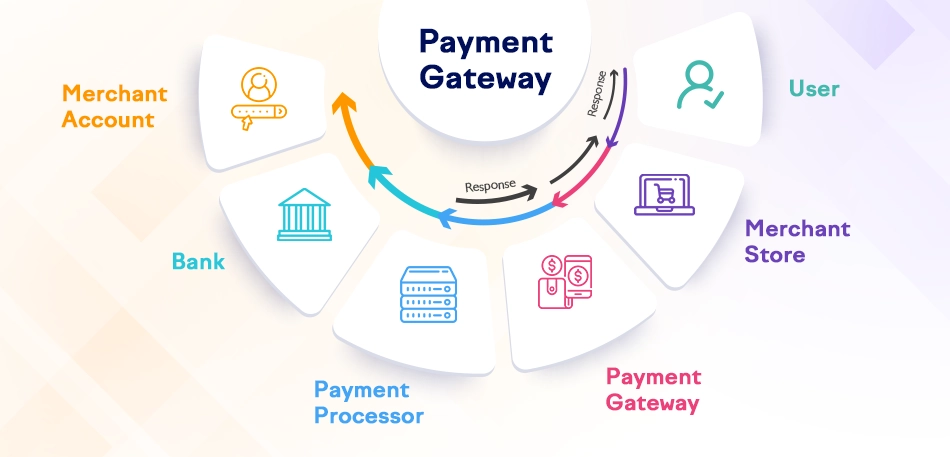
A payment gateway is an e-commerce service that authorizes payments for online businesses, online retailers, brick-and-mortar stores, or traditional brick-and-mortar stores. Payment gateways protect credit card information by encrypting it and securely transmitting it to the payment processor.
Payment gateways are essential for businesses that accept credit cards online. They provide a secure way to process payments and protect customer data. Additionally, payment gateways help businesses reduce fraud and improve their checkout process.
Here are some benefits of using a payment gateway:
Security: Payment gateways encrypt customer data and transmit it securely to the payment processor, protecting customer information from fraud and theft.
Convenience: Payment gateways make it easy for customers to pay for goods and services online, accepting various payment methods, including credit cards, debit cards, and electronic checks.
Fraud Reduction: Payment gateways help businesses reduce fraud by implementing security measures such as address verification and cardholder authentication.
Improved Checkout Process: Payment gateways simplify the checkout process by making it easy for customers to enter their payment information and complete transactions.
If your business accepts credit cards online, consider using a payment gateway. They can help protect your customers’ data, reduce fraud, and enhance your checkout experience.
Some common payment gateways include Stripe, PayPal, Authorize.Net, and Braintree.
Key Aspects of Payment Gateways
Several payment gateways are available for eCommerce websites, but the best ones share key technical and non-technical features for optimal functionality. Let’s explore them.
Security: Payment gateways use encryption and tokenization to protect financial information.
Integration: Gateways integrate with eCommerce platforms, enabling merchants to set up payment systems easily.
Compatibility: A good payment gateway should support credit cards, digital wallets, and bank transfers.
Fraud Prevention: Some gateways offer fraud detection tools that analyze transaction data in real time.
Customer Support: Reliable payment gateways provide 24/7 customer support for merchants.
When choosing and integrating a payment gateway for an eCommerce website, remember the importance of these invisible but essential elements in this crucial piece of the puzzle.
How to Choose the Right Payment Gateway for an eCommerce Website?
A payment gateway acts as a bridge between your website and your customers’ financial institutions, facilitating secure and convenient transactions. You need to carefully consider and select the right payment gateway for your eCommerce site:
Prioritize Security: Choose a gateway that emphasizes security features such as SSL encryption, PCI compliance, and fraud prevention tools. This protects both your customers’ confidential information and your business reputation.
Evaluate Integration Options: Research which payment gateways are compatible with your eCommerce platform or website builder. An integrated solution simplifies operations by automating processes like order confirmation emails and inventory tracking.
Consider Transaction Volume: If you expect high transaction volumes or plan to grow your business, select a gateway that can handle large volumes without affecting performance or incurring excessive fees.
Analyze Payment Data: Look for a payment gateway offering detailed analytics and reporting features. Access to data on customer behavior, transaction trends, and revenue breakdowns helps you make informed decisions and optimize sales strategies.
Reputation and Reliability: Investigate the reputation and reliability of different payment gateway providers. Read reviews, seek recommendations from other eCommerce businesses, and choose a provider with a proven track record.
Remember, the right payment gateway should not only enable secure transactions but also ensure a smooth, positive customer experience. Follow these steps to choose the best one.
How to Set Up a Payment Gateways in an eCommerce Site?
After choosing a suitable option, it’s time to integrate the payment gateway into your eCommerce site. This process begins with registering for the payment gateway, integrating it with your site, and testing it to ensure effectiveness and a good user experience.
Step 1: Register for a Payment Gateway Account
The first step is to register for a payment gateway account, integrate it with your site, and then test it to ensure the best shopping experience.
Research payment gateway providers to find one that fits your business needs. Check for security, ease of use, compatibility with your website platform, and supported payment methods.
Visit the payment gateway provider’s website to start the registration process. Accurately fill out the required information, including your business details, contact info, and bank account information.
Submit the registration form once completed. The provider may request additional documents to verify your business identity and bank account details.
Keep in mind that each payment gateway provider has unique registration requirements and processes. Follow the instructions provided by your chosen provider carefully.
Before making a final decision, test their services with a small transaction or seek feedback from other merchants who have used the platform. This ensures you select a trusted payment gateway provider for your eCommerce site.
Registering for a payment gateway like Stripe or PayPal enables hassle-free online payments on your eCommerce site.
Step 2: Integrate the Payment Gateway with Your eCommerce Site
After registering, proceed to integrate the payment gateway into your eStore.
Integration Documentation: Use the payment gateway’s integration documentation or developer guides for detailed instructions and code snippets specific to your eCommerce platform.
Payment Gateway SDK or Libraries: Utilize the payment gateway’s SDK (Software Development Kit) or libraries to simplify integration. These tools provide pre-built code modules handling payment processing and data exchange.
Implement Payment Flow: Integrate the payment gateway’s code into your website’s checkout process to handle customer payment information securely, send it to the gateway, and receive transaction status updates.
Customize Payment Options: Configure the gateway to offer desired payment methods such as credit cards, debit cards, e-wallets, and local options. This may require setting up merchant accounts or integrating third-party services.
Data Security: Ensure customer payment information is handled securely and complies with industry standards like PCI DSS. Implement encryption, tokenization, and secure data storage practices to protect sensitive data. For guidance, refer to our eCommerce PCI compliance checklist to avoid costly security issues.
This completes the integration of the payment gateway into your eCommerce site. However, the process isn’t finished until you have thoroughly tested the system.
Step 3: Test the Payment Gateway Integration
Perform various tests to ensure the payment gateway works correctly on your site.
Test Environment: Set up a test environment or sandbox mode within the payment gateway to conduct thorough testing without affecting real transactions.
Test Cases: Develop comprehensive test cases covering scenarios such as successful payments, declined payments, refunds, and error handling.
Manual Testing: Simulate customer actions manually to verify payments are processed correctly, transaction statuses update accurately, and error messages display properly.
Automated Testing: Use automated testing scripts to streamline testing and ensure consistent performance under various conditions.
Third-Party Testing: Consider hiring a third-party testing company or using specialized tools for independent and comprehensive testing of your integration.
Continuous Monitoring: Establish monitoring systems to track payment gateway performance, identify issues early, and ensure ongoing compliance with security standards and regulations.
Additionally, test other aspects of your eCommerce site, such as user registration, shopping carts, and order management system integration.
This concludes the setup of payment gateways on eCommerce sites. If this process seems challenging, consider hiring a professional eCommerce web development company for assistance.
How to Make the Payment Gateway Integration Secure?
Securing payment gateway integration is crucial for protecting sensitive customer data and building trust. Here are key steps to enhance security:
Implement SSL Certification
Encrypting customer data is vital to ensure the safety of payment gateway integration. By encrypting sensitive information such as credit card numbers and personal details, businesses can protect their customers from unauthorized access and cyber-attacks.
Data encryption transforms customer data into a secure code that only a specific key can decrypt. This ensures that intercepted information remains unreadable without the key. The encryption method must be strong and comply with industry standards for maximum security. Additionally, effective key management is essential to safeguard the confidential keys involved in the encryption process.
By applying proper encryption protocols, businesses reduce the risk of data breaches and build customer trust. Encryption offers an added layer of protection against both internal and external threats, ensuring sensitive customer information remains secure throughout the payment process.
Encrypt Customer Data
Encrypting customer data is essential for secure payment gateway integration. Protecting private information like credit card details and personal data prevents unauthorized access and cyber threats.
Encryption converts customer data into a secure code decipherable only with a specific key, keeping intercepted data incomprehensible to unauthorized parties.
The encryption methods used should be robust and adhere to industry standards to ensure maximum protection. Proper key management is also critical to safeguarding the encryption keys.
By implementing strong encryption protocols, businesses can minimize data breach risks and reinforce customer confidence. Encryption acts as a safeguard, protecting sensitive information during payment transactions.
Wrap It Up
Integrating payment gateways into eCommerce sites is essential for secure and smooth transactions. Offering multiple payment options increases conversions and enhances customer satisfaction.
Choose a payment gateway based on features, security, performance, pricing, and more. Then, register for an account, integrate the system into your eCommerce platform, and thoroughly test it to ensure security and a seamless shopping experience.
FAQs on Integrate Payment Gateways in eCommerce Sites
1. Which payment gateways are commonly used in eCommerce?
There are several popular payment gateways used in eCommerce, including PayPal, Stripe, Authorize.Net, and Braintree. Each has its own set of features, fees, and integrations, so research and choose the one that aligns with your business requirements.
2. Can I integrate multiple payment gateways into my eCommerce site?
Yes, many eCommerce platforms allow the integration of multiple payment gateways. This gives customers more options and flexibility during the checkout process. However, managing numerous gateways may require additional configuration and customization.
3. Do payment gateways support different currencies?
Yes, most payment gateways support a wide range of currencies. Before integrating a payment gateway, ensure it supports the currency you intend to transact in. Also, note that currency conversion fees may apply when accepting payments in a different currency.