Every day, online stores face cyber attacks. Hackers are always looking for ways to get the money out of your store. They either want your customer data or payment information, or they want your business to fail.
This is why eCommerce cybersecurity is more important than ever in 2026.
The practice of protecting online stores, customer data, transactions, and digital assets against cyber threats. It is not just about having a password. It is about creating multiple layers of protection.
The good news? With the proper security measures, you can protect your store. You can keep your customers safe and sleep better at night. Let’s see how…
What is eCommerce Cybersecurity?
eCommerce cybersecurity is protecting online shopping websites and apps from hackers and cyber threats. It is about securing:
Your credit card information when you buy something online
Your passwords and login details
Your personal information (name, address, phone number)
The customer database of the store
Payment transactions
Without strong cybersecurity, money can be stolen and important information compromised. The worst would be messing up the website. It uses technology and best practices to ensure that online shopping is safe for both customers and businesses.
How Does eCommerce Security Differ From General Web Security?
General web security is broad. It protects any website from attacks, phishing, threats, and different types of viruses. It is about overall safety online, but eCommerce security is specific. It focuses on transactions and protects payment processing.
Furthermore, it ensures customer trust and meets strict industry standards. Why is there a difference? Because eCommerce stores handle money and personal information on a daily basis. Online stores even process credit cards, so the stakes are higher.
Why Business and Customers Both Benefit from eCommerce Cybersecurity?
As a business owner, a breach will cost a lot of money. It damages reputation, might lose customers forever, and could face legal penalties.
For customers, it is personal. They trust online stores with their credit card numbers and even share their addresses. They expect the eCommerce stores to keep that safe.
Why is Cybersecurity for eCommerce Important?
The numbers are shocking. SecurityMetrics says that over 64% of shopping cart inspection reviews are suspicious, highly malicious, or at least a little concerning. Online sales keep growing, and digital fraud keeps growing, too.
Cybercriminals love eCommerce stores. Because customers have their wallets open, they are ready to buy and are more likely to enter payment details willingly.
The Real Cost of a Data Breach
A breach has real consequences and is not just a technical problem.
1. Data Loss and Financial Theft
As mentioned previously, hackers steal customer credit card data. They even steal addresses and personal details, then sell this information or use it themselves.
2. Reputation Damage
One breach and the trust disappears. Customers stop shopping on your online store. They tell their friends. Bad reviews spread fast online.
3. Revenue Loss
After a breach, sales drop. Customer acquisition costs spike. You might need to offer discounts to win back trust.
4. Legal Compliance Issues
PCI DSS is a required standard for payment security. GDPR is European law protecting customer privacy. Break these rules, and you face heavy fines. Sometimes millions of dollars.
“19% Share of malicious breaches caused by compromised credentials.”– NW University
This is not just a number. It is a business threat.
Common Cybersecurity Threats to eCommerce Websites
Understanding the threat is the first step to stopping it. Here is the list of threats that actually occur.
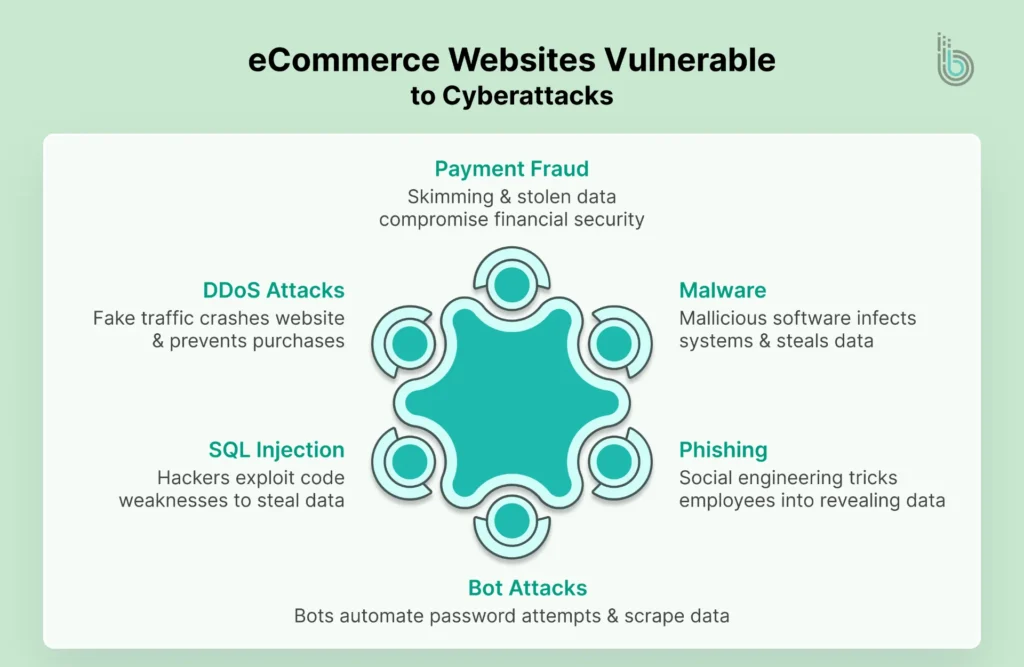
1. Payment and Financial Fraud
Directly hacking the systems is not the first thing most fraudsters use. Sometimes they are sneaky.
Skimming: This is when they place fake payment devices on checkout pages. Customers enter their card details, and the fake device captures them.
Stolen Card Data: This comes from breaches. Hackers sell stolen cards online, and criminals use them to make fake purchases.
Fake Payment Pages: They look real but are not. They capture card data when customers think they are checking out.
Solution: Use verified payment processors. Add SSL encryption and show security badges to customers.
2. Phishing and Social Engineering
Most breaches do not start with technical hacking, but they do start with a trick!
An attacker sends a fake email that looks like it is from your bank or boss. You click a link, and now they have your password.
This is phishing. It is simple but very effective, and it is the most basic form of fraud.
Social engineering is a one step further. Attackers pose as customers or IT support. They trick employees into revealing passwords or access.
Solution: Train your team and teach them to spot fake emails. Use email filters and enforce multi-factor authentication.
3. Malware, Ransomware, and Money Extortion
Malware is malicious software. It infects your systems without permission. It steals data, destroys files, and holds systems hostage.
Ransomware is worse. Hackers encrypt your data, and they demand money to unlock it. Either you pay or lose everything. These spread through infected files, through fake downloads, and through compromised plugins, too.
Solution: Use security software. Keep systems updated. Regular backups save you if ransomware hits.
4. DDoS Attacks
A DDoS attack surges your server with fake traffic. Thousands of requests come at once, so your website crashes, and customers cannot buy. During peak shopping seasons, a DDoS attack can cost thousands per hour. This is why eCommerce website maintenance is important too.
Solution: Use DDoS protection services. They filter fake traffic, and genuine customers still get through.
5. SQL Injection and XSS Vulnerabilities
These are technical attacks. Hackers exploit weaknesses in your code.
SQL injection happens when hackers insert malicious code into search boxes. They trick your database into giving up customer data.
XSS (Cross-Site Scripting) lets attackers insert fake scripts into pages. These scripts steal customer information or redirect them to fake sites.
Solution: Use secure coding practices. Have developers validate all inputs, and regular security testing catches these issues.
6. Bot Attacks for Credential Stuffing
Automated bots try thousands of password combinations. They attempt to log in repeatedly.
If a customer uses “password1234,” the bot finds it, and now hackers have account access. Bots also scrape your website for data. They copy product prices, and they steal email addresses.
Solution: Use CAPTCHA on login pages. Implement account lockouts after failed attempts, and monitor for suspicious login patterns.
Core Cybersecurity Measures for eCommerce Websites
Now that you understand the threats, here are the ways to defend against them.
1. SSL/TLS and HTTPS Encryption
SSL certificates encrypt data in transit. When a customer enters their credit card number, encryption protects it.
Look for the padlock icon in browsers. That is a mark of SSL at work, and without it, data travels in plain text, making it easy for hackers to intercept it.
HTTPS is the secure version of HTTP. All pages of your website should be HTTPS, and there should be no exceptions.
How to implement: Purchase an SSL certificate. Install it on your web server. Your hosting provider can help.
PCI DSS has 12 main requirements that cover network security. The primary requirement over here is to look after:
User access
Data protection
Regular monitoring
Non-compliance means fines and sometimes thousands per day. Major payment processors will drop you.
How to implement: Audit your systems and use compliant payment processors. They often handle PCI compliance for you.
3. Strong Authentication Methods
Passwords alone are not enough. Hackers crack them, guess them, or just steal them.
Multi-Factor Authentication (MFA) adds layers to this. After entering a password, you need a second verification. Be it a code on your phone, an authenticator, a biometric scan, or a security key.
Even if hackers have your password, they cannot log in without the second factor. It is sometimes also termed the Two-Step Verification process.
How to implement: Enable MFA for admin accounts immediately and offer it to customers as well. Use authenticator apps or SMS codes.
4. Web Application Firewalls (WAF)
A WAF sits between your website and visitors. It inspects traffic and blocks malicious requests. It stops SQL injection attempts and blocks XSS attacks. It also filters out bot traffic, so only legit customers pass through, and attacks are automatically blocked.
How to implement: Use Cloudflare, Sucuri, or similar services. They are easy to set up and affordable.
5. Malware Vulnerability Scanning
Regular scans find infections before they cause damage. They detect weak points in your code. Automated scanners run 24/7 and check for malware. They test for vulnerabilities and alert you to problems. A single undetected malware infection can compromise your entire database. That is why it is important to create a successful eCommerce marketplace that is both safe and strong.
How to implement: Use tools like Wordfence, Sucuri, or OpenVAS. Run scans weekly and investigate any warnings immediately.
6. Secure Coding with Regular Updates
Hackers target outdated software. Old versions have known vulnerabilities, and hackers use publicly available exploit code to gain access. Every update patches security holes, and even plugin updates are as important as the core system updates.
Your development team should also follow secure coding practices. Validate all inputs and never trust user data.
How to implement: Enable automatic updates where possible. Schedule regular update checks and test updates on staging first.
7. Data Encryption and Tokenization
Stored customer data needs protection, too. So even if hackers breach your database, encrypted data is useless to them.
Tokenization is smarter because this system does not store full credit card numbers but instead stores tokens. Tokens are random strings, and the real card data stays with your payment processor. Even if hackers access your database, they get only useless tokens.
How to implement: Use tokenization through your payment processor. Encrypt stored data with strong algorithms and use unique keys.
Advanced eCommerce Cybersecurity Tactics for Your Store
These go beyond basics. They are for stores serious about security.
1. Network Segmentation
Do not put everything on one network. Divide systems into zones, such as the customer-facing zone, admin zone, payment processing zone, etc.
Each zone should have its own access rules. If one zone is compromised, others stay protected. The knowledge of eCommerce architecture is highly recommended for such network segmentation.
How to implement: Work with IT professionals and segment customer data from employee networks. Use firewalls between zones.
2. Zero Trust Security Model
Most threats are from the inside. It is when companies assume employees are safe. One should check visitors carefully, and zero-trust flips this. Verify everything, like every person, every device, and every access request.
Even your IT manager needs to prove they should be granted access to sensitive data. Further, internal systems get verification checks. It is more work, but vastly more secure.
How to implement: Require authentication for all systems. Implement role-based access control, log all access attempts, and review them regularly.
3. AI or Machine Learning for Threat Detection
Modern threats are a head-scratcher, and humans cannot catch everything. AI watches behavior patterns, and it learns what normal looks like. When something abnormal happens, it is immediately alerted.
So if there is an unusual login from a strange location, AI flags it. If there is a sudden download of customer data, AI also catches it.
How to implement: Use managed security services with AI detection. Cloud providers like AWS and Google Cloud have packages for this.
4. Third-Party Risk Management
You are only as secure as your weakest third-party link. Your payment processor, shipping plugin, or analytics tool can seep in any threat if not monitored.
If any of these gets breached, your customer data might be exposed. So, vet before integration, and check security practices. Ensure they are compliant with standards.
How to implement: Create a vendor security questionnaire. Ask about their security practices and review their compliance certifications. Limit data access to what is needed.
The eCommerce Cybersecurity Best Practices Checklist
This is your action plan. Use it and share it with your team.
Do Regular Security Audits: Monthly reviews are a minimum necessity; hire eCommerce developers and professionals annually.
Apply Patches and Updates: Do not wait for convenient times. Unpatched systems are hacked systems.
Educate on Cyber Hygiene: Teach your team to spot phishing. Show them secure password practices and make security part of your culture.
Monitor Logs and Suspicious Activity: Use monitoring tools and set up alerts for unusual access. Also, review logs weekly.
Backup Data: Backups save you from ransomware. Test them monthly and make sure they actually work.
Monitor Third-Party Plugins and APIs: Regularly check for updates and review plugin access permissions. Remove unused plugins immediately.
Use SSL Certificates: There should be no exceptions on any page. Even your about page needs HTTPS.
Check Access Controls: Use role-based permissions. For example, admins should not have cashier access, and cashiers should not have admin access.
Maintain Incident Response Plans: Ploy what to do if attacked. Who calls whom, and how do you notify customers? Document it.
How to Respond to a Cybersecurity Breach Incident?
Prevention is best, but incidents happen when they are least expected. Here is what to do.
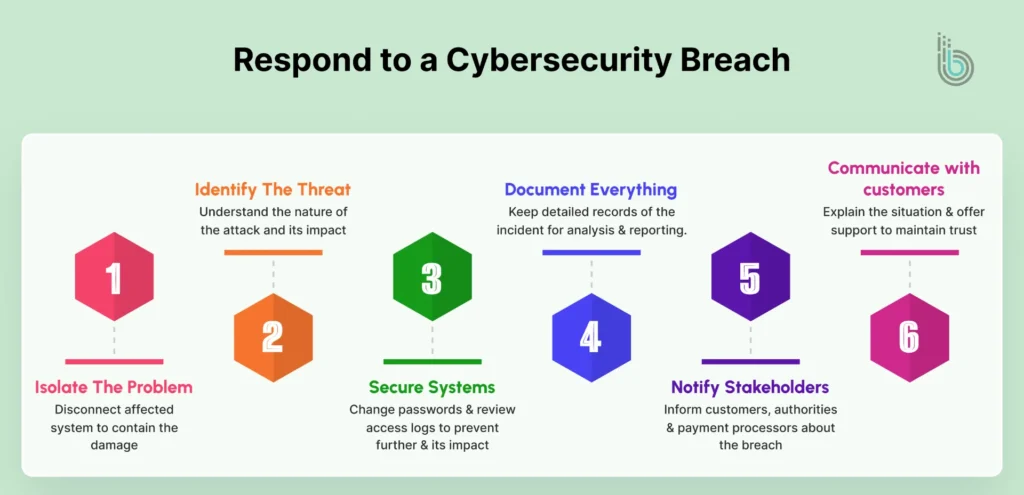
Immediate Response Steps
Isolate the Problem: Disconnect affected systems and contain the damage. Stop the attack from spreading.
Identify the Threat: Understand what happened. Was it malware? A data breach or unauthorized access?
Secure Your Systems: Change all passwords and review access logs. Look for back doors or persistent threats.
Document Everything: Keep detailed records. What time did the attack happen? What was accessed? How did it happen?
Notification and Reporting
You are legally required to notify customers if their data was exposed. Do not delay or try to hide it. Inform relevant authorities and notify payment processors. Inform insurance companies as well if this occurs. The longer you wait, the worse it gets.
Customer Communication
Explain what happened and what data was compromised. Present what you are doing to fix it. You can take these next steps:
Offer credit monitoring
Provide free identity theft protection
Show you take responsibility
In most cases, transparent companies recover fast, and companies that hide information lose customers forever.
Tools and Resources for Securing Your eCommerce Store
To get excellent security for eCommerce websites, there are services and tools that already exist. Check out all the popular tools that resolve most issues in cybersecurity for eCommerce.
Category
Tools
What They Do
Security Scanners
Wordfence, Sucuri, OpenVAS
They find vulnerabilities and malware.
WAF Services
Cloudflare, Sucuri, Akamai
They block attacks before they reach your site.
MFA Providers
Authy, Google Authenticator, Microsoft Authenticator
They add authentication layers.
Backup Solutions
Acronis, Veeam, managed backups from hosting
They save you from data loss.
Monitoring Tools
New Relic, DataDog, Splunk
They watch for suspicious activity 24/7.
Payment Processors
Stripe, Square, PayPal
They handle PCI compliance. You can focus on your business.
Want to Implement the Best eCommerce Cybersecurity Practices?
eCommerce cybersecurity protects everything you have built. It is no longer optional, and the threats are real. The stakes are high, and hackers are not slowing down, so your store needs to be smarter.
Start with the basics, such as installing SSL certificates, using strong passwords, and keeping software up to date. Then layer on WAFs, MFA, and other monitoring tools. Build from there and add advanced tactics when you are ready. Maintain your practices consistently because every day you wait is another day of risk.
Your customers trust you with their sensitive information; protect it and make that trust worthwhile. To audit your systems and fix weak points, hire eCommerce developers who specialize in robust encryption and data protection.
FAQs
1. Is HTTPS really necessary?
Yes. It is an industry standard now and required on every single page. Browsers warn visitors when sites are not HTTPS, and you will lose customers if you do not have it.
2. How much does eCommerce security cost?
It varies. Basic security (SSL, WAF, scanning) costs $50-$200/month. Advanced solutions cost more, but a single breach can cost thousands, so it is smart to invest in eCommerce cybersecurity.
3. Do I need PCI DSS compliance?
If you accept credit cards, then yes, as it is required by law. If you use payment processors like Stripe, they often handle much of the compliance for you.
4. Can small stores really get hacked?
Absolutely. Attackers target small stores because they often have weaker security. Do not think you are too small to be a target.
5. How often should I run security scans?
A weekly minimum is recommended, and a daily minimum is better. Continuous scanning catches problems faster.
6. Do I need cyber insurance?
It is strongly recommended, as it covers breach costs, recovery costs, and legal fees. Especially important if you are not yet confident in your security.