A visitor won’t stay on a site that loads slowly or has a messy navigation. You wouldn’t either. What you need is a good web design, especially if you are selling something online. An eCommerce store needs to keep the visitors engaged and eliminate unnecessary steps that hinder conversion. Implementing eCommerce web design tips would help achieve this goal.
No matter if you are redesigning an existing online store or building one from scratch, these guidelines work. They help your eCommerce site look and function at its best. The eCommerce industry is growing rapidly, accounting for trillions of dollars in global sales every year. Explore the most important elements and effective eCommerce website design tips to tap into this opportunity and grow your online business.
What Is an eCommerce Website?
An eCommerce website is an online platform designed specifically to buy and sell goods or services over the internet. Business owners use it to sell their products or services online, reaching a wider range of audience. Whereas visitors can easily search and browse required products, compare different options, and add them to the cart. Visitors can do all of these and more without physically stepping into a store.
Despite popular belief, eCommerce websites aren’t actually hard to build or manage. Maybe that’s why the eCommerce domain is becoming increasingly competitive. The primary purpose of the eCommerce site is to “Make Sales.” So, the real challenge lies in designing a site that helps make more and quicker sales.
If your site is slow, has complex navigation, or has a long checkout process, users will leave frustrated. eCommerce site features like internal site search, user-friendly navigation, secure payment, 24/7 support, etc help retain a customer.
How are E-commerce Websites Different from Traditional Websites?
Not just design, the very core structure of the eCommerce website is different from traditional websites. Other major distinctions lie in their purpose, functionalities, level of user interactions, and security.
Factors
eCommerce Website
Traditional Website
Objective
To make more sales
To provide information
Key functionalities
Shopping cart, product comparisons, online payments, and order management
Search and contact forms
User interactivity
Very high, from product search to checkout
Quite low due to read-only or downloadable content
Security
Supports online transactions. So, require SSL certificates, payment encryptions, and more
Standard security measures
Content update frequency
Product catalogs are regularly updated with new merchandise, images, videos, and customer reviews
Content is mostly static with longer update cycles
Offline presence
Doesn’t need a physical store
Must have a physical workplace or storefront
Types of eCommerce Websites
eCommerce websites are categorized by the types of buyers and sellers specific to the platform, such as business-to-business (B2B), consumer-to-business (C2B), business-to-administration (B2A), etc.
Business-to-Business (B2B): It’s a model where one business sells its products or services to other businesses. Alibaba and Amazon Business are popular examples of B2B eCommerce websites.
Business-to-Consumer (B2C): Websites where businesses sell products or services to customers are called business-to-consumer eCommerce stores, like Amazon and Walmart.
Consumer-to-Business (C2B): When an online platform enables individuals to sell their products or services to businesses, it is a C2B type of eCommerce. Upwork is the perfect example of a C2B website.
Consumer-to-Consumer (C2C): C2C platforms serve as a marketplace that connects one user with another to buy, sell, or exchange specific products or services. For example, C2C sites like eBay and Facebook Marketplace hold online auctions and transactions between sellers and potential buyers.
Business-to-Administration (B2A): When a business website offers products or services for a public administration or a government agency to use, it is B2A eCommerce.
Consumer-to-Administration (C2A): C2A refers to the marketplace where individual customers can sell their products or services to government agencies or public administrations.
Why is eCommerce Design Important?
When it comes to eCommerce design, you have to maintain the balance between elegant representation and easy navigation. In this case, the web design is not just about how it looks but also how it works: First Impression is the Last Impression.
You lose users if the site is slow or has a long checkout process. But you lose their trust by providing irrelevant search results and insecure payment options. UI/UX of the website influences and often drives customers to make a purchase.
A truly engaging web design can seamlessly guide a simple product search to a successful order placement. Hence, good eCommerce design leads to increased sales and revenues. Implementing eCommerce design best practices makes your site user-friendly and intuitive. It helps offer a personalized shopping experience, attracting new and repeat customers.
Which Elements Make an eCommerce Website Design Great?
Consistent and responsive design, web security, and easy navigation are the most important traits of a great eCommerce web design.
Responsive Design:
A study suggests that mobile devices account for 62.54% of global website traffic in the second quarter of 2025. In the US alone, about 45.49% of online traffic comes from mobile. So, when developing an eCommerce website, make sure its design is optimized for mobile. It is better to manually test the responsiveness of the eCommerce website before the launch.
💡 Pro Tip: Ensure that your eCommerce site fits and works smoothly across different screen sizes and devices for maximum reach and minimum bounce rates.
Clear Site Navigation:
Website navigation is supposed to help visitors find specific products and pages quickly. Good navigation improves search rankings as well. Keep your header menu as minimal as possible, including only the most important or most visited pages at the top. Be clear and direct when labeling headers. Moreover, make sure your visitors can find the intended page or product in two to three steps maximum. Add additional navigational links in the footer.
Trust Indicators:
Adding elements like your company’s contact information, customer reviews, and testimonials for each product, providing different yet secure payment gateways, and details of the return policy specific to various product categories help build consumer trust before they even make a purchase. Deals and discounts might help attract many visitors, but these trust indicators are what encourage them to stay.
Consistent and Compelling Experience:
Maintaining a consistent color scheme and font style with essential usage of the company logo reflects a strong brand identity. Smartly utilize a clear visual hierarchy, psychological design, and high-quality images to leave a lasting impression.
Have the products photographed in a way like camera angle, background, and photography concept, that appeals to your targeted audience while maintaining brand image. Strategic placement and selection of company logos, along with elements like fonts and colors, help influence customers’ decisions.
Best eCommerce Website Design Tips
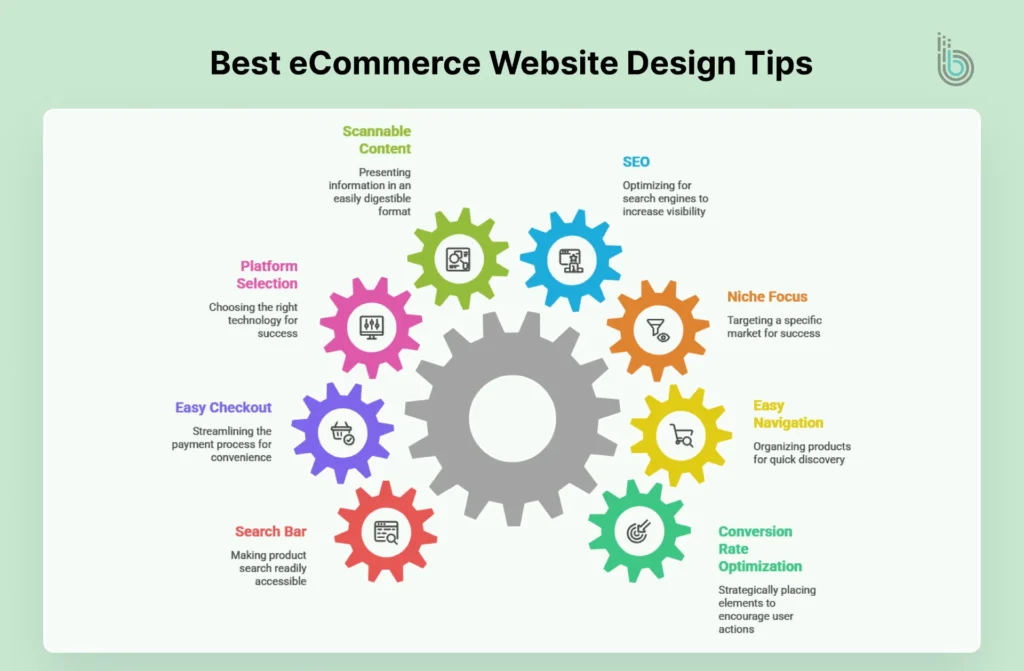
Implementing the best eCommerce web design tips is essential to make the most out of your site. Keeping the layout simple, using SEO best practices, publishing scannable content, focusing on users, and converting them are a few best practices that prove effective for all types of eCommerce stores.
1. Conversion Rate Optimization
Performing conversion rate optimization means strategically placing important texts and elements across your website to encourage users into taking specific actions. It helps drive more sales on the website.
For example, a clear call-to-action tells your visitors what to do. It can either be a button saying Buy Now! Or an input form saying Book Your Appointment Now. When you make it easy for your customers to take the next step, they are more likely to follow.
Build a user-friendly eCommerce website with conversion-focused UI/UX
If your product inventory is not well-organized, it will be difficult for visitors to find the product, let alone buy it. Preparing clear and navigational product categories helps users quickly discover the items users are searching for.
Tangling them in a messy site navigation would just kill their desire to buy anything from your website ever again. On the contrary, if you have a well-organized and in-depth product category list with a rich product catalog, customers will surely visit again to discover more products.
3. Pick your Niche
Your eCommerce website shouldn’t be a jack of all trades, at least not at the beginning. Even Amazon, the current eCommerce giant, started with books only and then gradually scaled its website. During the initial phase of the business, resources are often limited. Once you gain success in a specific niche, you can expand easily. There are benefits to working with a niche in the eCommerce sector; the competition remains low, and if you do it right, your site will be easily ranked for long-tail keywords in your niche.
4. Search Engine Optimization
When implementing SEO, make sure to target important or relevant keywords and phrases. You need to find out what your targeted audience is looking for and how to include similar information on your website. Product descriptions must consist of these relevant keywords and phrases, but make sure they are not too long. Also, optimize your eCommerce site for other factors like site performance, responsiveness, Alt tags for images, and more. Good SEO leads to more visibility.
5. Publish Scannable Content
People come to your site to purchase, not to read. There is no need to put a wall of words, explaining the features and benefits of the product. Instead, create short descriptions, infographics, bullet points, and a table structure to present product data neatly. This allows visitors to easily scan through the information they need to make an informed decision.
Using clear headlines and well-organized categories is another way to help visitors find the product they are looking for. Scannable content minimizes bounce rate and increases conversion rate.
6. Use the Right Platform
Picking the right eCommerce development platform is a decision that can either make or break your online store. It is important to gather information about your options, including the features, strengths, and limitations of each framework. In the end, select a platform that is more likely to provide all necessary features and lead your project to success.
7. Easy Checkout
Design a secure and fast checkout page and keep it simple. You don’t want your checkout page to crash or fail to load when the visitor is attempting to make an online payment. It is best to create a dedicated checkout page to minimize the hurdles when customers are about to pay.
Don’t ask for unnecessary information, and add more payment gateways for the customers’ convenience.
8. Keep the Search Bar Handy
The most effective eCommerce web design tip to make your online store user-friendly is to keep the search bar within reach at all times. Searching or browsing products is the primary task on an eCommerce website. A visible search bar simplifies navigation and reduces the time taken by the user when looking for products. This is significantly helpful in making a quick purchase decision.
Conclusion
eCommerce website design tips are all about enhancing user experience. Implement them right, and your online business will grow. Many websites out there sell products, but not everyone can deliver a unique shopping experience. It is the key to converting web visitors into paying customers. Use these eCommerce website design guidelines to create a professional, user-friendly, and visually appealing online store. In case of any query, contact our experts now.
FAQs
Q1. What Makes A Great eCommerce Website?
Having elements like easy navigation, mobile-first design, high-quality visuals, simple and secure checkout process, social proof, SEO, smart search, and filters makes a great eCommerce website.
Q2. Can I build an eCommerce website on my own?
If you have the necessary knowledge or experience, then use a suitable or preferred eCommerce platform. If not, then hire expert eCommerce developers or a reputed eCommerce development company. There are a few no-code platforms that help build a simple site, but for advanced features, you need to have the necessary coding skills.
Q3. How can I improve my eCommerce navigation?
Keep only core pages in your header navigation and place other important links in the footer of the eCommerce website.
Q4. Which is the best platform to build an eCommerce website?
Shopify, WooCommerce, Wix, BigCommerce, and Magento are some of the best platforms to create an eCommerce website.
Q5. How much does it cost to build an eCommerce website?
The eCommerce development cost largely depends on your project requirements. As the number of features and project complexity rise, so does the price. The eCommerce platform you use and the geographical location of the eCommerce developers you hired from also influence the overall project cost.