The online auction market is booming, with global sales expected to reach $5728.4 million by 2030. This surge proves buyers and sellers increasingly prefer digital bidding for convenience and broader reach.
Building an auction website is more than just listing items and waiting for bids. It involves creating a trustworthy space where users enjoy the thrill of competition. eCommerce development experts say that features like real-time updates, secure payments, and fraud prevention contribute to making a successful platform.
So, in this blog, we will give you a step-by-step guide to building an auction website. You’ll learn how to structure your site, choose the right technology, and keep users returning. So, let’s dive in!
Why Build an Online Auction Website?
Auctions have existed for a long time. The concept is not new, and we recommend that most businesses start initiating this for new opportunities. However, online auction website builders now replace most traditional auction methods.
Traditional auctions cannot match the accessibility, convenience, or speed of a website. That is why many auction businesses have moved online.
Main reasons to build an online auction website:
First, auctions create natural urgency. The ticking clock pushes buyers to act fast, driving prices higher than fixed-price sales. This psychology works for everything from rare collectibles to wholesale merchandise.
You can trade directly, without intermediaries.
For sellers, auction websites come with unmatched reach. Your items are visible to interested bidders worldwide.
The global exposure helps to get better prices and faster sales.
Initial development costs may be higher, but long-term costs are lower than repeatedly hosting physical auctions.
The platform can generate revenue through listing fees, commissions, or premium memberships.
Automated bidding systems, secure escrow payments, and AI-powered fraud detection make auctions smoother.
Multilingual support removes language barriers and enables trading in multiple languages.
In short, building an auction website is your gateway to tapping into the fast-growing online bidding market. You now have the key insights to create a platform that buyers and sellers will love. One that combines excitement, trust, and innovative technology.
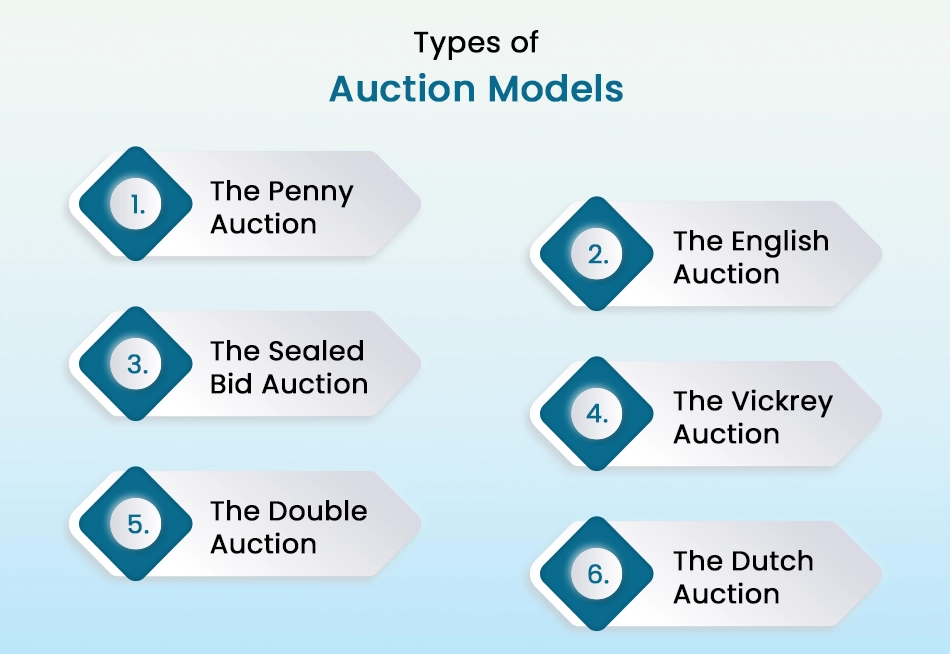
Types of Auction Models
Auctions aren’t just for art galleries and estate sales. They’re used everywhere, from online marketplaces to stock exchanges. Here’s a simple breakdown of the most common types and how they work:
The Penny Auction: A unique twist where each bid increases the price by just a small amount (like a penny), but every bid costs a fee. These auctions create excitement but require strategy. If you’re not careful, you might spend more on bids than the item’s value.
The English Auction: This is the classic “raise-your-paddle” style most people picture. Bidders compete openly, offering higher bids until no one is willing to top the last offer. The highest bidder wins. Think of lively auction houses or eBay listings with countdown timers.
The Sealed Bid Auction: No public bidding. Everyone submits a single private bid, and the highest one wins. Governments often use this for contracts to ensure fairness since no one knows what others offer.
The Vickrey Auction: A smarter version of sealed bids: the highest bidder wins, but they pay the second-highest bid’s price. This encourages honest bidding, as trying to lowball could mean losing out. Common in ad space sales.
The Double Auction: Buyers and sellers submit bids simultaneously, like stock exchanges. Prices settle where supply meets demand. It’s fast, efficient, and perfect for trading commodities or cryptocurrencies.
The Dutch Auction: Here, the auctioneer starts with a high price and drops it gradually until a bidder accepts. It’s excellent for selling multiple identical items quickly, like flowers in wholesale markets or IPO stock allocations.
Whether you are bidding on collectibles or selling ad space, understanding these models is vital to avoiding costly mistakes. To build a scalable auction platform, a professional eCommerce marketplace development company can help you implement the most effective model.
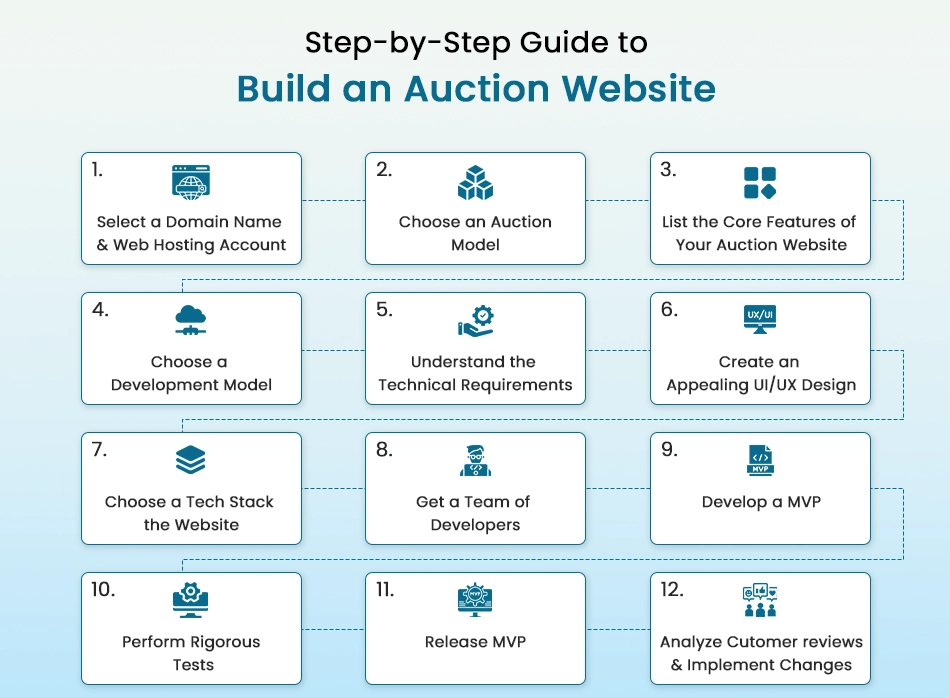
Step-by-Step Guide to Building an Auction Website
Let us now look at the detailed steps to build an auction website.
Step 1: Select a Domain Name & Web Hosting Account
Your domain name is more than just a web address; it’s the first impression of your auction business. Think of it like a digital storefront sign: it must be clear and memorable and tell customers exactly what to expect.
A strong domain follows seven key rules: it should be memorable (easy to recall), relevant (hinting at auctions), short (under 15 characters), pronounceable (for word-of-mouth sharing), unique (to avoid legal issues), brandable (stand out from competitors), and SEO-friendly (helping search rankings). Names like eBay.com or Sothebys.com work because they check all these boxes.
For hosting, reliability is non-negotiable. Your site must stay online during live bidding wars. Start with shared hosting if you’re testing the waters (it’s affordable), but upgrade to VPS or cloud hosting as traffic grows.
Look for providers (like Bluehost or SiteGround) offering 99.9% uptime guarantees, free SSL certificates, and one-click WordPress installs. Experts recommend buying your domain for 3+ years upfront. It boosts SEO credibility and prevents competitors from grabbing it if you forget to renew.
Before finalizing, research your domain’s history using Wayback Machine to avoid shady pasts, and check its SEO potential with tools like Ahrefs. If you own a domain, ensure it’s linked to your new hosting and set auto-renewal to avoid losing it. A great domain + robust hosting lay the foundation for everything that follows. So, don’t rush this step.
Step 2: Choose an Auction Model
Your auction model shapes everything from how users bid to how you earn revenue. Start by understanding the six main types, each with unique advantages for different markets.
English auctions (eBay-style) work best for unique items like art or collectibles. Bidders compete openly, driving prices up. It is great for sellers but requires strong anti-sniping tools. Dutch auctions (descending price) suit bulk inventory (e.g., wholesale flowers or electronics), where speed matters more than maximum profit.
For specialized needs, consider sealed-bid auctions (ideal for real estate or corporate contracts) where private bids prevent collusion. Reverse auctions flip the script. Suppliers compete to offer buyers the lowest price, perfect for B2B procurement.
Key considerations:
Revenue model:English auctions often use final-value fees (10-15% of sale price), while penny auctions charge per bid.
User behavior: Open bidding (English) creates excitement but needs fraud prevention; sealed bids reduce drama but may limit bidding wars.
Tech complexity:Real-time English auctions demand WebSockets for live updates, while sealed bids can use simpler forms.
Step 3: List the Core Features of Your Auction Website
Your auction website’s success hinges on its features, they determine how smoothly users can browse, bid, and buy. Start by mapping out must-have functionalities for each user role: sellers need easy listing tools, bidders require real-time updates, and admins must manage disputes and fraud.
For sellers, prioritize:
Listing management: Drag-and-drop tools to add/edit items with photos, videos, and detailed descriptions (e.g., condition, provenance).
Bid templates: Save time on repetitive listings (crucial for dealers with large inventories).
Analytics dashboards: Track views, bids, and conversion rates to optimize pricing.
For bidders, focus on:
Real-time bidding:Live counters and push notifications for outbid alerts (use WebSockets for instant updates).
Search/filters: Let users sort by price, location, or auction end time. These filter drives more bids.
Watchlists: Allow saving items and receive alerts when bidding starts.
Dispute resolution: Messaging systems with audit trails for buyer/seller conflicts.
Payment escrow: Hold funds until delivery confirmation for high-value items.
Technical cornerstones:
Payment gateways: Integrate PayPal (familiar) and Stripe (low fees), plus local options for global reach.
Mobile-first design: Many people use phones to place bids, so optimize for thumb-scrolling and one-tap bidding.
SEO-ready listings: Auto-generate meta descriptions from product details to attract organic traffic.
Step 4: Choose a Development Model
The right development approach balances your budget, timeline, and long-term goals. You have four main paths—each with pros and cons that impact scalability and control.
Example: A global art auction house uses Headless to sync live bids across their website and gallery displays.
Hybrid Model (Core Custom Code + Pre-Built Modules)
Best for: Balancing speed and customization.
Pros: Build key features (bidding engine) from scratch while using SaaS tools for CMS/payments.
Cons: Risk of integration bottlenecks.
Example: A jewelry auction site codes its unique “bid insurance” feature but uses Stripe for payments.
Step 5: Understand the Technical Requirements
Now that you’ve planned your features and development approach, it’s time to translate those into technical specifications. This step ensures your auction website can handle real-world demands while delivering a seamless user experience.
Website Architecture & Navigation
Map out your site structure to optimize user flow. Key pages include:
Homepage (featured auctions/categories).
Product listing pages (with filters for price, ending soonest, etc.).
Load speed: Aim for <2-second page loads (Google penalizes slower sites). Optimize images (WebP format), lazy load content, and use CDNs.
Concurrent users: Stress test for bidding wars. If expecting 1,000+ simultaneous bidders, consider cloud hosting with auto-scaling (AWS, Google Cloud), database sharding for bid transactions, and Redis caching for real-time price updates.
Wireframing & UI Specifications
Convert features into tangible designs:
Wireframes: Sketch bidding interfaces with tools like Figma. Prioritize above-the-fold bid buttons (mobile-friendly tap targets), persistent countdown timers, and one-click bid increments.
Design systems: Standardize colors (e.g., red for “ending soon” alerts), fonts, and button styles for consistency.
Compliance & Security
Auction sites handle sensitive data, cut corners here and risk fines or breaches:
Payments: PCI DSS compliance for credit card processing (use Stripe/PayPal to offload risk).
Data: GDPR/CCPA compliance for user data (cookie consent banners, data deletion tools).
Fraud prevention: SSL encryption, CSRF tokens, and rate-limiting for bids.
Cross-Platform Testing
Your site must work flawlessly across:
Browsers: Chrome, Safari, Firefox (test Edge for corporate buyers).
Devices: Mobiles, tablets, and desktops.
OS versions: Older Android/iOS for global audiences.
Step 6: Create an Appealing UI/UX Design
Your auction website’s design isn’t just about looks; it’s the bridge between your users and successful bids. Start by transforming wireframes into high-fidelity mockups that showcase:
Visual hierarchy: Bold bid buttons, countdown timers, and price displays should instantly grab attention.
Mobile-first layouts: Most people place bids using phones. Design for thumb zones with:
48px+ tap targets for bid buttons.
Collapsible filters for small screens.
Offline functionality for spotty connections.
Trust signals: Display payment badges (SSL, PayPal) near bid fields and include easy-access return policies.
Use tools like Figma to prototype animations, like real-time bid confirmations, that make bidding feel dynamic.
Step 7: Choose a Tech Stack For Building the Auction Website.
Technology choices determine whether your auction site scales or crashes during bidding wars. Match stacks to your auction type:
For English auctions (high concurrency):
Frontend: React (virtual DOM handles rapid UI updates).
Analytics: Mixpanel for tracking bid drop-off points.
Cloud: AWS EC2 auto-scaling for traffic spikes.
Avoid over-engineering. A WordPress + WooCommerce Auction Plugin stack works for MVPs testing demand.
Step 8: Get a Team of Developers
Building an auction platform requires specialized skills. For a mid-sized custom build, you’ll need:
Core Team (3-6 months):
2 Frontend Devs (React/Vue experts).
1 Backend Dev (Node.js/Laravel).
1 UX Designer (Figma/ProtoPie).
1 QA Engineer (Jira/TestRail).
Key Kickoff Activities:
Agile setup: 2-week sprints with daily standups (Zoom + Jira).
Code standards: ESLint for frontend, PSR for PHP backend.
Security protocols: OWASP Top 10 compliance checklist.
You can hire our eCommerce development company to build your auction website if you don’t have a team.
Step 9: Develop an MVP
An MVP allows you to validate your auction concept with real users while minimizing development costs. Focus on building only the core features that demonstrate your platform’s value.
Essential Features to Include:
User registration and authentication.
Basic product listing and management.
Real-time bidding functionality.
Secure payment processing.
Notification system for outbid alerts.
Development Approach:
Built using modular components for easy scaling.
Implement analytics to track user behavior from day one.
Design for easy iteration based on early feedback.
MVP Testing Strategy:
Conduct private beta tests with select users.
Gather quantitative data (conversion rates, bid activity).
Collect qualitative feedback through surveys and interviews.
Use your MVP to test pricing models and try different commission structures to see what converts best before fully committing.
Step 10: Perform Rigorous Tests
Thorough testing ensures your auction platform can handle real-world use before launch. Implement a multi-layered testing strategy.
Functional Testing:
Verify all bidding rules work correctly (minimum increments, auto-extend rules).
Test edge cases like simultaneous last-second bids.
Validate payment processing and escrow releases.
Performance Testing:
Simulate peak loads (500+ concurrent bidders).
Measure response times during bidding wars.
Test failover mechanisms for server outages.
Security Testing:
Conduct penetration testing for vulnerabilities.
Verify data encryption for sensitive information.
Audit user authentication and session management.
Implement automated testing for regression testing as you add new features post-launch.
Step 11: Release MVP
A strategic launch minimizes risk while maximizing learning opportunities.
Phased Rollout Strategy:
Start with invite-only access for controlled growth.
Gradually increase user load while monitoring performance.
Begin with a single auction category to simplify operations.
Launch Preparation:
Set up monitoring tools for real-time performance tracking.
Prepare customer support resources and FAQs.
Create backup and rollback procedures.
Initial Operations:
Have developers on call for immediate bug fixes.
Monitor key metrics like bid conversion rates.
Watch for unexpected user behavior patterns.
Consider running your first auctions with “test” items to work out kinks before real inventory goes live.
Post-launch optimization is where good auction platforms become great:
Data Collection Methods:
Implement analytics for user flow and drop-off points.
Gather direct feedback through in-app surveys.
Monitor support tickets for common issues.
Key Metrics to Track:
Bid-to-purchase conversion rates.
Average time to first bid.
Seller inventory turnover rates.
Iterative Improvement Process:
Prioritize changes based on impact and effort.
A/B test new features with user segments.
Maintain a public roadmap to show user-driven development.
Create a power user program. Your most active bidders and sellers will provide the most valuable feedback for improvements.
Building an auction website requires careful planning, wise tech choices, and continuous refinement. Define your auction model and essential features, then develop an MVP with an intuitive design and robust functionality. After thorough testing, launch your platform and keep improving based on real user data and feedback.
Benefits and Challenges to Building an Auction Website
Benefits
Higher seller revenues: Bidding among other competitors drives final prices higher than fixed pricing. Sellers earn more per item.
Recurring revenue: Transaction fees, listing fees, and premium services create steady income as your user base grows.
Network effects: More sellers attract more buyers, and those attract more sellers in return. This growth accelerates over time if you handle it well.
Data insights: Auction patterns reveal which products are popular, when demand peaks, and what prices users are willing to pay. Use this data to improve your platform.
User engagement: Auctions create excitement. Users return frequently to check bids, monitor auctions as they end, and participate in bidding wars. This is better than one-time purchases.
Challenges
Building trust: New users worry about fraud. You must build security and verification systems. Transparent feedback and ratings help, but take time to establish.
Real-time complexity: Bidding systems are technically harder than shopping carts. Getting real-time updates wrong can lead to lost bids, confused users, and legal problems.
Payment and legal issues: Users can dispute charges, and refunds create complications. Consult a lawyer early about liability, user agreements, and local auction regulations.
Managing bad actors: Fraudsters bid without paying. Sellers post counterfeit items. You need moderation systems, dispute resolution, and the ability to ban problem users.
Regulatory variations: Auction rules vary by location because some items cannot be auctioned. Some jurisdictions regulate who can run auctions. Research the target market laws early.
User acquisition costs: Building the first community is hard, and you need sellers with products and buyers with cash. Without both, neither group has a reason to use your website. Plan your launch strategy carefully.
What Determines the Cost to Develop an Auction Website?
The investment required to build an auction platform varies significantly based on your project’s scope and specifications.
Basic implementations using existing templates and plugins provide core functionality like product listings, bidding systems, and payment processing, ideal for validating market demand. These starter solutions offer fundamental features while keeping initial costs manageable.
More sophisticated custom builds incorporate specialized elements such as real-time bidding interfaces, enhanced security measures, and tailored user experiences. These mid-range solutions suit businesses ready to scale with unique requirements.
At the enterprise level, platforms can integrate cutting-edge capabilities, including artificial intelligence, multi-vendor architectures, and native mobile applications designed for high-volume transactions.
Several key considerations influence the budget: development team composition, technology infrastructure decisions, and feature complexity. A strategic approach involves launching a minimum viable product to gauge user response before committing to extensive development.
This phased methodology mirrors the growth trajectory of industry leaders who initially deployed streamlined versions of their platforms.
Build Your Auction Website with BrainSpate!
Start by choosing your auction model and identifying your target sellers and buyers. Validate your idea with surveys or landing pages before committing to development. The fastest way to learn is to launch a working MVP and listen to real users.
At BrainSpate, we focus on fast, stable, and secure builds. We pick the right tech stack, set up real-time bidding, and integrate safe payments. Everything is optimized for speed and scale.
We work in clear phases:
Define your auction model and business goals.
Map user flows for buyers, sellers, and admins.
Build an MVP with only core features.
Test, refine, and then add advanced options.
You get transparent communication, short feedback loops, and measurable milestones. We provide a clear roadmap from idea to live platform.
So, if you want a practical, execution-focused partner for your auction website, BrainSpate is built for that.
Final Thoughts
Building an auction website is an exciting challenge with real potential. Start small with core features, then grow as your audience does. The best platforms focus on making bidding simple, secure, and engaging for users.
Remember, eBay began as a simple idea. What matters most is launching, learning, and improving. Your first version doesn’t need every feature, just what proves your concept works.
With careful planning and the right team, your auction platform could be hosting winning bids sooner than you think. If you need help with building your auction website, talk to our experts today!
FAQ on Building an Auction Website
Q1. What’s the most important feature for an auction website?
A seamless bidding experience tops the list. Your platform needs real-time updates so bidders see price changes instantly. Pair this with a simple, one-click bid button and clear countdown timers. Don’t forget trust signals like secure payment badges—they reassure users their transactions are safe.
Q2. How long does it take to build an auction site?
Timing depends on complexity. A basic MVP with core features takes 2-3 months. Custom platforms with advanced bidding tools need 4-6 months. Remember, testing takes 3-4 weeks alone—never rush this phase. Start simple, then scale based on user feedback.
Q3. Can I add new features after launch?
Absolutely. Most successful auction sites evolve over time. Start with essentials like bidding and payments, then add AI recommendations or AR previews later. Just ensure your tech stack is flexible enough for upgrades. Regular updates keep users engaged and coming back.