A smooth, dynamic shopping experience can be the difference between completing a purchase and cart abandonment. That’s why so many brands prefer using ReactJS for eCommerce.
ReactJS is a JavaScript library designed for fast, interactive user interfaces. Its component-based architecture is perfect for building dynamic, responsive storefronts with real-time product search and filtering, interactive catalogs, personalized recommendations, and more.
This blog explores why ReactJS has become a go-to for eCommerce development, how websites are built and deployed, and the challenges that come with it. Let’s begin.
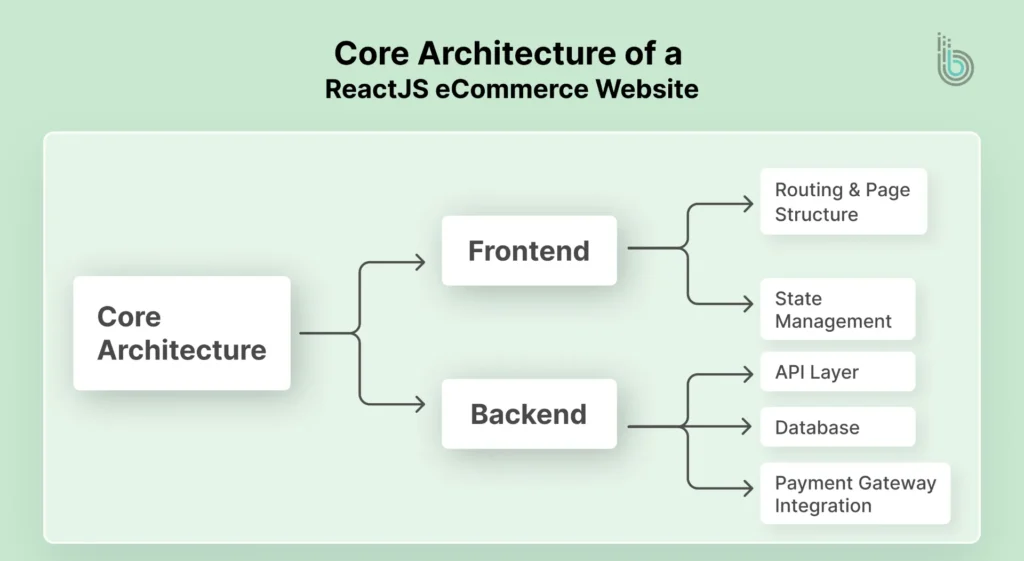
Core Architecture of a ReactJS eCommerce Website
Using ReactJS for eCommerce involves a headless architecture. ReactJS works as the presentation layer, i.e., the frontend, while the backend is handled by a CMS or a custom solution. These layers are connected with APIs. This decoupled headless Commerce architecture makes the website easier to customize and faster to scale up.
Frontend (React UI Layer)
React components build the visual storefront: product grids, cart modals, and checkout flows. A clean, responsive interface provides intuitive navigation and a seamless shopping experience on any device. These components make the interface interactive, fast, and reusable across the entire shopping experience.
Routing & Page Structure
Routing controls how users navigate between pages such as Home, Category, Product Details, Cart, and Checkout. React-based routing ensures smoother navigation without full-page reloads. A clean structure improves UX, supports SEO, and keeps your store easy to expand.
State Management (Store Data Handling)
State management handles changes to data such as selected filters, logged-in user details, and wishlist updates. Rather than passing data through several components, state management tools keep the flow organized. It helps maintain consistency and reduce bugs during checkout and browsing.
Backend (Commerce Engine)
The backend is the server-side of the website. It manages core eCommerce logic, including inventory tracking, products, pricing, customer accounts, shipping rules, and order processing. React connects to the backend via an API to fetch data, complete purchases, and manage operations.
API Layer (Frontend ↔ Backend Connection)
The Application Programming Interface (API) connects your React-based frontend interface with the backend services. It sends requests for products, user login, cart updates, and order creation. API also integrates your store with systems like ERP and CRM for more streamlined operations.
Database
The database stores all essential eCommerce information. That includes product details, user accounts, orders, inventory levels, and payment status. Then the data will be accurate and available in real time. A well-designed database helps the store handle growth and traffic.
Payment Gateway Integration
Payment gateway integration enables customers to pay securely using cards, wallets, UPI, or net banking. React manages the payment flow on the frontend, while the backend handles secure transactions. Reliable integration reduces failed payments and builds customer trust.
Looking at this architecture, you can understand the complexities of designing an eCommerce website using ReactJS. That’s why you need to follow the process below to get the best results.
How to Build & Deploy a React eCommerce Website?
Building a ReactJS eCommerce website involves creating a smooth user interface for shopping and integrating it with backend systems. Then you deploy it on a fast, scalable hosting setup.
Define the eCommerce Scope & Architecture
First, you define the core architecture of your React-based eCommerce store. That involves outlining the product types, user flows, cart, checkout, user accounts, etc. You can choose between a headless CMS (such as the Shopify Storefront API) or build a custom backend.
Set Up the React Project
Create the project foundation, including routing, folder structure, styling, and environment configurations. You can bootstrap your application using create-react-app, or Next.js for better SSR or routing. Install the essential dependencies for routing, UI styling, and state management.
npx create-react-app ecommerce-frontend
Or
npx create-next-app@latest
Install react-router-dom for routing, a UI library (like Material-UI or Tailwind CSS), and state management (@reduxjs/toolkit react-redux or use Context API).
Build the React UI Components for eCommerce
Create reusable, presentational components: Header, Footer, Product Card, Navigation bar, and Hero section. Structure them in a components/ directory for maintainability.
Use a modular approach:components/{common, product, cart}.
Implement a consistent design system using CSS Modules, Styled Components, or a utility-first framework like Tailwind CSS.
Build the Product Pages
Develop dynamic pages to display products: a listing page (ProductList) with filtering/sorting and a detailed page (ProductDetail) with images and “Add to Cart”.
Product Listing: Fetch products from an API. Implement filters (by category, price) and pagination.
Product Detail Page: Create a route (e.g. /product/:id) that fetches and displays full product details, variants, and description.
Implement the Shopping Cart Functionality
Use React state (via Context or Redux) to manage cart items locally. Create a Cart component that displays items, quantities, subtotal, and allows updates.
State Logic: Create a CartContext or Redux slice to handle addItem, removeItem, updateQuantity.
Persistence: Use localStorage or cookies to persist the cart between sessions.
Set Up the Checkout Method
Build a multi-step checkout flow (Shipping, Billing, Review). Manage form state with React Hook Form or Formik, and validate user input.
Checkout Flow: Create components for CheckoutForm, ShippingForm, OrderSummary.
Form Handling: Use libraries to handle form state and validation efficiently.
Integrate Payment Processing
Integrate a third-party payment gateway like Stripe or PayPal. Use their client-side libraries and securely handle transactions on your backend.
Frontend: Use Stripe Elements or PayPal JS SDK to render secure payment inputs.
Backend: Create an API endpoint (/api/create-payment-intent). It communicates with the payment gateway to confirm transactions.
Build a Secure Authentication System
Implement user registration, login, and protected routes using JSON Web Tokens (JWTs). Store tokens securely in HTTP-only cookies.
Flow: Users log in via a /login page; your backend verifies credentials and issues a JWT.
Security: Protect API routes and frontend routes (e.g. /account). Use an AuthContext or similar to manage user session state.
Create the Admin Panel
Build a protected area for admins to manage products, orders, and customers. This requires role-based access and CRUD API endpoints.
Features: Dashboards for viewing orders, forms to create/update products, and user management.
Access Control: Ensure all admin routes and APIs check for a valid admin role in the JWT token.
Server-side Rendering with Next.js
If using Next.js, leverage getServerSideProps or getStaticProps for product/category pages to improve SEO and initial load performance.
SSR/SSG: Use SSR for dynamic, personalized pages (checkout). Use Static Generation (SSG) for product pages that can be cached at build time.
Test the React eCommerce Application
Write unit tests for components and integration tests for user flows (adding to cart, checkout) using Jest and React Testing Library.
Testing Scope: Test critical business logic, component rendering, and API interactions. Use tools like Cypress for end-to-end testing of the purchase flow.
Deployment of React eCommerce Website
Build
Run npm run build to create a production-optimized bundle in the build/ folder.
Backend API
Deploy your Node.js/Express API to a platform like DigitalOcean or AWS.
Frontend
Deploy the static build folder to Vercel, Netlify, or AWS S3.
Environment Variables
Ensure all API keys and environment variables (e.g. Stripe secret) are configured on your hosting platform.
Connect
Point your frontend to the live backend API URL.
From the procedure, you can see that building an eCommerce website with ReactJS can be a little complicated. It would be suitable to get our dedicated eCommerce website development services. Our experts will analyze your eStore workflow and determine the best architecture and subsequent procedures.
Real-world Implementation
Before moving ahead, check out the Reddit discussion showcases eCommerce store development using Reactjs and other technologies.
ReactJS is well-suited for building eCommerce websites, as it enables the creation of fast, scalable, and dynamic UIs. They can significantly enhance the shopping experience.
Fast & Dynamic UI/UX
React’s virtual DOM updates only the changed parts of the page. It makes interfaces like live search, cart updates, and filters incredibly fast. It’s critical for keeping shoppers engaged and reducing the bounce rates.
SEO-friendly with Next.js
Using Next.js (a top React framework) enables server-side rendering, ensuring product and category pages are crawlable by search engines. It’s a key advantage for eCommerce visibility and organic search traffic.
Smoother Integration Capabilities
React works seamlessly with headless commerce platforms (Shopify, BigCommerce), payment gateways, and CMS tools. Then you can create modern, decoupled storefronts.
Component-based Architecture
React’s modular components let you build reusable UI blocks for products, carts, and headers. This speeds up development and ensures design consistency across complex, multi-page eCommerce sites.
Rich Ecosystem & Tooling
React has extensive libraries (such as Redux) and ready-made UI kits. It accelerates the addition of essential eCommerce features, such as state management, routing, and responsive layouts.
Scalable & Maintainable
React features clear structure and one-way data flow; that makes it easier to scale your store and add new features (like wishlists or recommendations). And you can maintain the code as your product catalog grows.
Overall, React can be an excellent choice for building high-performance, future-proof eCommerce websites. It will increase customer engagement and drive more sales.
Common Challenges in React eCommerce Development (& How to Solve Them?)
While building an eCommerce website with React is beneficial, you may also face technical and business challenges. It may be related to performance, state management, security, and the overall UX.
Complex State Management
Synchronizing state across cart, user session, inventory, and UI becomes messy with prop drilling.
Solution: Use Redux Toolkit or React Context API or useReducer for a centralized, predictable store. Implement optimistic UI updates for a snappier cart experience.
Security & Data Privacy
Protecting payment data and user information, and preventing XSS/CSRF attacks in a client-heavy app can be challenging.
Solution: Never store sensitive data client-side. Use HTTP-only cookies for JWTs, sanitize inputs, and handle all payments through a secure, PCI-compliant gateway like Stripe on your backend.
Integration with Third-party Services
Connecting multiple APIs (payment, shipping, CMS, email) can lead to brittle code and inconsistent data.
Solution: Build a robust Node.js/Express backend as an integration layer. Use it to normalize data from all services before sending it to your React frontend. It keeps the UI decoupled and clean.
Logistics & Fulfillment
Managing real-time inventory, shipping rates, and order tracking within the UI.
Solution: Integrate dedicated services via your backend. Use Shippo or EasyPost for shipping, and connect to your inventory/order management system with webhooks for live stock updates.
Performance Bottlenecks
Large product catalogs, high-resolution images, and numerous re-renders slow down the site.
Solution: Implement code splitting, lazy loading for routes/images, and create component memos (React.memo, useMemo). Use a CDN for assets and optimize API calls with caching (Redis).
SEO & Server-side Rendering (SSR)
Search engines struggle with JavaScript-heavy React SPAs, harming product discoverability.
Solution: Use Next.js for built-in SSR/SSG. This pre-renders product and category pages on the server. It makes them fully indexable and dramatically improves initial load performance.
User Experience (UX) & Cart Abandonment
A clunky checkout process or poor mobile experience directly loses sales.
Solution: Streamline checkout to a single page. Persist the cart with localStorage. Use Progressive Web App (PWA) features, including offline capabilities and push notifications, to re-engage users.
Scalability & Architecture
The monolith architecture of React becomes unwieldy as features grow, making deployment and updates difficult.
Solution: Design a headless, modular, feature-based architecture from the start. It allows for independent scaling of the UI, database, and microservices.
Navigating these challenges effectively will make your React-based eCommerce website more successful.
React’s component-driven architecture lets you create rich, dynamic UX, from interactive product galleries to seamless, single-page checkouts. It keeps customers engaged and drives conversions.
You need to embrace solutions like Next.js , state management, and a headless approach for seamless integrations and server-side rendering. These will help overcome the challenges of traditional eCommerce.
The result will be faster, scalable, and more responsive digital storefronts. They’ll be ready to grow alongside your business.
FAQs on ReactJS eCommerce
Q1. Is React enough to build a complete eCommerce website?
React is a top framework for frontend development. But for a complete eCommerce website, you will also need a backend solution for payments, orders, products, and users. One of the best combinations to opt for is React with Node.js or Laravel. You can also try a headless commerce platform.
Q2. Can ReactJS handle large eCommerce websites with heavy traffic?
Yes, React can support large-scale eCommerce websites when properly optimized. Use caching, CDN delivery, clean state management, and a scalable backend API. It helps maintain speed during peak traffic and sales events.
Q3. How long does it take to build a ReactJS eCommerce website?
The timeline depends on features and complexity. A basic React store can take 3-6 weeks, while a scalable eCommerce platform with advanced filtering, custom checkout, admin panel, and integrations can take 2-4 months or more.
Q4. Is ReactJS eCommerce secure?
While React is secure on its own (for the frontend), overall security depends on how you implement the backend. Robust security would include HTTPS, secure admin access, proper authentication, validated APIs, and secure payment handling. Then your site will be protected against vulnerabilities like CSRF and XSS.