The eCommerce sector is evolving rapidly, bringing new trends and innovations. Shoppers now look for immersive and personalized shopping experiences. Offering 3D product views is an excellent way to provide a clearer perspective of the product, helping customers make well-informed purchasing decisions.
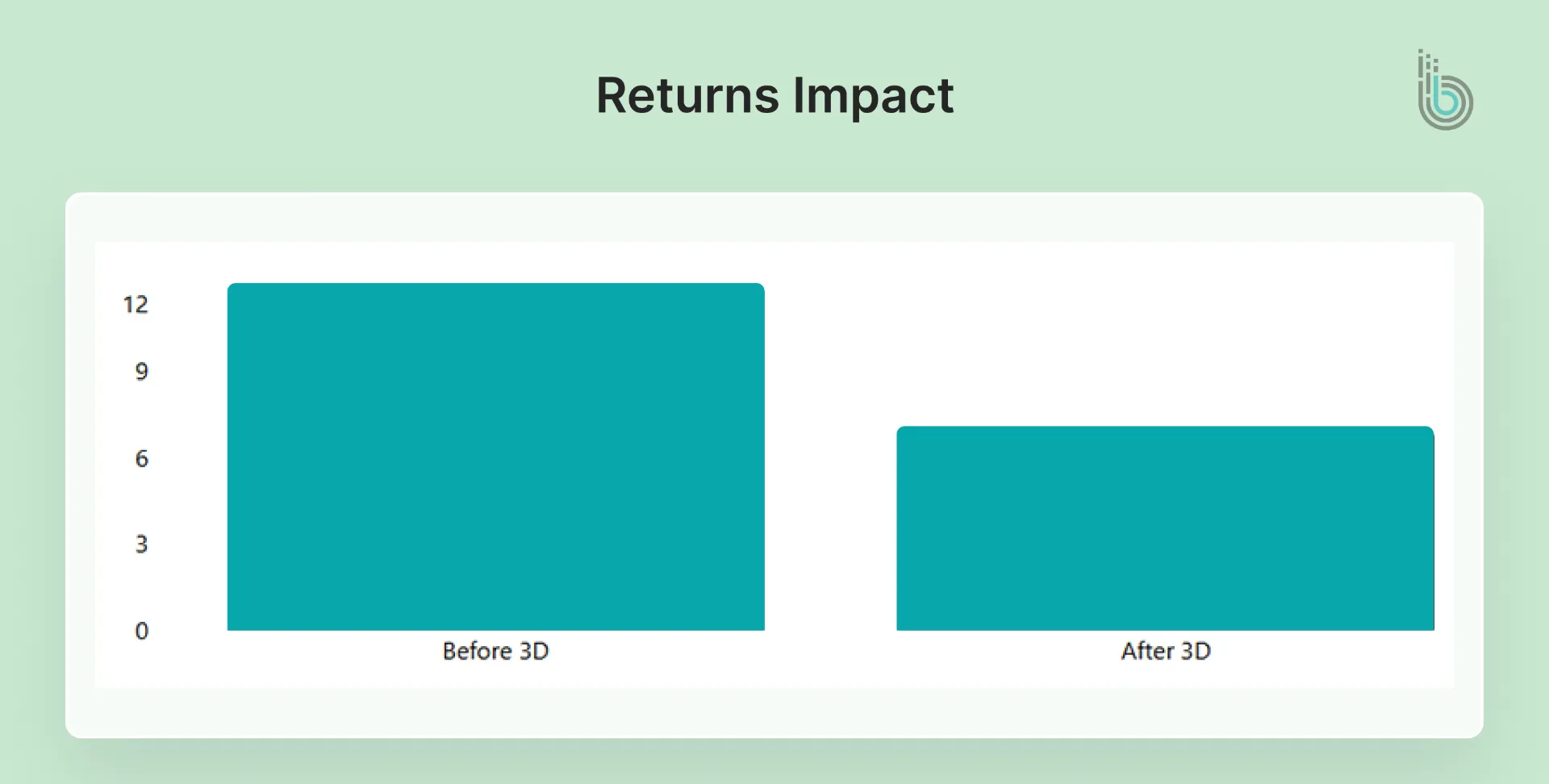
A 3D Product Configurator is a game-changing tool for creating such immersive, interactive shopping experiences. It allows shoppers to build, customize, and visually explore their desired product in a photorealistic 3D environment. This tool also helps reduce product returns by increasing consumer confidence throughout the purchase process.
This blog explains the Magento 3D Product Configurator in detail, how to implement it, best practices, and more.
What is a 3D Product Configurator?
A 3D product configurator is an interactive tool embedded in your eCommerce store that allows customers to:
Rotate and zoom a 3D model of the product.
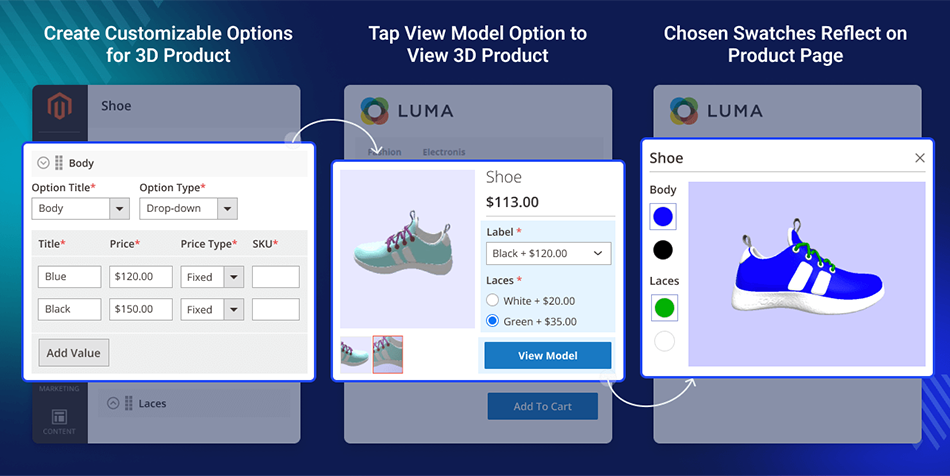
Change colors, materials, finishes, or components.
See real-time visual updates as they select options.
Get automatic price updates as they configure.
With it, consumers can visualize and customize a product in a photorealistic, 3D space directly within a website. Also, instead of guessing from a few photos, buyers can “build” the exact product they want on-screen.
Basically, it gives customers a tangible sense of the final product before purchase.
For example, a consumer trying to purchase furniture, such as a sofa, will typically see only a few images and videos on a standard eStore. However, with a 3D product configurator, consumers can view the product from multiple angles and customize it to their preferences.
Why Use Magento 2 Product Configurator?
A Magento 3D product configurator can directly help us address the core eCommerce challenges. Here are a few reasons to adopt this technology:
Increase Conversion Rates
By reducing purchase uncertainty, interactive 3D models give customers the confidence to complete a purchase. It directly boosts add-to-cart actions.
Reduce Product Returns
Customers see exactly what they are customizing. That minimizes the gap between expectations and reality, a primary driver of returns.
Enhance Customer Engagement
The interactive play-and-explore experience increases time on page and creates a memorable brand interaction.
Upsell and Cross-Sell Automatically
Highlight premium options and accessories within the configurator. Cross-selling and upselling make it easy for customers to find and add value to their base purchase. That is why they are among the best eCommerce marketing strategies.
Gather Precise Customer Data
Gain invaluable data on popular customizations, feature preferences, and design trends to inform inventory and marketing strategies.
Better Brand Perception
Very few companies use immersive customization, and most rely on 2D images. An advanced feature like a 3D product configurator positions your brand as an innovative, customer-centric leader in your market.
Major Features of 3D Product Configurator for Magento Stores
A good 3D product configurator is more than just a visualizer for product pages. It is one of the best ways to boost sales. For Magento-powered stores, a 3D product configurator like Magento 2 3D Product Configurator would be outstanding.
Here are a few features you can have with it.
Real-time 3D Visualization & Rendering: The system is made for customers. They can see the results immediately and do not have to wait for the page to load when changing the preferences.
Interactive 3D Model: The customer can use the 3D model interface to turn, enlarge, and move the object. They can see every side of it with natural perception.
AR Product Visualization: Helps customers visualize their customized product in their real-world environment using their smartphone camera.
Live Price Calculation: The total cost is displayed to the user immediately after the user selects an option.
Admin-friendly Rule Engine: Easily define compatibility rules (e.g., certain fabrics only available with specific frames) to guide user choices.
Mesh Value Configuration: Precisely control and modify individual elements of the 3D model (e.g., resizing a lamp stem) for complex customizations.
GLTF/GLB Files Support: Guarantees broad compatibility with high-quality, small-sized 3D model files for fast loading.
Asset Management & ZIP Upload: Simplifies uploading and managing large libraries of 3D models, textures, and materials directly from the Magento admin.
These features help to improve customer engagement, which keeps customers coming back.
How to Implement Magento 3D Product Configurator?
While adding a 3D product configurator to your Magento store, you need to take care of the technical integration with creatives as well. A successful implementation proceeds as follows.
Step 1: Define Your Customization Rules
Begin by mapping out the customer journey. See which product attributes are customizable and use the applicable business logic. These attributes can be color, material, engraving, size, components, and more.
Define what options are compatible or mutually exclusive.
Step 2: Source or Create 3D Models
High-quality 3D models of the product will now be created. You can either make them in-house using 3D modeling software like Blender or Autodesk Maya, or you can outsource to a specialized agency.
Ensure the final models are optimized for web use. It should be in the GLTF/GLB format for board compatibility and fast loading.
Step 3: Select a Configurator Solution
Choose a dedicated Magento extension or a third-party SaaS platform that integrates with Magento. Select the solution considering the criteria:
The feature set
Ease of integration with your theme
Performance impact
Scalability
Quality of vendor support
Step 4: Configure Rules and Logic
This phase is where you execute everything that was planned in the previous stage. Within the chosen configurator admin interface, you will map the Magento product attributes to the components of the 3D model.
For example, you will link the Magento attribute “Frame Color” with the specific texture files for “Matte Black” and “Brushed Nickel.”
Also, configure the rule engine to enforce dependencies and trigger live price calculations based on the selected options.
Step 5: Integrate Backend and Catalog
The configurator integration must ensure that user interactions directly modify a Magento quote item. That involves accurately passing the configured product’s SKU, custom options, and final price into the Magento shopping cart.
Additionally, the inventory should be checked for the selected components, and the order should be displayed correctly in the admin.
Step 6: Integrate and Test on Your Store
Before launch, conduct comprehensive testing within a Magento staging environment. Here’s what you need to test:
Functional: Test every customization combination to make sure rules work and prices update correctly.
Catalog Integration: Verify the configurator loads correctly on the assigned product detail pages.
Checkout Flow: Ensure the customized product and its price persist throughout the Magento checkout process.
Performance: Audit page load times to ensure the 3D element does not degrade user experience or SEO performance.
Step 7: Launch & Promote
Once testing is complete, deploy the feature to your live Magento store. Promote it aggressively using the Magento built-in tools. Here is what you need to:
Send announcement emails through your integrated ESP.
Update category and product pages.
These promotional features will help bring traffic and engagement.
This integration can be incredibly advantageous for your Magento store. Sales will be driven by delivering the personalization and convenience buyers demand. For professional help and the best results with it, you can get our Magento development services.
Types of 3D Product Configurators for Magento
Magento comes with multiple approaches to product configuration. Understanding these options helps you choose the right tool for specific customization needs.
Built-in Magento Product Types
Magento offers several native product types that support basic configuration without additional extensions. These built-in options work well for easy customization.
Simple Products: These are single items with no variations. They do not offer configuration options by default, but can include custom options such as text fields, file uploads, or dropdowns.
Configurable Products: They help customers select from predefined attribute variations such as size, color, or material. Each combination links to a simple product with its own SKU and inventory.
Bundled Products: Customers build their own product packages by selecting from groups of associated items. This works for creating kits, sets, or packages where customers choose components.
Custom Options: These can be added to any product type. Stores can offer personalization through text inputs, file uploads, dropdowns, radio buttons, checkboxes, and date selections. Each option can have its own price adjustment.
These native features address many standard configuration needs. But they have limitations when handling complex product relationships.
Advanced and Third-Party Product Configurator Solutions
These are for businesses that require extensive configuration beyond Magento’s native features.
Advanced Configurators: They offer visual product builders that let customers preview their customizations. These solutions support conditional logic, such as selecting one option affecting the available choices in other fields.
Third-Party Configurators: These excel at handling complex pricing calculations, like formula-based pricing, quantity discounts, and dynamic price adjustments.
When evaluating third-party solutions, merchants should consider factors such as ease of use for administrators and customers, performance impact on site speed, integration capabilities with existing systems, mobile responsiveness, and the availability of ongoing support and updates.
Top Magento 3D Product Configurator Tools
Tool
Features
Pricing
Platform Compatibility
Threekit
3D + AR, real-time pricing, High-fidelity 3D
Tiered/Enterprise
Magento, Shopify, BigCommerce
Expivi
Advanced logic, complex variants, strong pricing logic, AR readiness
Subscription based
Magento, WooCommerce, Salesforce
BeeGraphy
True parametric design, CNC output, live cost price, Bespoke 3D models
Best Practices for Magento 3D Product Configuration
A 3D configurator is not just about the technology. You need to execute it strategically. Adhere to some best practices to maximize ROI and get a better customer experience.
Focus on the Best Sellers: Implement your configurator on high-value, complex, or best-selling products first. This targets max impact and provides a strong ROI case before a wider rollout.
Use High-quality Visuals: The 3D model is your product sample. Invest in photorealistic textures, accurate lighting, and clean geometry to build trust and make the digital product feel tangible.
Provide Instant Visual and Price Feedback: Every customization choice must trigger an immediate visual update and price recalculation.
Integrate with AR Where Possible: Augmented Reality is the logical extension of 3D. Users can view their custom creations in their own space, the ultimate tool for closing the imagination gap.
Prioritize Speed and Performance: A slow configurator kills engagement. Optimize model file sizes (using GLTF) and for easy coding to maintain fast load times, a big factor for SEO and user retention.
Simplify the User Interface: The customization panel should be intuitive and user-friendly, avoiding technical jargon. Guide users with clear labels, logical steps, and a clutter-free design that keeps the product front and center.
Get Mobile-First Functionality: With most traffic coming from smartphones, your configurator must give a good touchscreen experience. A feature like easy pinch-to-zoom and smooth rotation will be helpful.
Utilize Analytics Strategically: Track which customizations are most popular. This data is best for informing inventory planning, marketing campaigns, and future product development.
Our team follows proven practices, so when you hire dedicated Magento developers, you get reliable performance and real results for your eStore.
Wrap It Up
When you want to stand out from a crowd of millions of eStores, you need some advanced features and integrations. One such integration is a 3D product configurator. Having it on your Magento store can shift it from a transactional storefront to an interactive destination.
With a Magento 3D product configurator, your customers can visualize and customize products as they like, and order with greater confidence. That means higher conversions, fewer returns, and a more distinct competitive edge.
Do you want advanced features, such as a configurator, for your store? Then connect with us today!
FAQs on 3D Product Configurator for Magento
Q1. What is the best file format for 3D models in Magento?
The GLTF/GLB format is the industry standard for web-based 3D. It provides an optimal balance of high quality and small file size. That means faster loading times on your product pages.
Q2. How does the configurator impact my store's loading speed?
Performance is critical. With optimized 3D models (like GLB) and efficient coding, the impact is minimal. A well-built solution prioritizes speed to maintain a positive user experience and SEO rankings.
Q3. Can customers save their custom configuration for later viewing?
Yes, most advanced configurators include functionality to save a unique link or store the configuration in the user’s account session. So they can return later to review or purchase their creation.
Q4. How does a 3D configurator help reduce product returns?
It sets accurate expectations by allowing customers to see the exact product they are creating. That eliminates the “imagination gap” that often leads to dissatisfaction and returns based on mismatched expectations.