When people search for products on Google, they first see the meta title and description. These elements grab attention. They help convince users to click on your Shopify store.
Good meta titles and descriptions improve search rankings. They boost click-through rates (CTR). They attract more potential customers. These elements explain your page’s content to search engines and users. Expert Shopify developers consider them vital for Shopify SEO.
In this blog, we’ll explain Shopify meta titles and descriptions. We’ll cover why they’re important and how to write them effectively. You’ll also learn how to add them to your store. If you’re new to Shopify or want to improve your ecommerce marketing, we’ll show you how to use these titles and descriptions. They can help you get better visibility in search results. Let’s dive in!
What are Shopify Meta Description and Title?
Shopify meta title and description are key SEO elements. They help describe your page to both search engines and visitors.
Meta Title: Sometimes referred to as the SEO title or page title, this is the link title found in Google search results. It provides users with a brief impression of what the page is about.
Meta Description: The meta description is a short page summary. It appears below the meta title in search results. A well-written description grabs attention. It convinces users to click your Shopify store link.
Meta tags serve two crucial purposes. They help search engines understand your page. They also influence a visitor’s decision to click. This is why straightforward, compelling meta tags matter. Your Shopify title and description should include keywords. This improves visibility in search results. It also boosts click-through rates (CTR).
Why Add Meta Titles and Descriptions to Shopify?
Adding meta titles and descriptions helps your Shopify store in multiple ways. These elements are essential in improving your search rankings. They boost click-through rates (CTR) and also enhance the user experience. Good meta tags make your store more visible. They encourage more customers to visit.
The top reasons why they matter include the following:
Better Search Engine Rankings
Search engines such as Google utilize meta tags to comprehend the subject of your page. A good Shopify meta title and description help your store show up in searches. This boosts your visibility.
Increase Click-Through Rates (CTR)
A good meta title and meta description compel users to click from search pages. Customers are more likely to visit your online company when they find a short and attractive description compared to others.
Improve User Experience
Your meta tags give users a quick look at what to expect on your product page, collection page, or Shopify blog. This helps to establish the right expectations and improve customer experience.
Improve eCommerce Marketing
Optimize your Shopify meta descriptions with key keywords. This way, potential customers can find your store faster. This aids your eCommerce marketing effort through organic traffic.
Stand Out from the Competition
A distinct meta description distinguishes your store. Use unique meta descriptions for each page. Craft engaging content that encourages users to choose your store over others in the Shopify network.
Strong meta descriptions and titles help attract more visitors, enhance search visibility, and increase sales for your Shopify store. With our Shopify website development services, we always ensure that your Shopify store is SEO optimized so that it gets maximum.
Shopify Meta Title and Description Character Limits
Search engines display titles and descriptions within a limited pixel width, which roughly corresponds to a certain character range. Most SEO best practices recommend:
Meta Title: Aim for about 50–60 characters to avoid being cut off.
Meta Description: aim for about 120–160 characters so the main message stays visible on both desktop and mobile.
Shopify’s form fields often allow more (for example, up to 70 characters for the title), but staying within these ranges keeps your snippet clean and readable.
Ideal Shopify Meta Title Length
For meta title length, Shopify store owners should treat 50–60 characters as the safe zone.
That space is enough to include:
Your primary keyword.
A specific product or category term.
One short hook or benefit (like “Free Shipping” or “New 2026 Collection”).
This supports meta title best practices, eCommerce: clear keyword placement early in the title, plus a reason to click.
Ideal Shopify Meta Description Length
An effective Shopify meta description usually works best between 120 and 160 characters.
Within those 2–3 short sentences, you should:
State what the page offers.
Add 1–2 important keywords naturally.
Use action words or benefits that speak to the searcher’s intent.
This length is short enough to avoid truncation while leaving room to optimize Shopify organic traffic with compelling, human‑friendly copy.
Pixel Width VS Character Limit Explained
Google does not technically cut based on characters; it cuts based on pixel width (roughly 600 pixels for titles and around 920 pixels for descriptions).
Some letters (like “W” or numbers) take more space than others, so two titles with the same character count can show differently. That is why good tools talk about pixel width, not just characters, when you optimize Shopify SERP snippet previews.
Meta checkers and SERP preview tools let you paste your Shopify SEO title and meta description and see if they visually fit before you publish.
It is a summary of your page that informs users and search engines about your content. Here is a simple framework you can reuse on any Shopify page:
Start with what the user wants (product, category, solution).
Add 1-2 benefits or USPs.
Close with a soft call to action.
This is how you consistently produce eCommerce SEO title tags and descriptions that feel human, not keyword-stuffed.
1. Use Primary Keywords Naturally
Your primary keyword (for example, “shopify title and meta description” or “shopify meta description”) should appear once in the description, close to the beginning if possible.
Guidelines:
Write for humans first; then check if you can insert the keyword without breaking the flow.
Avoid repeating the exact keyword; instead, use close variations, such as “title and meta description Shopify” or “Shopify SEO title.”
This keeps your copy natural while still helping optimize Shopify SEO meta tags.
2. Add a Value Proposition or USP
Search results are a comparison environment. Your snippet sits next to competitors’.
Highlight what makes your store different:
Better price or bundle
Stronger guarantee of returns
Faster shipping or local delivery
Niche focus or higher quality
For example, a category page description could say: “Shop eco‑friendly yoga mats with non‑toxic materials, free shipping over ₹999, and hassle‑free returns.”
That line explains what the user gets beyond just “yoga mats,” which is at the core of Shopify meta title optimization and persuasive descriptions.
3. Include Action-Oriented Words
Strong verbs help users decide. You are not just describing; you are guiding the next step.
Some good action phrases are Shop now, Explore the collection, Compare styles, Download guide, and Build your custom set!
Competitors often use these CTAs in meta descriptions to drive higher click‑through rates. Work at least one action verb into each description to keep it focused on outcomes, not just information.
4. Avoid Duplicate Meta Tags
Having duplicate meta tags on Shopify across many pages confuses Google and weakens relevance.
Common duplication issues:
Same meta title on dozens of product variants.
Category and subcategory pages share almost identical metadata.
Collection pages are copying the homepage title.
Use a simple rule that if a page deserves to exist on its own, it deserves a unique meta title and description.
5. Optimize for Search Intent
Two people typing “running shoes” and “best running shoes for flat feet” clearly want different things. Your metadata must reflect that.
Identify:
Informational intent: “how to add meta title in Shopify”, “how to add meta title and description in Shopify.”
Commercial intent: “shopify product title seo”, “shopify product page meta title.”
Then align your wording so users immediately feel, “This snippet answers my exact need,” which is at the heart of Shopify’s best practices for custom meta tags in SEO. Hire Shopify experts with us, as they can handle everything related to your eStore.
Lastly, a good meta description can greatly boost your Shopify SEO and click-through rate. Keep it short, use keywords, and make it engaging. This helps attract the right audience and boosts traffic to your Shopify store.
How to Add Shopify Meta Description and Title?
Shopify lets you edit meta tags easily. You can customize them for different pages. This includes your home page, product pages, and collection pages. All other pages can be optimized, too.
You can also add and modify your Shopify meta title and description for different areas of your shop with the following steps:
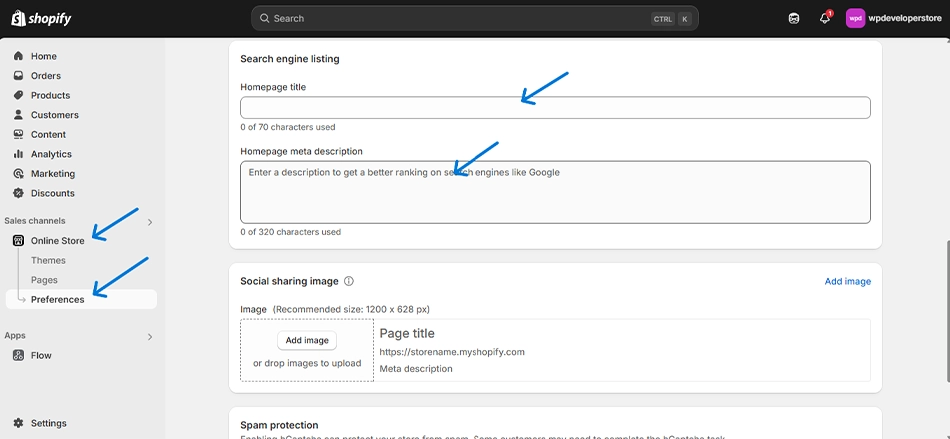
Adding Meta Title and Description for Shopify Homepage
Your homepage meta description and title are crucial as they represent your store in Google search results. Here’s how to add them:
In the title and meta description section, add a clear meta title (up to 60 characters). Then, write a concise, keyword-rich meta description (150-160 characters).
Click Save to apply the changes.
Your homepage meta description should clearly explain your store’s purpose and products. Highlight what makes you unique to draw in potential customers.
Adding Meta Title and Description for Product Pages
The meta description on your product page shows potential customers what the product is about before they click. To add or edit it:
Go to your Shopify dashboard and navigate to Products.
Select the product you want to optimize.
Scroll down to the search engine listing preview section.
Click “Edit website SEO.” Then add a clear product title that includes the main keyword. Include a short, catchy meta description that shows the product’s benefits.
Click Save to update the details.
Avoid duplicate meta descriptions by writing unique content for each product. This improves your Shopify SEO and helps users differentiate your products.
Adding Meta Title and Description for Collection Pages
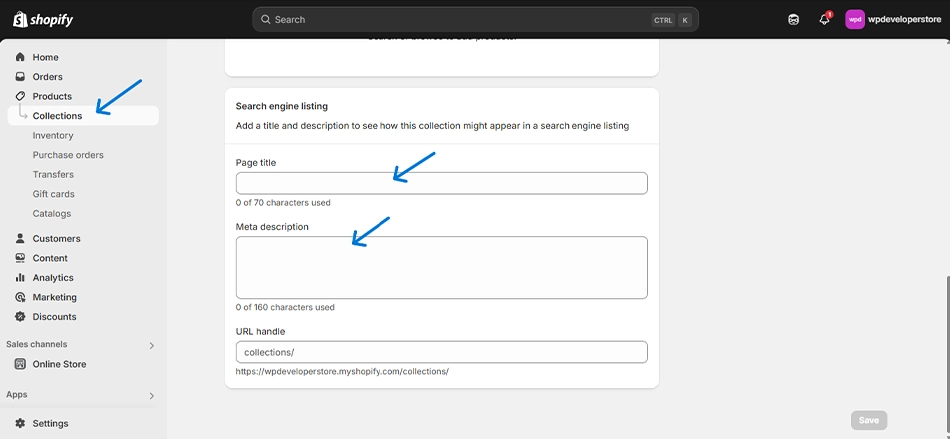
Your collection page meta description helps organize products and improve search engine rankings. Follow these steps:
In your Shopify admin, go to Products → Collections.
Select the collection you want to edit.
Scroll down to the search engine listing preview section.
Click “Edit website SEO.” Then, add a collection title that describes the category. Also, write a meta description that summarizes the collection’s purpose and products.
Click Save to apply changes.
Use relevant keywords naturally to describe what products are in the collection while keeping it engaging for users.
Adding Meta Title and Description for Other Pages (Blogs, Contact Page, etc.)
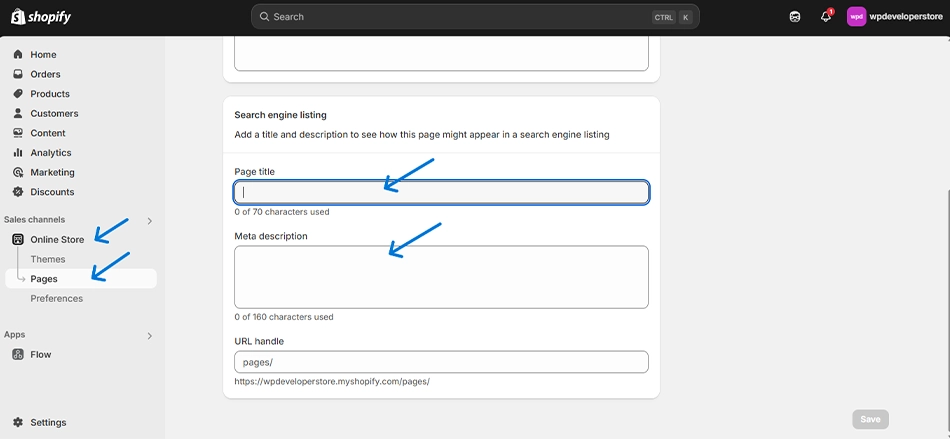
For blog posts, contact pages, or any other custom pages in your Shopify store, you can add meta descriptions the same way:
In your Shopify admin panel, go to Online Store → Pages.
Select the page you want to optimize.
Scroll down to the search engine listing preview.
Click Edit website SEO and add a title that accurately represents the page and a meta description that briefly explains the content.
Adding Meta Title and Description for Other Pages (Blogs, Contact Page, etc.)
For blog posts, contact pages, or any other custom pages in your Shopify store, you can add meta descriptions the same way:
In your Shopify admin panel, go to Online Store → Pages.
Select the page you want to optimize.
Scroll down to the search engine listing preview.
Click Edit website SEO and add a title that accurately represents the page and a meta description that briefly explains the content.
Click Save to update your changes.
For Shopify blogs, include the topic and main points in the meta description. This helps boost clicks from search results.
How to Edit Shopify Meta Title and Descriptions in Bulk?
If you run a large store, editing every page individually is slow and risky. Bulk editing gives you speed and consistency. You have two main options: Shopify’s own bulk editor or specialized apps.
1. Using the Shopify Admin Bulk Editor
From the admin:
Go to Products, then select multiple items using the checkboxes.
Click Bulk edit.
In the editor grid, use the column picker to add SEO title and SEO description fields.
Update titles and descriptions directly in the grid.
Save all changes at once.
You can use the same approach for collections and pages, which is very useful when you are doing a structured Shopify SEO meta tags optimization project.
2. Using Third‑Party SEO Apps
Apps provide faster workflows and safer templates, especially for large catalogs. Some tools help you:
Add or edit meta titles and descriptions in bulk with rules and variables (like product name + brand + USP).
Preview snippets, count characters in real time, and get metadata quality scores.
Automate recurring tasks, such as seasonal updates and Shopify meta-title optimization for new products.
Solutions like bulk‑edit apps and SEO suites are built exactly for this kind of Shopify on-page SEO optimization at scale.
How to Preview Shopify Meta Titles and Descriptions in Google SERPs?
Before you publish or after a big batch update, you should check how your snippets actually appear.
There are three practical ways:
Use a SERP preview tool: copy your title and description into a SERP checker that simulates Google’s layout and pixel width limits.
Use your SEO app’s preview: many tools include a live preview in the editor, so you can optimize the Shopify SERP snippet visually.
Search manually: after changes are indexed, Google your brand + key terms (like “Shopify meta description” or “Shopify SEO title”) and verify that the live snippet matches your expectations.
SERP previews help avoid cut‑off phrases and keep your main selling points visible.
Common Shopify Meta Title and Description Mistakes to Avoid
Here are frequent problems that quietly hurt rankings and CTR:
Duplicate or missing tags: the same title across dozens of URLs or empty fields, leading to duplicate meta tags and Shopify warnings in SEO audits.
Keyword stuffing: repeating “Shopify meta description,” “meta description Shopify,” and similar terms unnaturally just to hit more variations.
Over‑reliance on meta keywords: the old meta keywords tag is no longer a ranking factor, so spending time on “meta keywords Shopify” brings little or no SEO value.
Titles that say nothing: vague lines like “Home” or “Products” instead of specific, benefit‑driven Shopify SEO title copy.
Fixing these issues is one of the fastest wins in Shopify SEO meta tags optimization.
Tips to Optimize Shopify Meta Tags for Better Rankings
Think of your metadata as mini‑ads for each page. Use these practical tips:
Lead with the main keyword: Put the core term near the start of the title, especially for high‑value pages like the homepage and key collections.
Align title and description: Do not promise something in the title that the description or page does not deliver.
Use your brand name strategically: Add it to build trust, especially on the homepage and in important categories.
Group pages by intent: Plan different patterns for product pages, collections, and content (guides, FAQs) to support structured eCommerce SEO title tags.
Improve search visibility: You can do this Shopify‑wide by prioritizing high‑impression URLs first, and you will find them easily in Google Search Console.
When you design a repeatable pattern for titles and descriptions, you are effectively building Shopify-best-practices SEO into your whole store, instead of making random one‑off edits.
Final Thoughts
Meta titles and descriptions are crucial for your Shopify store. Adding them boosts your SEO. They help attract more visitors. Every page should have unique meta tags. Keep them relevant and engaging. This improves the user experience. It also increases your chances of ranking higher in search results.
Optimize these elements. Your Shopify store will see higher click-through rates and greater visibility. If you need expert assistance with your Shopify store, consult with us today!
FAQs on Shopify Meta Description
1. Which pages should have meta description and title?
Every key page needs meta titles and descriptions. This includes your homepage. Product pages must have them, too. Don’t forget the collection pages. Blog posts should consist of them. Contact pages need them as well.
2. Has Google changed your Shopify meta description and title?
Google can change your meta description. It may also rewrite your title. This happens if yours aren’t relevant enough. It also occurs if they’re not compelling to users.
3. What are Shopify titles?
Shopify titles appear in search results. They also show in browser tabs. These meta titles summarize page content. They help users understand the page. They also help search engines categorize it.