As your online store grows, the cracks in your current platform start to show. Slow load times during busy sales, constant plugin conflicts, and limited scalability can quietly hold your business back. This is often the point when businesses plan to migrate to Shopify for a more stable, high-performing eCommerce setup.
Let’s first understand what Shopify migration is.
What Is Shopify Migration?
Migrating from your current eCommerce platform to Shopify is a Shopify migration. This includes the migration of a lot of important data, such as products, customer information, orders, website content, and design elements.
It is not as easy as copying data from one place to another. It requires setting up store structure, choosing from prebuilt themes or customizing a new one, and reconnecting the integration that you had on your previous stores. All to make sure that your stores work smoothly in the new environment.
Businesses usually plan a Shopify migration when their existing platform starts limiting their growth. But let’s understand the reasons in detail why businesses plan to migrate to Shopify.
Why Businesses Are Migrating to Shopify in 2026
Shopify migration ensures enhanced scalability, 99.98% uptime, and reduced maintenance costs. Brands can focus on business growth rather than the technical aspects of the website. You get a user-friendly interface, robust security (PCI compliance), and superior mobile responsiveness.
Scalability and Performance
Shopify stores can easily handle high traffic volumes and large product catalogs, ensuring rapid business growth.
Simplified Management
It comes with an intuitive admin panel that allows easy editing of themes, products, and collections without writing any code.
Enhanced Security
Shopify comes with built-in SSL certificates and PCI DSS compliance, ensuring top-tier security for customer transactions.
Extensive App Ecosystem
You get access to thousands of apps to extend the functionality for SEO, marketing, and analytics.
Headless Commerce Compatibility
As Shopify supports headless commerce, it enables faster page loads, lower bounce rates, and more conversions.
Security and Compliance Benefits
Shopify includes built-in SSL certificates and PCI DSS compliance, ensuring secure transactions and customer data protection without manual setup.
Many businesses report improved conversion rates after migrating to Shopify due to faster load times, better UX, and optimized checkout experiences.
When Should You Consider Shopify Migration?
If your website cannot handle traffic spikes, it is time to consider a Shopify migration. A slow website may be costing you a lot of business. It is advisable to migrate such websites to Shopify to improve mobile optimization, streamline inventory management, and enhance overall performance.
Your Website Is Slowing Down
If your website’s page load time exceeds ~3s, it may be affecting your page speed. Some websites take a lot of time to load on mobile devices. It affects your Google rankings and conversion rates. Shopify’s lean themes and managed infrastructure improve the website’s page loading speed.
Your Site Requires Constant Maintenance
Self-hosted eCommerce platforms come with theme compatibility, plugin updates, server patches, and security monitoring. While it is manageable in the early stages, maintaining plugins, security, and performance becomes increasingly complex as your store scales.
Your Checkout Experience Is Outdated
A clunky checkout experience with too many steps may lead shoppers to abandon their carts. Avoid using poorly optimized flows and heavy plugins on your store. Shopify provides a convenient checkout process, making it a preferred choice for users.
It Is Difficult to Manage Plugins and Integrations
If you have a lot of plugins on your website or multiple plugins for the same functionality, it may be slowing down your website. You can choose Shopify and ask developers to pick the right plugins and integrations for your online store.
Security and Compliance Are a Concern
Every eCommerce store needs to be PCI-compliant and protect customer data. If you use self-hosted platforms, you need to ensure such compliance. Shopify provides security and compliance automatically, helping you reduce stress.
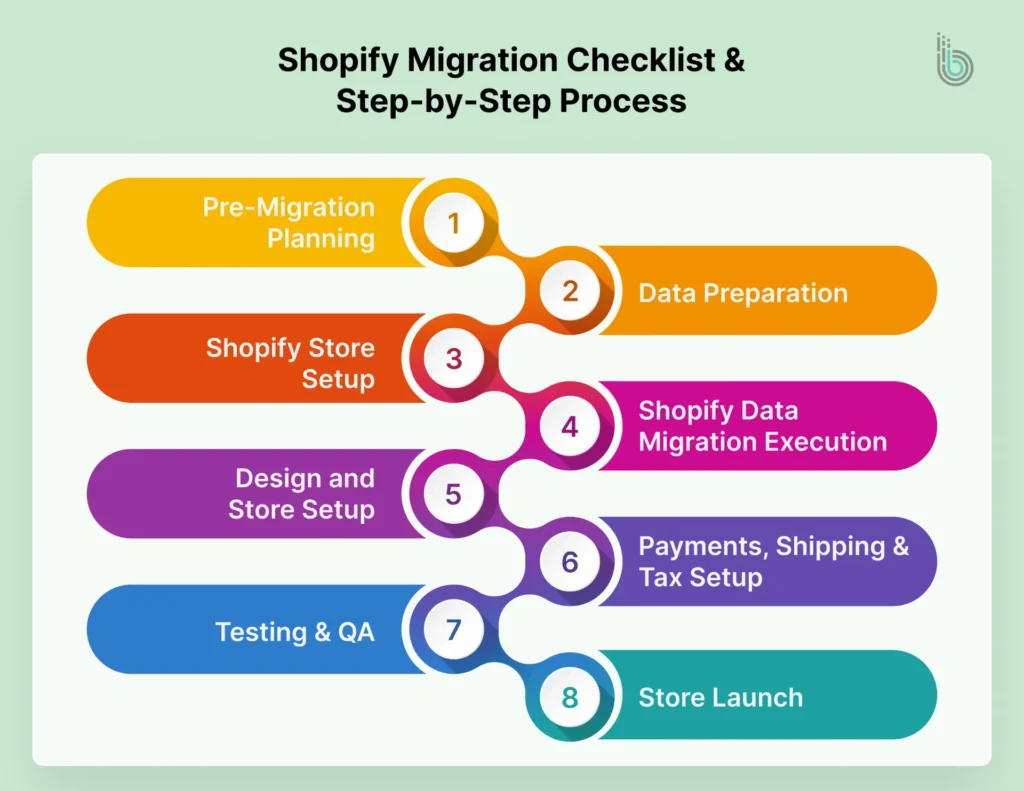
Shopify Migration Checklist & Step-by-Step Process
This is the most important step of the entire migration process. If these tasks are completed successfully, the transition will be smooth.
Pre-Migration Planning
It is important to know which data you want to migrate to Shopify and which you don’t. Include all the important information, such as products, collections, customers, orders, reviews, media files, and pages and blogs. Exclude anything that is outdated or no longer needed. You should review the structure of your old store and remove outdated categories, duplicate content, or missing product details.
Data Preparation
You should take a backup of inventory, customers, and orders before the process. Export all the data from your current platform to create secure backups. If something goes wrong with your system, you will have a clean copy of data ready to be restored.
Shopify Store Setup
Create your Shopify store by adding business info, currency, and other details. Pick the best suitable theme (free or premium) and install the right apps. Import tools, reviews, and email to set up the store.
Shopify Data Migration Execution
Collect all the CSVs for products, orders, customers, and content, and export all data from the old platform to Shopify. It is important to check product titles, images, inventory, and visibility to avoid problems during launch.
Design and Store Setup
Create your homepage, organize the product categories, and design your product pages. Make sure the design is clean and easy to navigate.
Payments, Shipping & Tax Setup
Set up payment options, shipping policies, taxes, notifications, and currencies. How people place orders and receive their orders depends on this step.
Testing & QA
It is essential to verify the payment process, calculate taxes and shipping charges, and ensure everything runs seamlessly by placing test orders. You should ensure redirects function correctly, and products are displayed accurately.
Store Launch
Once your store is live, you should monitor it regularly. Check 404 error pages, missing redirects, and keyword drops, and resolve them.
Shopify Migration Challenges, Mistakes & Pro Tips
Shopify migration is a major step for any eCommerce business owner, but it comes with challenges and risks. It requires careful planning to ensure the best customer experience, improved SEO rankings, and no data loss.
Some common Shopify migration challenges:
Common Challenges
Data Loss or Corruption: Incorrect inventory counts, missing variants, and images that do not migrate can lead to poor product representation.
SEO Ranking Fluctuations: Broken URLs and improper redirection can cause fluctuations in SEO rankings.
App Compatibility Issues: Rebuilding custom features from old platforms can result in broken workflows, which may slow down the app.
Downtime and Disruption: With Shopify store migration, the website may be temporarily inaccessible, leading to lost sales and lower conversion rates.
Mistakes to Avoid
Skipping SEO Planning: Not setting up 301 redirects for all old URLs to their new equivalents, not migrating SEO metadata, and not submitting Sitemap.xml to Google Search Console.
Ignoring Testing: Inadequate testing can lead to functionality issues.
Broken Links and Navigation Issues: Failing to update internal links after migration.
Pro Tips for Success
Pre-Migration Site Audit: Map all the existing URLs and create a complete backup of the website.
Use Automated Tools: Use dedicated apps for transferring data rather than relying on manual data entry.
Audit and Test All Integrations: Businesses should perform a full audit of all existing tools and systems to prevent integration issues.
Use the Staging Environment: Using a staging site with a password-protected feature is important.
Prioritize SEO Before Design: It is essential to prioritize SEO before designing the store.
Shopify Migration Cost & Timeline
There is no fixed cost for Shopify migration services. One business may spend $8,000 on a store migration, while another may spend $50,000 on a complex setup. The factors influencing the cost and timeline of a Shopify migration include the size of the catalog, the level of integration, the complexity of the project, and the amount of cleanup required in the legacy system.
Type of Migration
Cost
Timeline
Basic
$300 – $1,000
1 – 3 weeks
Mid-range complexity
$1,000 – $8,000+
4 – 8 weeks
Large/enterprise level
$10,000 – $50,000+
2 – 4 months
Post-Migration Checklist
You have migrated your website to Shopify. Your job does not end there. You need to conduct a post-migration check before launching your website.
Point Your Domain and Go Live
Disable the password on your new Shopify store, so it is live to the public. Update your DNS records and ensure that the SSL certificate is active.
Testing
Act as a customer and place orders to ensure everything runs smoothly. Check the payment methods, shipping costs, and taxes by placing orders.
SEO and Data Integrity
Verify metadata, image alt text, and check canonical tags.
Customer Experience and Communication
Send an email to customers to update their passwords to activate their accounts.
After your store goes live, it’s important to track its performance. Tools like Google Analytics (GA4) help you understand where your visitors come from and what they do on your site. You should also set up Facebook Pixel or similar tracking tools to run effective ads and reach the right audience.
Finally, submit your sitemap to Google Search Console so Google can easily find and index your store pages.
Conclusion
Migrating your eCommerce store to Shopify is more than just switching between platforms. It is about improving performance, scalability, and customer experience. It is a strategic move that can help you unlock faster growth you were holding back earlier by improving conversions and making it easier to manage your eCommerce store.
FAQs
1. How do I know if my store is ready for Shopify migration?
If you feel your website is slow or your conversion rates are low, consider migrating your existing website to Shopify. It helps to automate and streamline the processes.
2. Will I lose my SEO rankings during the migration?
No. With proper redirects and content structures, you would not lose any rankings. You should hire eCommerce developers who pay special attention to SEO while migrating your website.
3. Can I keep my existing website design while migrating the site?
You can either keep the same design or create a cleaner, more modern version.
4. Should I migrate the website to Shopify or Shopify Plus?
If you require unlimited product variants, advanced B2B features, and dedicated support, you can opt for Shopify Plus. Shopify Plus may cost $ 2,000 or more per month.