Build and Deploy Custom Stores with Shopify Hydrogen and Oxygen: A Complete Guide
Quick Summary
This guide explains how Shopify Oxygen hosting and Hydrogen framework work together to create custom storefronts for growing eCommerce brands.
We use Shopify Oxygen as the native hosting platform to deliver storefronts with low latency, automatic scaling, DDoS protection, and easy Shopify integration.
Learn about Shopify Hydrogen as the React-based framework built on Remix, with component-based architecture, built-in API hooks, and server-side rendering.
Compare pros and cons, including advantages versus disadvantages, and follow the 5 best practices to collaborate across developer/designer/marketing teams.
Most Shopify stores start with a theme. For many brands, that is enough, but when they grow, they may want to:
Launch a very custom design that no theme can handle.
Add multiple product flows, bundles, or configurators.
Integrate with third‑party systems and custom apps.
Serve traffic from many countries without any performance issues.
Outdated stores with generic themes may struggle to meet these needs. That’s where Shopify Oxygen and Hydrogen come in. With this stack, you keep the Shopify backend (products, orders, checkout) while having a completely custom, reliable front end.
This article explains what Shopify Oxygen and Hydrogen are, how they work, when to use them, and how to get started.
What is Shopify Oxygen?
Shopify Oxygen is Shopify’s native hosting platform for custom Hydrogen storefronts. Instead of deploying your headless store to a third‑party service, you can host it directly on the Shopify infrastructure. In easy words, Hydrogen builds your storefront, and Oxygen runs it. It is fast, secure, and close to your shoppers.
How Does the Shopify Oxygen Work?
Oxygen uses a global edge network. It is powered by providers such as Cloudflare to serve your storefront from locations near your shoppers. For example:
Shoppers in Europe hit an edge server in Europe.
Shoppers in the US hit an edge server in the US.
Pages render and respond with low latency worldwide.
Under the hood, Oxygen in Shopify is designed for serverless runtimes. Your Hydrogen app runs as lightweight edge functions. Shopify built Oxygen to integrate with the Hydrogen sales channel, the Shopify Admin, and the Storefront API.
In practice, this looks like:
You build or update your Hydrogen code in a Git repository.
Shopify integrates with that repo and provides a CI/CD pipeline that deploys changes to Oxygen.
You can have multiple environments (production, preview, etc.) depending on your Shopify plan.
Shopify manages scaling, uptime, and security on the hosting side.
So instead of setting up servers and configuring CDNs, you work on your storefront code and business logic.
Best Features of Shopify Oxygen
Global Edge Network: Reduces latency by delivering content from servers closest to the user.
Enhanced Security: Built-in protection against DDoS attacks and other vulnerabilities.
High Scalability: Handles traffic spikes during sales or promotions with ease.
Easy Integration: Works out of the box with Shopify, requiring minimal setup.
Optimized for Hydrogen: Designed to pair perfectly with the React-based framework for custom storefronts.
Included Hosting: With many paid Shopify plans, you do not pay separately for third‑party hosting.
Shopify Oxygen is the backbone of Shopify Plus storefronts. Together, these features make Oxygen a strong choice when you want headless performance.
What is Shopify Hydrogen?
Shopify Hydrogen is a React-based framework that helps developers create custom, fast, and engaging storefronts. It is purpose‑built for headless commerce on Shopify. The latest versions of Hydrogen are built on Remix. It is a modern full‑stack framework that excels in nested routing, data loading, and fast server-side rendering.
Where a standard theme is bound to Shopify Liquid and theme architecture, Hydrogen is freeform. You design and build any front-end you like, while Shopify still powers pricing, inventory, and checkout.
How Does Shopify Hydrogen Work?
Hydrogen sits between the frontend and backend of Shopify:
Frontend Logic
You create pages and components in React (via Hydrogen). These define how your storefront looks and behaves.
Data Fetching via Storefront API
Hydrogen uses built‑in hooks and utilities to fetch products, collections, cart data, and other information from Shopify’s Storefront API.
Server‑Side Rendering (SSR)
Hydrogen renders pages on the server first, then hydrates them in the browser. This improves both performance and SEO, as search engines see fully rendered pages rather than empty shells.
Deployment to Oxygen or Other Host
Once built, your Hydrogen app can be deployed directly to Oxygen or to another compatible hosting service (such as Vercel or Netlify) if you prefer.
Hydrogen does not replace Shopify admin, checkout, or data. It only replaces the theme layer with a more powerful, modern front end.
Best Features of Shopify Hydrogen
Hydrogen offers several features that solve real‑world problems for growing stores:
Component‑Based Architecture: Hydrogen ships with reusable components for cart, product detail pages, navigation, and more, which speeds up development.
Built‑In Storefront API Hooks: Ready‑made hooks help you query Shopify data without writing raw API code each time.
Server‑Side Rendering and Streaming: Pages can be rendered on the server and streamed to the browser, resulting in faster first-paint and improved SEO.
Optimistic UI and Nested Routing: Hydrogen supports modern UX patterns, including optimistic updates and nested routes, ideal for interactive product experiences.
Open Integration with Third‑Party Tools: If a service has an API, you can integrate it with Hydrogen, like personalization engines, headless CMS, CRM, search, etc.
First‑Party Shopify Support: Hydrogen is built and maintained by Shopify, so it evolves in sync with Storefront API changes and Shopify’s roadmap.
For brands looking to go beyond what themes can deliver, these features make Hydrogen a powerful alternative.
How to Build an eCommerce Store with Shopify Oxygen and Hydrogen?
Creating a high-performance eCommerce store with the Hydrogen framework on Shopify and Oxygen Hosting requires using the combined strengths of both platforms. Oxygen provides reliable, scalable hosting, while Hydrogen offers the flexibility to build fast, customizable storefronts. Let’s break it down step by step.
Step 1: Set Up Shopify Plus
To access Shopify Oxygen, you need to be a Shopify Plus merchant. This subscription unlocks advanced features such as custom checkout, best-in-class API capabilities, and exclusive hosting benefits.
Step 2: Install Shopify CLI
The Shopify Command Line Interface (CLI) is essential for setting up and managing your Hydrogen storefront. It simplifies project initialization and molds the development process.
Here is how to get started with Shopify CLI:
Install Shopify CLI on your system.
Run the following command to start a new Hydrogen project.
npm create @shopify/hydrogen@latest
Follow the on-screen prompts to configure the project and set up your development environment.
Step 3: Develop the Storefront
Hydrogen offers prebuilt components and advanced customization options, enabling you to create a storefront that aligns with your brand vision.
Follow these steps to create a custom eCommerce store:
Use prebuilt components of Hydrogen, such as product lists, carts, and navigation, to save time.
Customize the design to match your brand style and functionality requirements.
Integrate the Shopify Storefront API to enable dynamic content, such as real-time inventory updates and personalized recommendations.
Step 4: Optimize for Performance
A fast-loading online store is not just good for user experience. It also boosts your conversion rates and SEO rankings. Shopify provides tools to help you achieve optimal performance.
Here are some tips to optimize the performance of your store:
Use server-side rendering (SSR) to improve initial page load speed.
Optimize images using Shopify’s built-in image compression and responsiveness tools.
Minify JavaScript and CSS files to reduce overall page size.
Regularly test performance using tools such as Lighthouse or Google PageSpeed Insights to identify areas for improvement.
Step 5: Deploy to Shopify Oxygen
Shopify Oxygen provides the hosting infrastructure your Hydrogen storefront needs to perform at its best. Deployment is straightforward with the CLI of Shopify.
To make your project live, run this command:
shopify hydrogen deploy
Oxygen will automatically handle server configuration, load balancing, and scaling to assure that your storefront runs smoothly.
Step 6: Monitor and Maintain
Launching your online store is just the beginning. Continuous monitoring and maintenance ensure your store remains fast, secure, and up to date.
Here are some helpful tips:
Use the performance monitoring tools to track speed, uptime, and other key metrics.
Regularly update Hydrogen components and dependencies to ensure compatibility with the latest Shopify features.
Audit your storefront periodically to identify and fix potential performance bottlenecks or security issues.
Building an eCommerce store with Shopify Oxygen and Hydrogen involves setting up Shopify Plus, leveraging Hydrogen’s development framework, and deploying to Oxygen’s hosting platform. By following best practices for performance optimization and ongoing maintenance, you can build a scalable, high-performing online store.
If you are experiencing issues with Oxygen and Hydrogen, consult our Shopify development company. Our experts have years of experience building the best eCommerce stores on Shopify.
Pros and Cons of Hydrogen and Oxygen
Hydrogen and Oxygen are powerful, but they are not the best fit for every store. Here is a clear view of the advantages and trade‑offs.
Advantages of Hydrogen
Unlimited Front‑End: You are not tied to Liquid or theme limitations. Any custom layout, animation, or flow your designers imagine can be built in React.
Better for Complex Use Cases: Advanced product configurators, multi‑step flows, and heavy personalization are easier to build and maintain in a modern framework.
Improved Performance Potential: With SSR, streaming, and optimized data loading, Hydrogen can outperform heavy theme setups when implemented well.
Modern Developer Experience: Developers use React, Remix, and modern tooling instead of legacy template languages, improving productivity and hiring.
Deep API Integrations: Hydrogen integrates well with any service that exposes an API, headless CMS, custom search, loyalty platforms, etc.
Disadvantages of Hydrogen
Higher Development Cost: Building a Hydrogen storefront requires a skilled React team or a specialized agency, which increases the upfront cost compared to installing a theme.
Ongoing Maintenance: You are now responsible for keeping a custom app up to date, like framework upgrades, dependency updates, and technical debt need attention.
Not Best for Simple Stores: If your store is small, with a simple catalog and basic needs, the overhead of a headless approach may not pay off compared to a well‑optimized theme.
Advantages of Oxygen
Native to Shopify: Oxygen is built and maintained by Shopify, designed specifically for Hydrogen storefront hosting.
Fast, Edge‑Based Hosting: Global edge deployment improves performance for international shoppers, especially during high‑traffic campaigns.
Integrated Environments and CI/CD: You get production and preview environments, automatic deployments from Git, and tight admin integration, which simplifies operations.
No Separate Hosting Vendor: You avoid negotiating with, paying, and managing a third‑party hosting provider for your Hydrogen storefront.
Disadvantages of Oxygen
Ecosystem Lock‑In: Oxygen is optimized for Hydrogen. If you later want to switch to a different front‑end framework or hosting strategy, you may need to re‑architect.
Plan‑Based Limits: Access to specific numbers of environments and advanced features depends on your Shopify plan level.
Less Flexibility Than General‑Purpose Hosts: While Oxygen is excellent for Hydrogen, advanced custom infrastructure patterns that are easy on generic platforms may be more constrained.
In Short
Choose Hydrogen + Oxygen when you need serious custom UX and performance, and are ready to invest in a more advanced setup. Stick with themes if your current store still meets your goals and your main bottlenecks are content or marketing, not technology.
How Do Shopify Oxygen and Hydrogen Work Together?
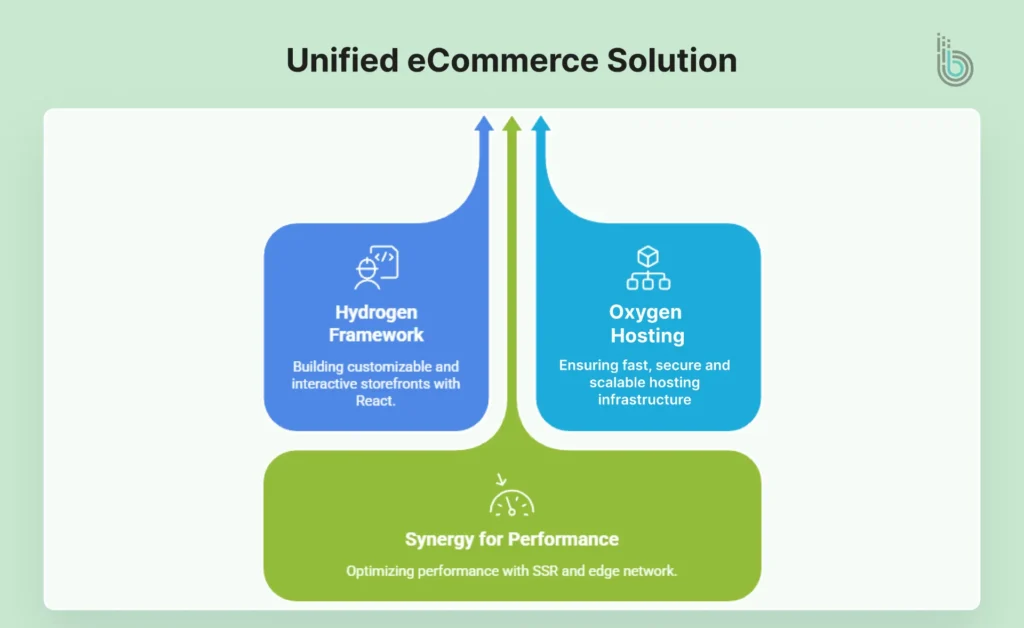
Shopify Oxygen and Hydrogen are designed to complement each other, creating a powerful solution for modern eCommerce. Oxygen offers hosting infrastructure that delivers fast, secure, scalable performance, while Hydrogen provides the flexibility to build dynamic, fully customizable storefronts. Together, they help businesses to deliver a world-class shopping experience that meets the demands of today’s online shoppers.
Here is how they work in sync:
Hydrogen Framework: Developers use the React-based tools of Hydrogen to create highly customizable and interactive storefronts.
Oxygen Hosting: A globally distributed edge network affirms fast load times by serving content from the nearest server to the user.
Synergy for Performance: Server-side rendering (SSR) from Hydrogen pairs with the Oxygen infrastructure to handle dynamic content, even under heavy traffic.
By integrating them, you can build high-performance eCommerce stores and create unforgettable shopping experiences for your customers.
Key Benefits of Using Oxygen and Hydrogen
When Shopify Oxygen and Hydrogen are used together, they provide a powerful solution for building and hosting eCommerce stores that excel in speed, growth, and customization. Here is a detailed look at the advantages:
Easy Deployment: Deployment is quick and easy, so store owners can bring storefront updates to market faster without relying on third-party integrations.
Unmatched Performance: Server-side rendering of Hydrogen improves responsiveness, delivering dynamic, interactive storefronts that perform well under heavy traffic.
Simple Customization: Developers can extend functionality through the Storefront API of Shopify, enabling advanced features such as personalized recommendations, real-time inventory updates, and multilingual support.
Demand for High Traffic: Oxygen is built to handle surges in traffic during peak events such as product launches, Black Friday sales, and seasonal promotions, guaranteeing storefronts remain operational and performant.
Developer Easiness: Developers familiar with modern JavaScript frameworks, such as React, can quickly adopt Hydrogen, thereby shortening project timelines.
Integrated Monitoring: The built-in performance monitoring tools of Shopify help developers identify and resolve issues before they affect the end-user experience. You can partner with our Shopify integration services for the same.
Better User Experience: The combination of Oxygen’s fast hosting and Hydrogen’s customizable framework delivers a simple, engaging shopping experience.
By using these advantages, merchants and developers can build eCommerce storefronts that not only meet but exceed modern customer expectations.
Best Practices for Using Shopify Oxygen and Hydrogen
To get the most out of Shopify Oxygen and Hydrogen, it is important to implement a balanced strategy that focuses on performance, user experience, and collaboration. By combining these best practices, you can build a storefront that is fast, scalable, and optimized for modern eCommerce needs.
Focus on User Experience (UX)
User experience is the foundation of any successful eCommerce store. A fast and intuitive shopping experience not only improves conversions but also keeps customers coming back.
Simplify navigation: Design clean, visceral menus that guide users through your website.
Better mobile experience: Use responsive techniques of Hydrogen to check your store works easily across devices.
Speed matters: The edge network of Oxygen reduces load times, providing a smooth shopping journey.
Incorporating visuals and functionality into your design fosters trust and enhances customer satisfaction.
Optimize for SEO
A well-optimized storefront ranks higher in search results, driving organic traffic and improving visibility.
Use semantic HTML: Properly structured HTML makes it easier for search engines to understand your content.
Meta tags and schema: Optimize meta titles, descriptions, and product schema to improve click-through rates.
Improve load times: Combine Hydrogen’s server-side rendering (SSR) with Oxygen’s globally distributed servers to ensure faster page load times, a critical factor for SEO and user retention.
With these optimizations, your storefront becomes more approachable and engaging for potential customers.
Test for Scalability
Scalability guarantees that your website performs well, even during peak traffic periods like sales events or product launches.
Conduct stress tests: Regularly simulate high-traffic scenarios to identify potential weak points in your infrastructure.
Use scalability: The elastic infrastructure of Oxygen automatically adjusts to handle increased traffic without compromising performance.
Prepare for promotions: Optimize storefront content and features ahead of high-traffic campaigns to avoid bottlenecks.
By planning for scalability, your store will remain reliable during critical business moments.
Utilize Pre-Built Components
The prebuilt components of Hydrogen provide a solid foundation, accelerating development while maintaining code quality.
Quick implementation: Use ready-made modules such as shopping carts, product pages, and navigation to update development.
Customization options: Adapt these components to fit your brand’s unique style and functional requirements.
Reduced development time: Save time and resources while still delivering a high-quality storefront.
These components allow you to focus on creating a personalized user experience without starting from scratch.
Collaborate Across Teams
Building a successful storefront demands teamwork and alignment between developers, designers, marketers, and stakeholders.
Developers and designers: Work closely to be confident that the storefront is both functional and visually engaging.
Marketers: Integrate marketing strategies into storefront design, including promotional banners and clear CTAs.
Stakeholders: Keep key decision-makers informed of progress and ensure the project aligns with business objectives.
Wrap It Up
If your store is simple and performing well with a theme, you may not need this level of power yet. But if you feel you have hit the ceiling with themes, Shopify Oxygen and Hydrogen are the natural next step.
Collaboration ensures the final product reflects the company’s goals while delivering value to customers. And if you need professional help with your project, contact us to make certain of the best outcomes.
The key is to approach them with a clear business case, the right technical skills, and a focus on UX and performance. When those pieces are in place, this stack can deliver faster pages, richer experiences, and a storefront that keeps up with your growth.
FAQs on Shopify Oxygen & Hydrogen
1. Is Shopify Hydrogen free?
Yes, Shopify Hydrogen itself is free to use as a framework. You do not pay a separate license fee for Hydrogen. However, there are still costs to consider:
Your Shopify plan (Basic, Shopify, Advanced, or Plus)
Development costs for building and maintaining the custom storefront
Any third‑party services you integrate (CMS, search, personalization, etc.)
While the framework is free, the overall project requires investment in custom development and architecture.
2. Does Hydrogen improve SEO?
Hydrogen can improve SEO, but it depends on how you implement it. It also supports server-side rendering and streaming, allowing search engines to index fully rendered pages with product content and metadata. This is better for SEO than single-page apps that render almost everything client-side.
3. Shopify Hydrogen vs. general Shopify: what is the difference?
Generally, Shopify uses themes built with Liquid and the theme editor. It is also faster and cheaper to set up. However, in many ways, Hydrogen + Oxygen represents Shopify’s answer to high-end headless commerce. Still, generic themes remain the best starting point for simpler stores. If your brand is reaching the limits of themes and you want a front-end that can grow with you, Hydrogen and Oxygen are the next options to explore.
4. What are the main benefits of using Shopify Hydrogen?
Hydrogen offers pre-built components, server-side rendering, and full customization capabilities, making it ideal for creating unique and fast e-commerce experiences.
5. Is Shopify Hydrogen suitable for non-technical users?
Hydrogen is designed for developers, so non-technical users may need to hire professionals to create and manage custom storefronts.