Elasticsearch is important if you want a fast Magento 2 search. It delivers instant, accurate results and handles typos, filters, and suggestions far better than the old database search.
Correct setup and configuration decide performance. A small mistake in the host, port, indexing, or version-matching can slow the search down.
Indexing keeps search results fresh. Regular reindexing, scheduled cron updates, and clean product data ensure that new products and changes appear without delay.
Optimization and security best practices will keep search stable in the long term. Heap tuning, shard control, SSD servers, and blocking public access to port 9200 help balance speed and safety.
Search is the most powerful feature in an online store. Nearly 70% of customers head directly to the search bar when shopping online. When they can’t find what they’re looking for, they leave. Customers expect speed and accuracy. If customers can quickly find what they want, the chances of making a sale increase.
To ensure customers quickly find what they want, Magento 2 uses Elasticsearch. It is built to handle large catalogs, fast queries, and real-time results. Traditional database searches struggle as stores grow. MySQL-based search was never designed for modern eCommerce requirements such as smart suggestions, typo tolerance, or instant filtering.
With Elasticsearch for Magento 2, search is faster, more accurate, and stable even during high-traffic sales. This shift improves the user experience and supports scalability, directly boosting conversions. But results depend on proper setup. Poor Magento 2 Elasticsearch configuration can lead to slow searches, missing products, or frequent errors.
In this blog, we’ll discuss everything about Magento 2 Elasticsearch, including its configuration and optimization. Let’s start!
What is Elasticsearch and How Does it Work With Magento 2
Elasticsearch is an open, distributed search engine built to handle large volumes of data with speed and accuracy. It can search text, numbers, locations, and even unstructured data in real time. Powered by Apache Lucene, it functions as a full-text search system that understands user intent. It suggests related keywords and complete queries as users type. It also enables store-wide search, showing relevant products with prices, images, and ratings to refine results.
The main difference between Elasticsearch and traditional database search lies in their purposes and speed. The database was built for storing data, not searching it. Elasticsearch is built solely for search. It can handle complex queries, filters, and suggestions without slowing down.
Elasticsearch for Magento 2 is especially useful for large catalogs, where fast and accurate search directly impacts sales. Experts also recommend it for Magento 2 speed optimization.
How Elasticsearch Works with Magento 2
Magento has integrated Elasticsearch directly into its product search. Since version 2.4, it has been the default search engine in Adobe Commerce, delivering faster and more accurate results.
Every time you add or update a product, Magento sends that data to Elasticsearch. It indexes product details in a structured way, so searches stay fast even with large catalogs.
When a customer searches, Magento does not scan the database. It pulls results instantly from Elasticsearch. This is why results appear without delay.
Elasticsearch understands how people search. It handles partial words, spelling mistakes, filters, and sorting smoothly, without slowing down the store.
With the right Magento 2 Elasticsearch configuration, store navigation improves. Shoppers find products faster, stay engaged longer, and are more likely to complete a purchase. To configure Elasticsearch for your store, consider choosing Magento development services that can help you grow effortlessly.
Key Benefits of Using Elasticsearch for Magento 2
Modern shoppers make decisions quickly. If the search is slow or confusing, they’ll leave. Magento 2 Elasticsearch is built to keep search quick and useful, so customers find what they want without friction.
Faster search results: Elasticsearch returns results in seconds, even with large product data. It uses smart caching to keep searches responsive and reduce wait time.
More accurate product discovery: Search results stay relevant. Customers see matching products with the right attributes, which helps them decide faster.
Handles typos and partial searches: Misspellings, incomplete words, and vague queries are handled smoothly. Search still delivers useful results instead of dead ends.
Auto-suggestions that guide buyers: As users type, Elasticsearch shows related terms and products. It reduces search time and the number of wrong searches.
Scales easily with growing catalogs: Elasticsearch is built to manage large and expanding product catalogs. It remains stable as traffic and data increase.
Flexible data handling: Product data updates become easy. It keeps indexing clean and search results consistent as the catalog grows.
In a nutshell, with the right Magento 2 Elasticsearch configuration, customers get what they want quickly, leading to better conversions. Data handling becomes much easier, increasing the platform’s scalability.
Magento 2 Elasticsearch Requirements
Before setting up Magento 2 Elasticsearch, ensure you meet the technical requirements. If the setup is weak, it might slow down searches, cause indexing failures, or result in storage errors.
Supported Elasticsearch Versions per Magento Version
Magento 2.4.x no longer supports older Elasticsearch versions like 5 or 6.
Elasticsearch 7.x is supported only in limited backward-compatible setups.
From Magento 2.4.6 onward, OpenSearch 2.x is the preferred and officially supported engine.
For newer Magento releases, plan your Elasticsearch setup with OpenSearch.
Server Requirements
RAM: Minimum 4 GB, but 8 GB or more is recommended for stable performance.
CPU: At least 2 cores; 4 cores are better for large catalogs.
Disk: SSD storage is strongly recommended for faster indexing and queries.
Dedicated servers are preferred over shared environments for search stability.
Java Dependency
Elasticsearch and OpenSearch require Java to run.
Java 17 is the recommended version for newer releases.
Avoid older Java versions, as they can cause startup and performance issues.
Network and Firewall Considerations
Magento and Elasticsearch must communicate over a stable internal network.
Port access (default 9200) should be restricted to trusted sources only.
Firewalls must block public access to Elasticsearch for security.
Low network latency is critical for fast search responses.
How to Install Elasticsearch for Magento 2
Installing Elasticsearch is straightforward. If your server is ready, follow the steps below, to ensure a stable setup for Magento search.
Step 1: Connect to Your Server Using SSH
First, connect to your server via SSH.
On Windows, use PuTTY.
On Linux or macOS, use the built-in terminal.
Enter your server details:
IP address of the server
Username (usually root or a sudo user)
Password or SSH key
Once connected, you are ready to begin the installation.
Step 2: Check and Install Java (JDK)
Elasticsearch requires Java to run. Start by checking if Java is already installed:
java -version
If Java is not found, install a supported version. For modern Magento environments, Java 17 is recommended.
sudo apt update

sudo apt install openjdk-17-jdk
Verify the installation again using java -version.
Step 3: Prepare the System for Secure Downloads
Before installing Elasticsearch, enable HTTPS support for package downloads:
sudo apt install apt-transport-https
This ensures secure communication when fetching packages.
Step 4: Download the Elasticsearch Package
Download a supported Elasticsearch release compatible with your Magento setup. Avoid older, deprecated versions.
Use the official package source and verify the checksum to ensure file integrity before installation.
Step 5: Install Elasticsearch
Once the package is downloaded, install it using the system package manager:
sudo apt update

sudo apt install elasticsearch
This places Elasticsearch in the correct system directories and configures it as a service.
Step 6: Start and Enable the Elasticsearch Service
Reload system services and enable Elasticsearch to start on boot:
Once Elasticsearch is installed, the next step is to configure it in Magento. Here, the search behavior, speed, and reliability are defined.
Step 1: Enable Elasticsearch in Magento Admin
Log in to your Magento Admin panel.
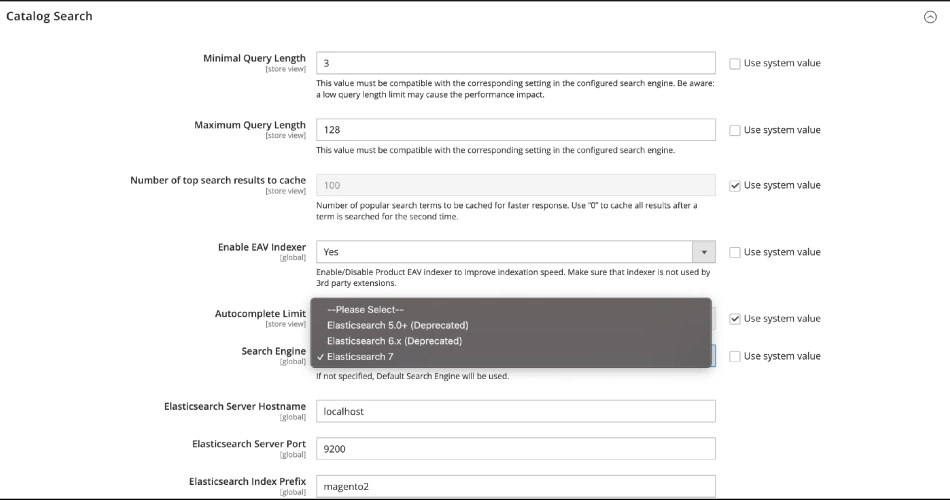
Go to Stores → Configuration → Catalog → Catalog Search.
Under Search Engine, uncheck Use system value and select the Elasticsearch version running on your server. Older versions may appear but should not be used. This step activates Magento 2 Elasticsearch as your store’s search engine.
You can also control basic search behavior here, such as query length limits and cached search results. Keep these settings simple to avoid unnecessary restrictions.
Step 2: Configure the Elasticsearch Connection
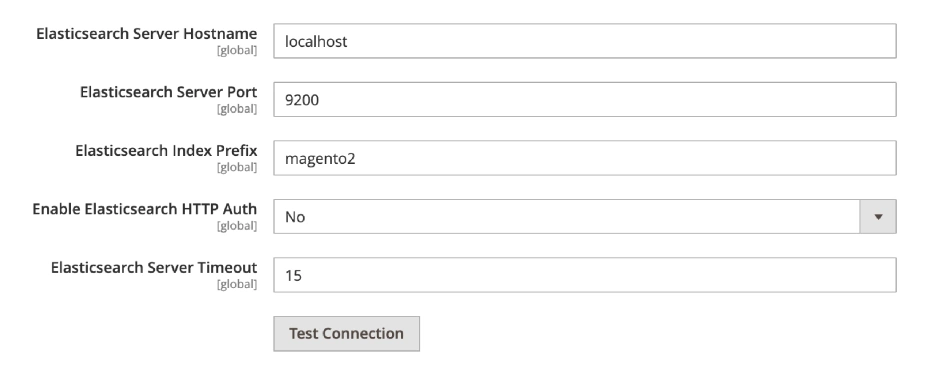
In the same section, set up the connection details:
Server Hostname: Usually localhost if Elasticsearch runs on the same server
Server Port: Default is 9200
Index Prefix: Use a clear name like “magento2” to avoid conflicts
Server Timeout: Keep the default unless your server is slow
If your Elasticsearch setup uses authentication, enable HTTP auth and enter the username and password. These values must match your server configuration.
This step is critical. Even a small typo can cause connection issues and prevent the search from working.
Step 3: Test the Connection
Click Test Connection before saving anything. If the test fails, double-check the host, port, and credentials. Most errors are caused by incorrect ports, firewall blocks, or Elasticsearch not running. Do not proceed until the test passes.
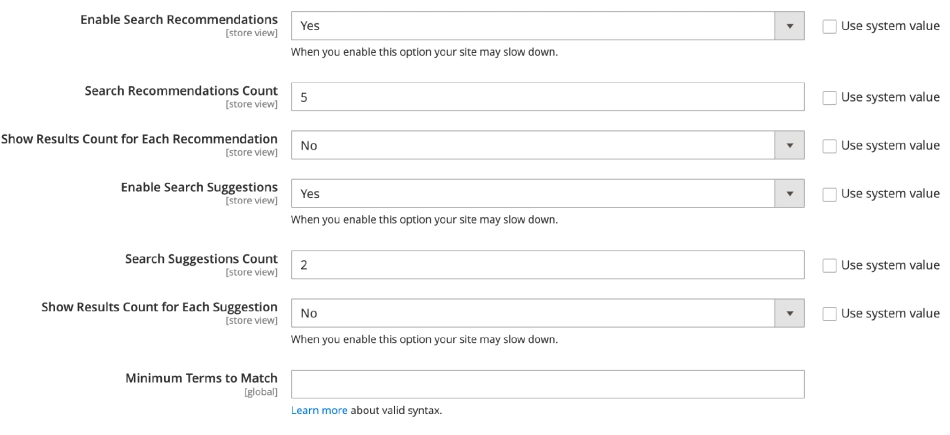
Step 4: Configure Search Suggestions and Recommendations
Scroll down the search enhancement settings.
Enable Search Suggestions to show helpful results as users type
Set a reasonable suggestion count to keep results clean
Enable Search Recommendations only if your server can handle it
These features improve usability, but they should stay balanced. Too many suggestions can slow down the system.
Step 5: Save and Reindex
Click ‘Save Config’ once everything is set. After saving the configuration, Magento needs to rebuild its indexes. This step syncs your product data with Elasticsearch and enables the search.
Start by running the reindex command from your server:
php bin/magento indexer:reindex
This process may take a few minutes, depending on the size of the catalog.
Next, clear the cache to apply the new search settings:
php bin/magento cache:flush
Without clearing the cache, Magento may still use old search data.
Once done, open your store frontend and test the search. Try common keywords, partial product names, and misspelled terms. Results should load fast and feel accurate.
If something looks off, check the Elasticsearch logs located in /var/log/elasticsearch/. These logs help identify connection issues, indexing errors, or memory limits. Once these checks pass, your Magento 2 Elasticsearch setup is complete and ready to handle live traffic.
Magento 2 Elasticsearch Indexing Explained
Indexing is the process of organizing product data into a searchable format. Magento sends this structured data to Elasticsearch, where it is stored for quick access. It allows search results to load in real time.
Magento Indexes Related to Search
Several Magento indexes work together to support search:
Product Attributes: Handles filters like price, color, and size
Category Products: Links products to categories for accurate results
These indexes ensure that Elasticsearch for Magento 2 returns relevant and complete search results.
When is Reindexing Required?
Reindexing is needed when product data changes. It includes adding new products, updating prices, changing attributes, or modifying categories. It is also required when you make changes to the search configuration or install a new extension.
How to Automate Indexing?
Magento supports scheduled indexing using cron jobs. When set to “Update by Schedule,” indexes refresh automatically in the background. This keeps search data up to date without manual intervention and ensures a stable Magento 2 Elasticsearch configuration.
Improving Search Relevance in Magento 2
More than speed, a good search is about showing the right products first. With Magento 2 Elasticsearch, relevance can be fine-tuned to match how real users search.
Adjusting Search Weight
Search weight controls which product fields matter most. You can prioritize product names, SKUs, or key attributes. This ensures the most relevant products appear at the top of the results.
Synonyms Configuration
Synonyms help Magento understand different words with the same meaning. For example, “tee” and “t-shirt.” When configured correctly, Elasticsearch for Magento 2 returns accurate results even when users search differently.
Stopwords and Stemming
Stopwords are common words like “and” or “for” that add no value to the search. Removing them keeps results clean. Stemming helps match word variations, such as singular and plural forms, without extra setup.
Partial and Fuzzy Search
Partial search displays results even when users type incomplete words. Fuzzy search handles spelling mistakes. Together, they prevent failed searches and keep shoppers on track.
Sorting Rules
Sorting rules decide how results are ordered. You can prioritize relevance, price, popularity, or new arrivals. With the right Magento 2 Elasticsearch configuration, sorting feels natural and helps users decide faster.
Fine-tuning these elements turns search into a guided experience instead of a guessing game.
Performance Optimization Tips for Elasticsearch in Magento 2
To achieve faster search, both the server and the indexes need tuning. These tips will help your Magento 2 Elasticsearch setup run smoothly.
Heap Size Tuning
Heap is the memory Elasticsearch uses to run searches and manage indexing. It is recommended to keep it balanced. If it is too low, it will lead to slow searches and crashes. If it is too high, it will strain system memory. A safe rule is to allocate about 50% of RAM, but avoid exceeding 30-32 GB heap to prevent performance drops.
Shards and Replicas Best Practices
Shards split your index into smaller parts, while replicas create copies for safety and speed. For most Magento stores, fewer shards perform better. If there are too many shards, it will create overhead and slow performance down. Use replicas only when you need high availability or load balancing across multiple nodes.
Server Sizing Recommendations
Search performance depends heavily on server resources. For small catalogs, a modest server can work. For mid-to-large-sized stores, plan for:
Enough RAM for heap + system memory
SSD storage for fast reads and writes
Strong CPU for indexing and heavy search traffic
If possible, run Elasticsearch on a separate server to avoid load spikes during peak hours.
Index Optimization
Indexing should be clean and efficient. Avoid indexing unnecessary fields, and keep product attributes structured and relevant. Reindex only when needed, and use scheduled indexing for smoother performance. A well-maintained index keeps Elasticsearch for Magento 2 responsive even as your catalog grows.
Query Performance Tuning
Slow search is often caused by heavy queries, not Elasticsearch itself. Limit the number of filters, reduce autocomplete load, and keep sorting rules simple. Cache top search results when possible. When the Magento 2 Elasticsearch configuration is correct, search will be instant and won’t strain the server.
These optimizations keep Magento search sharp, fast, and dependable, just as customers expect it.
Elasticsearch vs OpenSearch in Magento 2
If you are setting up Elasticsearch for Magento 2, you might be confused about the difference between Elasticsearch and OpenSearch. Both are powerful search engines that support fast catalog searches. Below is a quick comparison table of the two.
Factor
Elasticsearch
OpenSearch
What it is
Original search engine built on Lucene
Community-driven fork of Elasticsearch
Licensing
More restrictive licensing in newer versions
Apache 2.0 (open-source friendly)
Magento support
Supported in older Magento 2.4.x setups
Officially supported in newer Magento versions
Ease of setup
Straightforward, but version matching matters
Smooth for Magento 2.4.6+ environments
Performance
Fast and mature for search workloads
Comparable speed for Magento catalog search
Features
Strong ecosystem and enterprise features
Solid core search and growing feature set
Security options
Varies by version and distribution
Built-in security plugins in many setups
Future-proofing
Depends heavily on version and licensing path
Safer choice for long-term Magento upgrades
Best fit for
Stores already running compatible ES versions
Stores planning stable upgrades and support
If you are using newer Magento releases, OpenSearch is usually the safer and cleaner option. It aligns better with current Adobe Commerce support and avoids version conflicts. Elasticsearch can still work, but only when your Magento version and server setup are perfectly aligned.
Common Magento 2 Elasticsearch Errors and Fixes
There can be some issues with the Magento 2 Elasticsearch configuration. But most errors have simple causes. Once you know what to check, fixes are quick.
Elasticsearch Not Running
Common causes
Elasticsearch service is stopped or crashed
Java is missing or the wrong version is installed
Server ran out of RAM or disk space
Config file has invalid settings
Fixes
Check service status and start it:
sudo systemctl status elasticsearch

sudo systemctl start elasticsearch
Most Magento search issues come down to connectivity, indexing, or server limits. Fix those, and Elasticsearch for Magento 2 will stay stable.
Security Best Practices for Elasticsearch in Magento
Having a secure Magento 2 Elasticsearch configuration will protect your store without affecting search speed.
Restricting Public Access: Never expose Elasticsearch to the public internet. It is not meant to be accessed like a website. Keep it available only to your Magento server or private network.
Firewall Rules: Allow access only from trusted IPs. Block all other inbound traffic to the Elasticsearch port (usually 9200). This single step prevents most attacks before they even start.
Authentication and SSL: Enable authentication so only approved systems can connect. Add SSL/TLS to encrypt traffic between Magento and Elasticsearch. This protects credentials and search data, especially in cloud or multi-server setups.
Backup Strategies: Indexes can be rebuilt, but backups still matter. Use snapshots to safely store Elasticsearch data and quickly restore it after server failures or upgrades. Always test restores, not just backups.
These best practices will ensure your store remains secure while delivering fast search results.
Planning to Implement Elasticsearch in Your Magento Store?
eCommerce site search is a crucial feature. This is the reason why Elasticsearch is important for a Magento 2 store. It leads to a faster and smarter way to discover products. But you need to fine-tune it for the best results. Indexing, relevance settings, and performance tweaks will decide how the search performs.
Avoid common errors, keep indexing healthy, and secure Elasticsearch properly with firewalls, SSL, and access control. These measures will keep your Magento store secure without compromising search speed.
FAQs on Magento 2 Elasticsearch
Q1. How to verify that Elasticsearch is working?
First, check if the Elasticsearch service is running using systemctl status elasticsearch. Next, test the connection with curl http://localhost:9200 and confirm a valid JSON response. In Magento Admin, use the Test Connection option under Catalog Search settings. Finally, search for a product on the storefront to ensure results load fast and accurately.
Q2. Is Elasticsearch faster than MongoDB?
Yes, for search tasks, Elasticsearch is usually faster because it is built for indexing and quick retrieval. MongoDB is a database, so it focuses more on storing and managing data than on advanced search. Elasticsearch handles full-text queries, filters, and suggestions with less delay. For Magento product search, Elasticsearch is the stronger option.
Q3. Is Elasticsearch OLAP or OLTP?
Elasticsearch is neither a traditional OLTP nor an OLAP system. It is a search and analytics engine designed for fast searching, filtering, and aggregations. It performs best when used alongside a transactional database like MySQL. In Magento, it improves search speed and relevance, not core order or payment transactions.