How to Migrate From BigCommerce to Shopify: A Complete Store Migration Guide
Quick Summary
To migrate from BigCommerce to Shopify, start with a comprehensive audit, data backup, and stakeholder notification. It ensures a strong preparation.
Migration involves exporting data from BigCommerce and mapping it accurately to Shopify's structure. Then comes theme development and rigorous functionality testing.
To maintain search rankings, it is essential to implement 301 redirects, update internal links, and submit a new sitemap to Google Search Console.
Careful execution will help you avoid common risks such as data loss, site downtime, and broken integrations.
Shopify has become a go-to choice for many eCommerce brands. Many brands today are migrating from BigCommerce to Shopify to simplify store management and access Shopify’s growing ecosystem. More than 6 million websites use Shopify to handle eCommerce operations.
To ensure a successful migration, you need to follow a checklist. It should include everything from store backup to Shopify setup and data migration.
In this blog, we will provide a comprehensive checklist and share post-migration tips. So, let’s get started!
Why Businesses Migrate From BigCommerce to Shopify
Shopify is often a popular choice for businesses because it’s easy to manage and offers full control over your store.
While some merchants consider a Shopify-to-BigCommerce migration, many growing brands today are moving in the opposite direction because of Shopify’s ease of use, extensive app ecosystem, and scalability.
Here are some top reasons why you should consider migrating to Shopify:
Mobile Responsiveness: Shopify offers better mobile responsiveness features than BigCommerce. It offers a wide range of mobile-responsive themes and supports Accelerated Mobile Pages (AMP) with third-party apps.
Large App Ecosystem: It has a vast app ecosystem, so any task or customization is possible. In the app store, you will find apps for almost any task, such as email marketing, upselling, reviews, etc.
Payment Gateway Integration: It offers a built-in payment system and also allows easy integration with third-party payment gateways.
Advanced Reporting & Analytics: It offers a deep dive into the store data with built-in analytics.
Customization: Shopify generally offers more flexibility and customization options. Their themes are easy to customize based on your preferences.
Methods For Migrating From BigCommerce to Shopify
There are many methods you can use to transfer a BigCommerce store to Shopify, depending on your store’s size and the level of customization required. The best method will depend on your store’s size and the ideal migration timeline.
Manual: This method involves copying data from your BigCommerce store and pasting it into Shopify. It will give you full control over the process, but it’s often time-consuming. If you have a large store, this method may not work well.
Automation: You can use automated migration tools to transfer data from BigCommerce to Shopify. This method is simple and ensures there are no errors in the migration.
CSV File: Another method is using CSV files. You can export your current store’s data in CSV files and import it with Shopify’s built-in tools. This is a great method, but you may need to tweak the settings a little bit.
Design & Theme Migration: This includes recreating the visual elements and components of your BigCommerce store on Shopify. It will keep your user experience intact. However, this method will be time-consuming and may require changes in features.
Hire a Professional: If you want to ensure safe migration of data without disrupting your store operations, it’s best to work with professionals. They can transfer data and customize the new store to your needs.
For large stores, it’s recommended to work with professionals. Partnering with a Shopify migration services provider will help you migrate the data on time and ensure a functional storefront.
Pre-Migration Planning
Without proper planning, the BigCommerce to Shopify migration can lead to data loss, SEO ranking drops, broken integrations, or temporary downtime. Here’s what you should do before starting the migration:
Conduct an Audit of the Current Store
Explore your current BigCommerce store and perform an in-depth audit to document everything. Here are some important things to note down:
Number of SKUs
Product collections and categories
Customer accounts
Order history
Third-party integrations
URL structure
Custom functionalities
Take a Backup
To safeguard data, it’s best to take a backup. In case of a data loss, you can easily recover it. Take a backup of the following things:
Product data
Customer accounts
Order History
Theme files
Media files
Inform Customers and Stakeholders
It’s important to keep your customers and stakeholders informed about the upcoming store changes and migration. So in case of a mishap, they will support you.
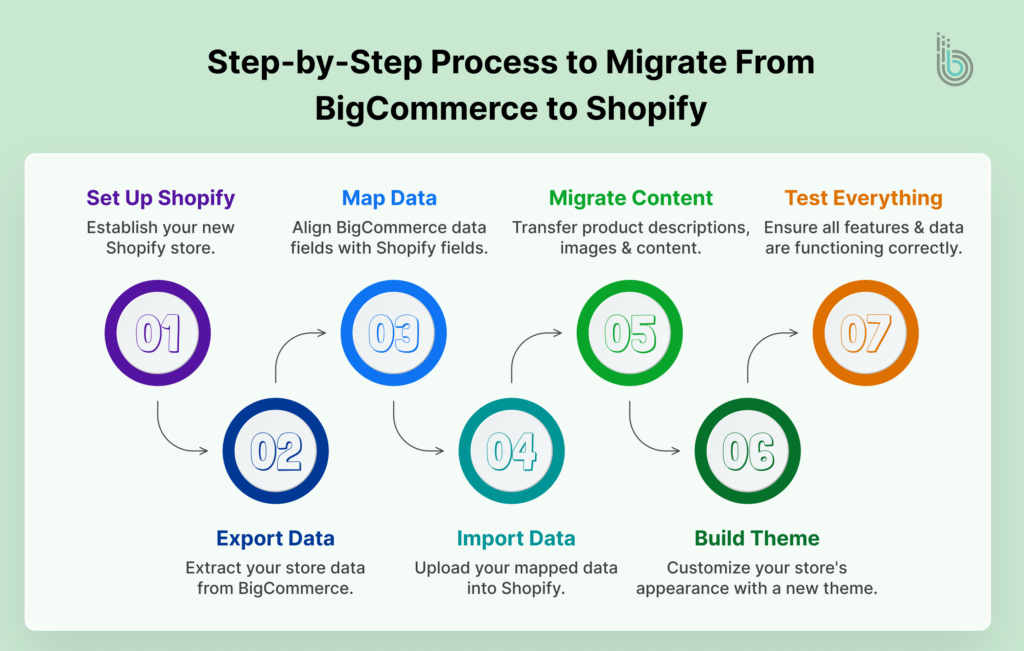
Step-by-Step Process to Migrate from BigCommerce to Shopify Migration
Once you complete pre-planning, you can begin the BigCommerce to Shopify migration process. Let’s go through the process of BigCommerce to Shopify migration step by step:
1. Set Up the Shopify Store
The first step is to create a Shopify store to migrate the data. If you don’t have an account, sign up and choose a plan that best suits your business needs. Then, choose a theme from Shopify’s built-in themes or opt for a custom one.
Now, configure basic things like store name, currency, shipping, etc. Keep the URL structure the same as your BigCommerce store to avoid a major effect on SEO rankings.
2. Export the Store Data
BigCommerce offers export data options in a CSV format. So, start exporting various types of data, such as product, customer, and order data.
3. Map the Data
Shopify’s data structure is different from BigCommerce’s. Some fields may be mapped directly, and some may require tweaks.
Here are some data cleanup tasks you might need to perform:
Set BigCommerce product options as Shopify variants
Set a clear pattern for SKUs and their naming
Ensure HTML formatting of product descriptions is organized
Validate image URLs
Set a flow to migrate categories into Shopify collections
Data mapping is a critical step. A single mistake can lead to product duplication or missing product information.
4. Import Data
After data cleanup, go for importing. You have three options to do that: choose the best method based on your store’s size and complexity:
Manual Import: Import the CSV file directly into the system. If the cleanup is done properly, data fields will be routed automatically. This method is suitable for small stores or simple product catalogs.
Third-Party Apps: When you have complex data or want to work with multiple datasets, using third-party tools is a good option.
API Migration: If you want to set custom rules for data migration and routing, the API-based approach is the best.
5. Migrate Content
If your business relies on content marketing, pages and posts are your main assets. Migrate them carefully, as they are your major revenue drivers. Here’s what to do:
Develop a blog structure in the Shopify store
Transfer blogs and pages with meta title, meta description, and images
Preserve the URL structure
Add the updated internal links
Implement 301 redirects
6. Build the Theme
Now is the time to develop your store’s user experience. If the existing design is working well and follows eCommerce UX best practices, you can consider replicating the same experience in the new store. And if it needs major changes, consult with a Shopify eCommerce development service provider to achieve the best results.
7. Test Everything
Remember: prevention is always better than a cure. You must run rigorous testing of your new store before the launch. This testing process helps prevent traffic loss, checkout errors, and revenue disruptions. Check the following things:
Product Catalogs: Review products and their SKUs in the new store to verify they have been transferred correctly. If there is a large product catalog, check products randomly.
Inventory Level: Check whether the inventory management system is functioning properly. Ensure that the inventory shown in the tool matches the actual stock.
Purchase Transactions: Create a sample order using a guest profile to verify that the checkout flow works smoothly.
Coupons and Discounts: Check whether coupons and discounts are applied correctly on the checkout page. Also, look for stackable coupons if available.
Broken Links: Use an SEO audit tool like Screaming Frog to identify 404 links.
Mobile Responsiveness: Test the website across different mobile devices and screen sizes to ensure full responsiveness. Mobile users account for the majority of eCommerce traffic and sales, so mobile responsiveness is necessary.
How to Preserve SEO During the BigCommerce to Shopify Migration?
SEO is one of the most critical elements to consider when you move from BigCommerce to Shopify. Neglecting this element can lead to a decline in organic traffic and lost revenue. So, you need to follow an eCommerce SEO website migration checklist to prevent a loss in rankings.
The below-mentioned are some top things to do:
Define a Redirection Plan
To direct search engine crawlers to your store’s new address, redirects are necessary. So, implement a 301 HTTP status to every URL and test it multiple times.
Ensure proper URL mapping when the URL structure changes.
Use Internal Linking
Internal links keep your pages connected and help users/crawlers navigate through relevant content easily. However, during the migration, existing internal links might break. So, conduct an SEO audit after the migration and implement internal linking in a relevant way.
Submit an Updated Sitemap
Create a new sitemap with updated URLs and submit it to the Google Search Console. This will indicate to Google that there have been some changes on the website.
Once the sitemap is submitted, look for these issues:
Not found (404)
Soft 404
Page with redirect
Duplicate without a user-selected canonical
Google chose a different canonical than the user
Crawled – currently not indexed
Discovered – currently not indexed
Blocked by robots.txt
Some volatility is normal in organic traffic after the migration. However, if there are significant drops, redirection issues, or indexing issues might be the cause.
If you want to ensure higher rankings and conversions for your store, refer to our guide on Shopify SEO strategies.
Mitigating the Risks of Migrating From BigCommerce to Shopify
eCommerce migration possesses its own risks. Some stores may experience data loss, increased downtime, and a drop in organic traffic. Any of these consequences can disrupt your business. To avoid that, pre-planning is necessary.
Here are some top tactics to use for different scenarios:
Data Loss
If there is data corruption, you might need to face many challenges. Customers’ order history can disappear, inventory levels can be inaccurate, and even checkout failures can happen. It can lead to customer distrust and lost sales.
Key actions:
Take a backup of everything, from product feeds to past orders and customers’ lists.
Inform your customers about the migration and password resets.
SEO Rankings Drop
Migration can also affect your website’s search engine visibility, resulting in a drop in organic traffic.
Key actions:
Ensure 301 redirects for every page
Transfer meta titles, meta descriptions, and canonical tags
Submit a new sitemap in Google Search Console
Conduct an SEO audit before the launch
Confusing User Experience
Customer experience is the modern currency for eCommerce stores. More than 30% of consumers say they will stop purchasing from a brand they love after just one bad experience.
Non-functional filters, missing product descriptions, or a slow checkout process can frustrate customers. So, there is a higher chance of customer churn.
Key actions:
Perform functional testing on every customer touchpoint
Place sample orders with different payment and shipping methods
Consider phased launches of the store
Integration Issues
If you use third-party tools for accounting, CRM, or shipping, they must be well integrated and work smoothly. A minor mistake in the integration can disrupt store operations.
Key actions:
Check the compatibility of current systems and tools with Shopify
Test integrations in a staging website before the launch
Downtime
No store owner would want to keep the business shut. But some downtime might be unavoidable to push the staging environment to the live site.
Key actions:
Consider performing the migration during low-demand periods
Go for a phased migration plan with dates determined for every phase
Define the downtime hours and inform your customers in advance
Post-Launch Checklist
Once your Shopify store is live and open for customers, it doesn’t mean you should stop testing. You might make changes to the website, update functionalities, or even add new features. All these things can cause conflicts in your current code, so testing is an ongoing process.
After the launch, put your store in validation mode. Then, follow this list:
Check that collections, filters, and sorting are working properly
Use the bogus gateway option to simulate different transactions
Verify conversion events are being tracked
Also, keep an eye on your top-performing pages and regularly monitor their organic traffic.
Final Thoughts
You might hear stories of failed migrations. There are two major reasons for it: either the migration was rushed, or it was treated as a simple content transfer. You need to treat this migration as a complete rebuild of your store. If any mistakes occur, you might lose important data and ongoing revenue.
To ensure a smooth migration and a functional Shopify store, you need to build a solid foundation. The foundation involves planning, meticulous testing, a launch strategy, and post-migration maintenance.
For the best results, you can rely on a professional to migrate from BigCommerce to Shopify. At BrainSpate, we are all about helping eCommerce brands thrive in the market. Our team has successfully migrated stores of multiple clients and possesses expertise in the Shopify platform. Reach out to us, and you won’t need to worry about the migration anymore!
FAQs
Q1. Is there a risk of losing important data?
If you are following a poor migration plan, yes, there is a risk of losing important data. It’s best to work with eCommerce migration professionals to ensure complete safety.
Q2. How long does it take to migrate my online store from BigCommerce to Shopify?
The timeline for migrating your store from BigCommerce to Shopify will depend on the store’s size and complexity. If the setup is simple, it can be done in 2 to 6 weeks. However, if there is an enterprise-grade store with custom features, the migration can take 8 to 12 weeks.
Q3. Will my redirects work after the migration?
Redirects will work after the eCommerce migration only if they are properly planned and executed. Consider creating a redirection plan in advance to avoid broken URLs.
Q4. Can I migrate my eCommerce store from BigCommerce to Shopify without losing SEO?
With proper planning, you can migrate your online store to Shopify without significant SEO loss. Implement 301 redirects, preserve URL structures when possible, and submit a new sitemap to Google Search Console.
Q5. Can BigCommerce integrate with Shopify?
While there is no native integration between BigCommerce and Shopify, you can use third-party automation tools. Tools like Zapier and Make can help you with inventory synchronization, product management, and customer database management.
Q6. How do I import data into Shopify?
To import data into Shopify, go to the Products section in the Shopify admin dashboard. Click Import and Add File to use the CSV file. Consider using Shopify’s sample CSV templates for formatting and data mapping.