QuickBooks and Shopify Integration: Better Financial Management
Quick Summary
QuickBooks and Shopify integration automate accounting workflows, eliminating manual data entry while keeping financial records accurate and up-to-date.
Syncing Shopify with QuickBooks provides real-time financial insights, helping merchants track sales performance, cash flow, and business growth.
A strong Shopify QuickBooks integration improves inventory management, prevents stock errors, and simplifies tax reporting for eCommerce businesses.
Following best practices such as data mapping, reconciliation, and testing ensures a stable, accurate QuickBooks integration with Shopify.
Manual data entry consumes up to 30% of a business’s time, and accounting errors can cost thousands annually. That’s a risk you can’t afford if you run a Shopify store. But don’t worry; the QuickBooks and Shopify integration might just be the answer you are looking for.
QuickBooks is one of the most popular accounting platforms for small businesses. When we combine it with Shopify, it creates a powerful system for managing eCommerce sales and financial records in one place.
In this blog, we will see how Shopify experts connect the storefront and bookkeeping to improve accuracy and free up time for growth-focused activities. Let’s start.
Benefits of QuickBooks and Shopify Integration
As a Shopify store grows, financial data accumulates, including order information, refunds, taxes, payouts, and inventory updates. Managing all of this separately in an accounting system can slow operations and increase the risk of errors. This is where integrating QuickBooks and Shopify becomes essential for maintaining accurate, efficient financial management.
Below is how Shopify integration with QuickBooks improves day-to-day eCommerce operations:
Automated Data Synchronization
When Shopify sales data automatically flows into QuickBooks, order details, payments, refunds, and customer information sync between the two platforms. It removes the need for manual entry and ensures your accounting records always match your store activity.
Reduced Accounting Errors
Manual bookkeeping often leads to duplicate entries, incorrect tax calculations, or missing transactions. A proper Shopify QuickBooks integration automatically transfers transaction data from Shopify to QuickBooks, greatly improving financial accuracy.
Accurate Financial Reporting
When you sync Shopify with QuickBooks, your financial reports reflect your store’s actual performance. Store owners can easily generate profit and loss reports, balance sheets, and cash flow statements based on actual eCommerce data.
Better Inventory Management
One of the most practical benefits of connecting Shopify to QuickBooks is improved inventory management. Product quantities update across systems automatically, helping prevent overselling, stock mismatches, and operational disruptions.
Simplified Tax Preparation
With QuickBooks integration with Shopify, sales transactions and tax details are recorded automatically. This keeps tax records organized throughout the year and makes filing far less stressful during tax season.
Significant Time Savings
Many store owners spend hours each week updating orders and reconciling accounts. When businesses integrate Shopify with QuickBooks, bookkeeping tasks happen automatically, saving valuable time that can be invested in growth and marketing.
Real-Time Financial Insights
With Shopify and QuickBooks connected, merchants can monitor revenue, track expenses, and review cash flow instantly.
Stronger eCommerce Fulfilment Operations
Accurate financial data and synced inventory also support smoother eCommerce fulfilment. When order and stock information stays consistent across systems, businesses can process orders faster and maintain better operational efficiency.
In short, the QuickBooks and Shopify integration connects your store operations to your accounting system. It creates a reliable financial workflow that improves accuracy, saves time, and supports sustainable eCommerce growth.
Different Ways to Integrate Shopify with QuickBooks
There are two main approaches to achieving this integration, each tailored to different business needs. Businesses typically integrate Shopify with QuickBooks using either direct connectors or third-party integration tools.
Direct connectors provide a simple, user-friendly way to link the two platforms, while third-party integration tools offer enhanced flexibility and customization for more complex workflows.
Direct Integrations/Connectors
Many apps available in the Shopify App Storeor QuickBooks App Store offer direct integrations between the two platforms. These tools are specifically designed to facilitate seamless data syncing for sales, inventory, and customer information.
Popular tools include A2X, Webgility, Zapier, and QuickBooks Online Global. These tools provide a straightforward way to connect your Shopify store and QuickBooks account, often requiring minimal setup.
Third-Party Integration Platforms
Platforms like Zapier, A2X, or Webgility go beyond direct connections by offering additional customization and automation features. These tools are ideal for businesses with more complex workflows or those managing multiple sales channels, allowing them to tailor integrations to their specific needs.
Understanding these methods can help you choose the best solution for your business, ensuring smooth and accurate synchronization of sales, inventory, and financial data.
How to Connect Shopify with QuickBooks Online
QuickBooks Online Global is a reliable, widely used integration app for syncing Shopify and QuickBooks.
Step 1: Install the App
To get started, visit the Shopify App Store and search for “QuickBooks Online Global”. Once you find the app, click the Install button. Follow the on-screen prompts to link the app to your Shopify store, ensuring the integration process begins smoothly.
Step 2: Authenticate Accounts
Log in to your QuickBooks Online account when prompted and authorize the app to access your data. Grant the necessary permissions to enable seamless syncing between Shopify and QuickBooks.
Step 3: Configure Settings
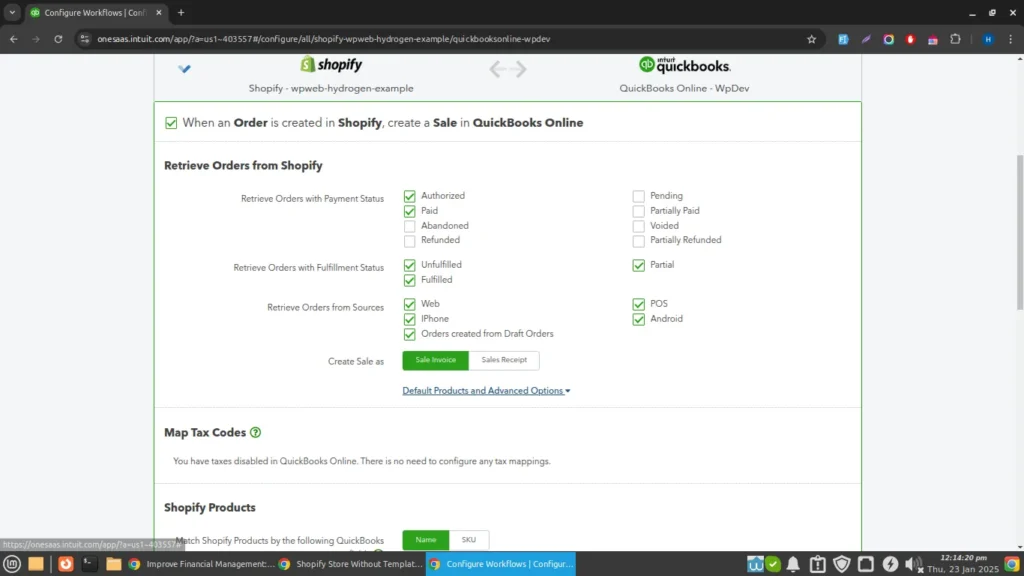
Map your Shopify sales channels to corresponding QuickBooks accounts (e.g., revenue, expenses, and tax accounts).
Set preferences for syncing order details, customer information, and payment methods.
Step 4: Sync Data
Perform a test sync to ensure data flows correctly. Verify that sales, orders, and inventory updates appear accurately in QuickBooks.
Step 5: Monitor and Troubleshoot
Regularly review synced data to confirm accuracy.
Common issues, like mismatched tax rates or duplicate entries, can often be resolved by reviewing app settings or updating account mappings.
If the process looks complex, consider partnering with a Shopify integration company. The experts will address the technical requirements and integrate QuickBooks to maximize efficiency.
Best Practices for QuickBooks and Shopify Integration
Setting up QuickBooks and Shopify integration is only the first step. To keep your accounting accurate and your store running smoothly, you need to manage the connection properly. Below are proven practices that can help you avoid common issues and get the most value from your Shopify QuickBooks integration.
Data Mapping
Proper data mapping is essential for a reliable Shopify QuickBooks integration. It ensures that the information moving from Shopify to QuickBooks is recorded in the right accounts.
When you connect Shopify to QuickBooks, make sure:
Sales revenue is mapped to the correct income account.
Taxes are assigned to the right tax codes to avoid reporting issues.
Discounts are tracked separately so you can evaluate promotions.
Shipping charges are mapped to the proper accounts.
Spending time on this step during setup prevents future accounting confusion.
Regular Reconciliation
Even with automation, it is important to verify that both systems are in sync. Regular reconciliation ensures your Shopify QuickBooks online integration stays accurate.
Schedule checks weekly or monthly to:
Confirm that all sales and expenses are recorded properly.
Review payouts and transaction totals.
Identify duplicate or missing entries.
Verify inventory numbers.
These checks keep your books clean and prevent problems during audits or tax filing.
Inventory Management
When businesses sync Shopify with QuickBooks, inventory tracking becomes easier, but it still needs proper attention.
To maintain strong inventory management:
Keep product SKUs and descriptions consistent across both systems.
Update stock levels regularly in Shopify so QuickBooks reflects the correct data.
Use low-stock alerts to avoid overselling.
Conduct periodic physical inventory checks to confirm accuracy.
Good inventory practices help maintain smooth operations and support efficient eCommerce fulfilment.
Handling Refunds and Returns
Returns are common in eCommerce, but they must be recorded correctly to keep financial records accurate.
When connecting Shopify to QuickBooks, follow these steps:
Record refunds or returns in Shopify so the data syncs automatically.
Use credit memos or refund receipts in QuickBooks to adjust revenue.
Track return transactions separately to analyze return patterns.
This ensures your revenue reports stay accurate and easy to review.
Testing and Monitoring
After you integrate Shopify with QuickBooks, testing is essential to make sure everything works correctly.
Start by:
Placing test orders to confirm data syncs properly from Shopify to QuickBooks.
Checking sales totals, tax calculations, and inventory updates.
Review the error logs from your integration tool if something doesn’t sync correctly.
Ongoing monitoring is just as important. Updates to Shopify, QuickBooks, or integration apps can sometimes affect syncing, so regular checks help maintain a stable system.
By following these best practices, businesses can get the full value from QuickBooks integration with Shopify. Proper setup, regular checks, and careful handling of inventory and returns help with financial data accuracy while supporting smooth eCommerce operations.
Let’s Summarize
Managing financial data alongside daily store operations gets overwhelming for Shopify businesses. There are multiple orders, taxes, refunds, payouts, and inventory updates that generate a constant stream of data. Without automation, all the information has to be entered manually, which will take time. It will also increase the chance of costly mistakes.
A QuickBooks and Shopify integration solves this challenge by automatically syncing sales data, financial transactions, and inventory information. This allows store owners to maintain accurate books, simplify tax preparation, and gain real-time insights into business performance.
You may use direct connectors or advanced integration tools; the key is correct setup and monitoring. If you need professional help with the implementation, get in touch with us today!
FAQs for QuickBooks and Shopify Integration
Q1. What are the benefits of QuickBooks and Shopify integration?
Integration ensures real-time financial visibility, accurate cash flow monitoring, and simplified tax reporting. It also helps maintain clean and accurate financial data, reducing the risk of costly errors.
Q2. Does the integration help with inventory management?
It synchronizes inventory levels between Shopify and QuickBooks, preventing overselling or stockouts. It ensures real-time updates, helping businesses manage stock efficiently and fulfill orders promptly.
Q3. How does the integration handle tax reporting?
The integration organizes sales data accurately and tracks tax details, ensuring compliance with tax regulations. This makes tax preparation less stressful and more efficient.
Q4. Can I manage returns and refunds through the integration?
Yes, returns and refunds are handled by syncing adjustments between Shopify and QuickBooks. You can track credit memos or refunds separately for better financial clarity and customer satisfaction.