
Quick Summary
- Shopify apps are custom web applications that extend store functionality using APIs, enabling merchants to manage products, orders, and customer data more efficiently.
- There are three types of Shopify apps: public, custom, and embedded, each suited for different needs, from broader distribution to store-specific solutions.
- The development process includes defining goals, setting up a Shopify Partner account, choosing a tech stack, building features, testing thoroughly, and submitting to the App Store.
- Building a successful Shopify app requires strong focus on performance, security, scalability, and compliance with Shopify guidelines, along with ongoing maintenance and updates.
Shopify is one of the most popular eCommerce platforms for building and scaling online stores. Beyond its ease of use, it offers a powerful app ecosystem that enables developers to extend the store’s functionality with custom solutions. The Shopify App Store has more than 16,000 apps to extend Shopify’s capabilities and perform various tasks effectively.
With the app store, Shopify has now become a whole ecosystem. Numerous developers and agencies contribute to the app store and earn through subscriptions. If you’re looking to develop a Shopify app from scratch or build a custom solution for merchants, explore our Shopify app development services and follow this guide to understand the complete development process.
What is a Shopify App?
A Shopify app is a web application that integrates with a Shopify store to extend its functionality beyond built-in features. These apps run on merchants’ servers or a serverless platform.
By using different secure APIs, Shopify apps connect and interact with merchants’ stores. When a merchant installs your app in their store, they grant permission to access a specific set of data, such as products, customers, and orders.
There are three main types of Shopify apps you can build:
- Public Apps: Public apps are listed on the Shopify App Store and can be installed by any merchant. They are built for a wider audience and usually follow Shopify’s approval guidelines.
- Custom Apps: These are private apps, developed for a single Shopify store to meet specific business needs. They are not listed on the App Store.
- Embedded Apps: These apps run within the Shopify admin dashboard, providing merchants with a seamless, native-like experience. They are usually built using Shopify App Bridge to connect your app with the Shopify interface.
How Shopify Apps Work?
Shopify apps use an OAuth 2.0 authentication flow to request permission from merchants during installation. Once they grant the permission, Shopify will send access tokens to the app. Then, your app can connect with the merchant’s store via API calls.
With App Bridge and Polaris, you can add screens in the merchant’s admin dashboard. And theme app extensions help you add features to the merchant’s store.
You can use both REST and GraphQL APIs to connect your app with Shopify. GraphQL lets you request specific data in a single query, while the appropriate API choice depends on your app’s requirements. Shopify SDKs can further simplify app development by providing tools for API integration and authentication.
Shopify App Architecture (Simplified Overview)
Shopify’s app architecture is modern and headless, with the app running on your infrastructure and connecting to the store via APIs and webhooks.
A Shopify app typically consists of four main components:
- Backend (business logic & APIs)
- Frontend (UI inside Shopify admin)
- Database (data storage)
- APIs (communication layer)
These descriptions will help you understand how each component is utilized by developers for different purposes.
Backend
The backend of a Shopify app handles crucial tasks such as business logic, data processing, and API communication.
Below are the most popular technologies used to develop a Shopify app’s backend:
- Ruby on Rails: It’s an excellent choice for creating a custom Shopify app. Many native Shopify tools and libraries support Rails, so it’s a go-to choice.
- Node.js (With ExpressJS and NestJS): Node.js is a suitable technology as it uses an event-driven architecture. So, concurrent connections can be handled easily. Many developers use it with ExpressJS or NestJS to maintain a clean and scalable codebase.
- Serverless Architecture: For webhook processing, small API endpoints, and event-driven tasks, you can also consider a serverless architecture. It’s a cost-effective approach, as you only pay for the computer time you use. AWS Lambda and Google Cloud Functions are good options.
Frontend
The frontend is the face of the app that merchants see. A modern, engaging, and responsive UI is essential to ensure high adoption of the app.
You can consider using these technologies for the frontend:
- React With Polaris: Polaris is a React component library that provides readymade components to match the look of Shopify Admin. With it, you can build a native-like app experience.
- Vue.js and Svelte: React with Polaris is the most common choice among developers, yet some also opt for performance-efficient frameworks like Vue.js and Svelte. If you use any of them, you will need to manually replicate the Shopify admin’s design.
- Shopify CLI and App Bridge: No matter which tech stack you choose, Shopify CLI and App Bridge will be the most important tools in your Shopify app development journey. Shopify CLI helps in app development, extension creation, testing, and deployment. App Bridge helps your embedded apps communicate seamlessly with the Shopify admin.
Database
There are various database options available, but your selection should be based on the type and volume of data.
The following are some reliable choices:
- PostgreSQL: It’s a robust, open source database, famous for storing structured data like store details, user settings, and product metadata.
- MySQL: It’s the most used relational database. All major cloud services and development frameworks support MySQL.
- NoSQL Databases: When you need to store unstructured or semi-structured data, NoSQL databases such as MongoDB and DynamoDB are helpful. They are also useful for high-speed writes like analytics and logging.
APIs
APIs play an important role in interacting with the Shopify platform. Shopify supports both REST and GraphQL APIs. GraphQL is a better choice because it lets you extract specific data in a single request. REST API is a reliable option for endpoints that are not supported by GraphQL.
How to Build a Shopify App from Scratch (Step-by-Step Overview)
To build a functional and efficient Shopify app, you need to plan carefully. A well-thought-out strategy will help you stand out in a crowded contributor ecosystem.
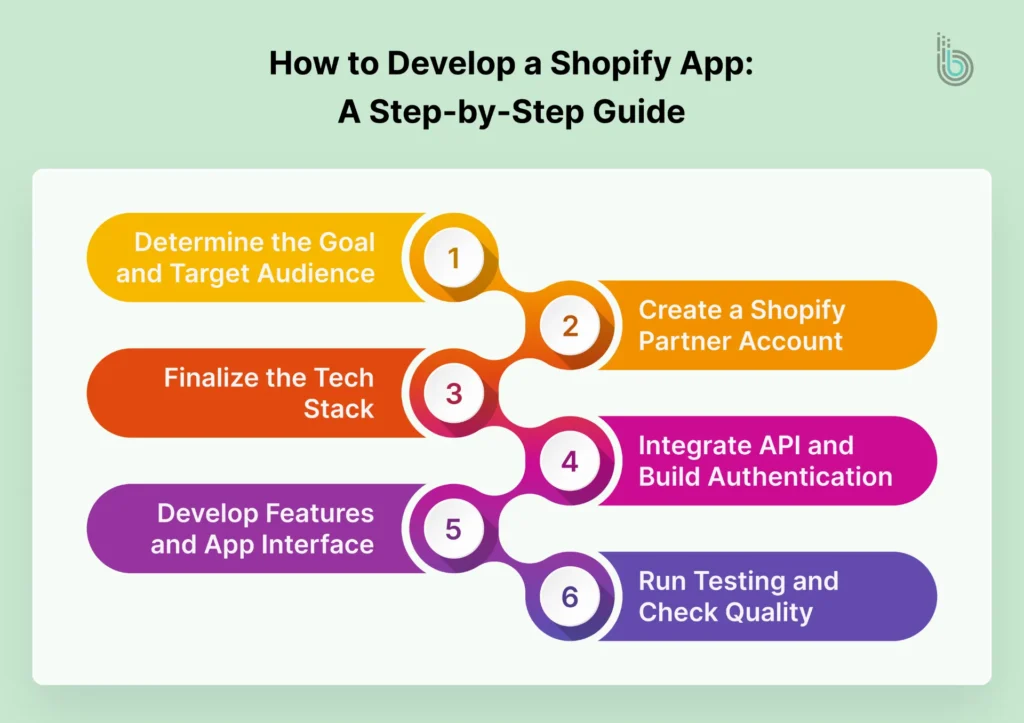
Here’s a simplified overview of the Shopify app development process:
- Define the problem and target users
- Set up a Shopify Partner account
- Choose your tech stack
- Build and authenticate your app
- Test and optimize performance
- Submit to the Shopify App Store
Here is a step-by-step, comprehensive process to develop a Shopify app:
1. Determine the Goal and Target Audience
Let’s first start with the basics. You need to figure out which problem you want to solve that merchants usually face, and what your ideal customer base will be.
Once you have identified a problem to solve, find solutions available in the market and find gaps. This analysis will help you prepare a list of features you need.
If possible, connect with Shopify business owners and understand their daily workflow and day-to-day challenges. It will help you in creating a realistic solution.
2. Create a Shopify Partner Account
Now, register for a Shopify Partner account to use development tools and the app submission portal. Additionally, you can create unlimited Shopify stores to test your app in different scenarios.
Shopify’s advanced development tools will help you create environments similar to merchants’ admin dashboards. You can utilize these environments to test app workflows and API connections. This way, you can find and resolve issues before launching the app.
3. Finalize the Tech Stack
Your app’s tech stack will decide its performance and scalability. Since Shopify supports a headless setup for app development, you can combine different technologies and frameworks to achieve the best results.
The most common tech stack among app developers is React with Polaris for the frontend and Node.js for the backend.
4. Integrate API and Build Authentication
Authentication is very important for your app’s security. Use OAuth 2.0 for merchant installation flows to validate installation requests and exchange authorization codes for access tokens. Also, enable HMAC validation for OAuth requests to ensure they are made by Shopify, protecting your app from unauthorized installations.
If you are creating an embedded app, remember that Shopify requires app developers to use session token authentication rather than traditional cookies for embedded apps. The session token must be processed with every request and validated on the server to ensure secure merchant sessions. Access tokens must be stored on the backend with encrypted storage, so it never gets exposed in client-side code or URLs.
To access store data and functionality, connect the Shopify Admin API to the Storefront API. The Admin API will handle products, orders, and store settings, and the storefront API will manage customer interactions.
For data protection, you must follow Shopify security best practices to comply with regulations like PCI DSS and GDPR.
5. Develop Features and App Interface
Now, start building the core features of your application. Consider building an MVP (Minimum Viable Product) first to get a sense, and then proceed with other features. Use efficient logging and error-tracking tools, such as LogRocket, to identify and resolve issues.
Use Shopify Polaris in React to design a native-like app interface. Polaris will offer you prebuilt design components that match Shopify’s design patterns, saving you time on design and development.
6. Run Testing and Check Quality
The most important part of ensuring a successful product is testing. So, perform comprehensive functional testing of all features across different scenarios. Test the app by creating different store types and using various data types and structures. Check with all the Shopify subscription plans to ensure compatibility.
Here are some important testing methods to try:
- Integration Testing: Ensure that your app interacts properly with Shopify APIs, webhooks, and third-party services.
- Performance Testing: Test the application under heavy load to verify it works properly. Use bulk data and realistic merchant usage patterns to see the accuracy.
- Security Testing: Start by validating all OAuth flows and checking if proper HMAC verification is being used. Look for access tokens and user inputs to reduce the risk of injection attacks.
How to Submit Your App to the Shopify App Store?
To submit your application for review in the Shopify App Store, it’s recommended that you check that it meets the platform’s requirements and guidelines. Also, you need to create a Shopify partner account and comply with the Partner Program Agreement.
Here are some of the most important things you need to keep in mind:
- Maintain Compatibility With the Core Workflows: Shopify requires all apps to work within its core workflows, not overwrite them. So, your app should be compatible with various workflows, such as inventory management, customer management, and marketing.
- Use Shopify’s Billing Options for Pricing: To define your app’s pricing plans, you must use Managed Pricing and the Shopify Billing API.
- Ensure Secure Communication Protocols: Use secure protocols for communication, such as TLS/SSL certificates.
- Utilize Access Scopes Properly: The Shopify team might ask you for proof that the access scope you are asking for from merchants is actually required for the app to work.
- Maintain a Clear Branding: The name and icon of your app should be consistent from store listing to in-app experience.
- Create a Detailed Listing: Your app’s listing should provide merchants with in-depth information, including images and descriptions.
- Add Comprehensive Documents: To help merchants use the app effectively, add detailed app setup instructions and demo videos. Also, create support documentation, privacy policy, and terms of service.
Once you have checked all these points, your app is ready for submission.
? Note: The Shopify team may take up to 7 days to review your app after submission. And they might also suggest changes before approval, so keep a buffer time of at least 2-3 weeks before the launch date.
Common Challenges in Shopify App Development
Shopify app development can be rewarding, but it also comes with technical and operational challenges. You need to manage many things while focusing on one big goal. Below are some top challenges you need to overcome:
API Limitations
Developers and agencies usually face API limitation challenges with rate limits and versioning requirements.
Shopify uses a leaky bucket algorithm to prevent sudden heavy loads on the platform. So, it sets a specific capacity for each app, and if your app exceeds that, it will lead to a 429 “Too Many Requests” error.
Additionally, the platform releases a new API version every quarter, and older versions get deprecated after one year of release. So, you need to update the API version at multiple intervals to avoid issues.
Approval Rejection
There can be delays in app launch due to changes suggested by the Shopify team after review. You can resubmit the application after the necessary changes are made.
Here are some common areas you might need to take care of:
- OAuth: The app should not redirect the merchant to an external page when they add the application to their store. Once they add it, the OAuth and permissions flow should start immediately.
- Leftover Code: Once the merchant uninstalls the app, any code added in the theme or .liquid file must be removed.
- Pricing Transparency: Shopify requires developers to define the pricing plans clearly. If an app starts charging customers during the free trial, it will get rejected.
- UI/UX: The app must follow Shopify’s Polaris design system to provide merchants with a consistent user experience of the Shopify admin.
- Incomplete Listing: Generic app description, missing screenshots, broken support links, or incomplete demo instructions can halt the approval.
Scaling Issues
Creating and maintaining a scalable infrastructure is a huge challenge. Shopify occasionally adds new apps to the spotlight, so merchants can discover them. This can increase your app’s user base, and you need to be prepared for that.
Additionally, your app may encounter technical challenges during high-demand periods such as Black Friday. You need to plan and prepare your application to handle large volumes of traffic and queries. So, ensure proper queuing, use background jobs efficiently, and check whether your database can handle load spikes.
UX Complexity
Designing for edge cases such as failed API calls, empty states, and permission restrictions is essential to avoid a poor user experience.
Consider these tips to ensure your app complies with UX requirements:
- Avoid the Clutter: You should limit the use of popups, banners, and conflicting messages that slow down the merchant’s store.
- Implement Asynchronous Data Updates: Your app must handle the data updates asynchronously with webhooks. If there is any change in data, it should be reflected instantly.
- Don’t Neglect Edge Cases: You must consider designing for edge cases like failed API calls, empty states, and permission restrictions. Neglecting them can result in unexpected UX disruptions.
Best Practices for Successful Shopify Apps
For a successful app launch and excellent user experience, you must follow these best practices:
- Quick Installation and Setup: Your app’s installation process should not be complicated or time-consuming. It should be installed instantly, and proper onboarding steps should be implemented, like authentication for permission and sign-up.
- User Interface: When designing your app’s user interface, use Polaris with React and follow App Design Guidelines to avoid issues or rejections from the Shopify team.
- Performance Metrics: Test your app’s performance score on Lighthouse. Aim for a high Lighthouse performance score (ideally above 80) to ensure fast and responsive app performance.
- Add a Video: In the app listing, consider adding a short video along with the detailed product description and installation instructions. The video will help you showcase the app’s impact.
- Create a Multilingual App: Non-English markets are also considerable in size, so build a multilingual app. Also, list all the languages your app supports in the description.
- Categories and Tags: When choosing categories and tags for your app, be mindful and select those that truly reflect your app’s purpose. Accurate selection will help you with better discovery and subscribers. Shopify lets you choose up to 25 structured features per category, so that merchants can compare features.
- Merchant Eligibility Criteria: Setting up merchant eligibility criteria will help you avoid unnecessary uninstalls and negative reviews. When submitting your app, you can define this criteria by specifying store types (online store or POS) and geography criteria such as country, currency, etc.
Real Examples of Shopify Apps
To help you build a reliable Shopify app and research-backed information, we have listed some of the most successful apps on the Shopify App Store. This will offer you crucial information for different app markets and the reasons behind a particular app’s success.
Kaching Bundles App & Upsells
Bundle and discount apps have been trending in recent years. It helps merchants run attractive sales like “Buy two, get 15% off” or “Buy any 3 items at $999”. Kaching Bundles App & Upsells has earned a great reputation on the app store for this category.
These kinds of apps use theme app extensions to add small UI elements to the merchant’s store. They utilize Shopify’s Discount APIs to enable offers.
Here is a sample code of a storefront script:
fetch("/apps/bundle-deals/api/bundles?productId=gid://shopify/Product/123")
  .then((res) => res.json())
  .then((bundles) => {
    displayBundles(bundles);
  });
This code is applied in the store’s frontend, and it fetches bundle rules from your server.
Printful: Print on Demand
Custom printed products like t-shirts and mugs are popular as gift items. Printful saw an opportunity here and created an app that connects eCommerce stores with print-on-demand services.
This kind of app needs complete order management and event handling. They use webhooks to receive and handle different orders. Here is a sample webhook:
app.post("/webhooks/orders/create", async (req, res) => {
  const order = req.body;

await printfulClient.createOrder({
    external_id: order.id,
    items: order.line_items.map(item => ({
      variant_id: item.variant_id,
      quantity: item.quantity
    }))
  });
  res.status(200).send("Order processed");
});
This is a similar data syncing method used in shipping tools, accounting software, and CRMs. It keeps Shopify stores and Printful on the same page.
Shiprocket
eCommerce merchants usually manage shipping and delivery separately, often through offline channels. But Shiprocket brought it online, and everyone followed. It calculates shipping rates in real time and updates order status instantly.
These kinds of apps calculate shipping rates before checkout or use carrier service APIs, as Shopify does not allow anything to run in the background during checkout. Here is a sample rate endpoint:
app.post("/shipping/rates", async (req, res) => {
  const { destination, items } = req.body;
  const rates = await fetchCarrierRates(destination, items);

res.json({
    rates: rates.map(rate => ({
      service_name: rate.name,
      total_price: rate.price
    }))
  });
});
This shows shipping options to customers before they initiate checkout.
Shopify App Development Cost And Time
Shopify app development costs and timelines depend on how complex your app is. Without a clear scope, it is easy to overspend or delay your launch.
For simple apps with basic features or small integrations, costs usually range from $5,000 to $10,000. These are quick to build and solve a single problem.
Mid-level apps with more features, custom UI, or third-party integrations typically cost between $10,000 and $25,000. They require more development effort and planning.
Complex SaaS style apps with advanced functionality and scalability needs often exceed $25,000. These involve deeper architecture and ongoing improvements.
In terms of time, a basic MVP can be built in 2 to 4 weeks. More advanced apps usually take 1 to 3 months or longer, depending on features and testing.
You should also plan for ongoing costs like hosting, maintenance, and API updates to keep your app running smoothly.
Conclusion
Creating your first Shopify app will take time, and it might even frustrate you. But it’s worth giving a chance if you are passionate and dedicated to your goals. The app store is constantly growing with new apps being introduced every day, and the eCommerce market has also reached a maturity stage. So, there is a huge scope.
Just remember to follow Shopify’s coding best practices, consider app development guidelines, and be patient. If you are solving a real merchant problem, the app will be loved by the merchants, definitely, just like the success stories we shared above.
FAQs
1. What programming languages can I use to build a Shopify app?

You can use any programming language to develop a Shopify app. Some of the most popular languages are JavaScript, Ruby on Rails, PHP, Python, and Rust.
2. How does Shopify handle app authentication?
Shopify handles app authentication primarily through OAuth 2.0 to offer access to store data along with session tokens.
3. How much does it cost to develop a Shopify app?
The cost of building a custom Shopify app depends on your requirements and the complexity of the app. It can range from $5,000 to $50,000. Apart from development costs, consider ongoing costs like app upgrades, API versioning, and hosting. There is also a one-time fee of $19 to enroll in the Shopify Partner Program.
4. What should I keep in mind when designing a Shopify app's UI?
When designing a Shopify app’s UI, consider using Shopify Polaris with React to create a native-like experience. Also, follow Shopify’s App Design Guidelines to ensure smooth approval for listing.
5. What are the most common reasons Shopify apps get rejected?
Some of the most common reasons why Shopify apps get rejected are a lack of GDPR compliance, billing API issues, improper OAuth flow, performance issues, and incomplete details in the app listing.