Top eCommerce Product Categories Driving the Most B2C Traffic
Quick Summary
Product categories drive most B2C traffic because shoppers search by intent (like “wireless earbuds” or “best running shoes”), not by exact product names.
A clean eCommerce category hierarchy boosts rankings and discovery by improving Google's crawlability and enabling users to find products faster.
Smart filters and facets improve UX and conversions by reducing bounce rate and making category pages easier to browse and buy from.
Category performance needs regular tracking using GA4, Search Console, heatmaps, and search term reports to spot gaps and fix weak pages fast.
B2C traffic rarely comes from “products” alone. It comes from product categories. Shoppers search for terms like ‘running shoes’ or ‘skincare’ rather than specific products. These categories drive the most traffic because they match buyer intent and signal to Google exactly what a store sells.
But the problem is that many brands can’t identify the top categories. They develop eCommerce site structures that confuse buyers and search engines. The result is weak visibility, poor category-based product listing pages, and missed sales. In such cases, there won’t be any traffic even if the products are great.
In this blog, we will focus on the top eCommerce product categories and discuss them in detail. We’ll explore what shoppers are buying, what search trends reveal, and the categories that dominate year after year. Let’s start.
What are eCommerce Product Categories?
eCommerce product categories define how shoppers and search engines understand your store. Because most people shop by intent rather than SKU, categories serve as high-intent entry points that help customers browse without knowing exact product names. This ensures the product catalog remains well organized and store navigation stays effortless.
Product categorization decides where each product belongs. It defines the eCommerce category hierarchy, product grouping rules, and the logic of your product taxonomy. Site navigation taxonomy is how that system is presented to users through menus, breadcrumbs, and eCommerce collection pages. These two often get mixed up, and that’s where stores lose traffic.
A clean structure improves category filtering in eCommerce, enhances discoverability, and builds search engines’ trust in your catalog. It also simplifies catalog management. The benefits include more organic traffic, better UX, clearer online product segmentation, and better targeting for marketing campaigns.
How Product Categorization Impacts Traffic
Product categorization has a direct impact on traffic because it controls how easily products get found. It decides what Google can index and what shoppers can discover in a few clicks. It makes a store searchable, scannable, and trustworthy.
Better Visibility Across Your Store & Google
A clear eCommerce category structure improves internal discovery and helps search engines crawl your catalog faster. Strong eCommerce navigation categories also reduce “dead ends” where products remain hidden.
Category Pages Rank for Broad, High-intent Searches
Most shoppers start with generic queries like “best running shoes online.” They usually land on collection- or category-based product listing pages rather than single-product pages.
Better UX Reduces Bounce Rate and Supports Rankings
When shoppers reach the right category quickly, they browse longer. That improved engagement becomes a strong organic signal over time.
Clear Taxonomy Helps Machines Understand Your Products
Search engines rely on structure. A solid product taxonomy for eCommerce sites makes it easier to interpret product types, variants, and relationships. This strengthens product classification in eCommerce and improves indexing quality.
Filters and Facets Unlock Faster Product Discovery
Smart category filtering in eCommerce, such as size, brand, price, and features, helps shoppers narrow choices. It also improves online product segmentation and supports smarter product grouping.
In short, smart product categorization turns your store into a search-friendly catalog and a shopper-friendly experience. It ensures that the store doesn’t just attract traffic, it actually converts.
If you want your category pages to rank better, load faster, and convert more shoppers, hire eCommerce developers. They will help implement a clean taxonomy, smarter filters, and SEO-ready category architecture.
Top B2C eCommerce Product Categories Driving Traffic
Certain product categories consistently lead B2C traffic because they match real buyer intent, broad search interest, and frequent purchase behavior. These categories draw not just clicks, but engaged, ready-to-buy visitors. Below are the top eCommerce categories that drive the most meaningful traffic in today’s online marketplace:
Electronics & Tech Gadgets
This category captures high-intent traffic because buyers research features, compare specs, and read reviews before making a purchase. Major subcategories like smartphones, wearables, and smart home devices dominate search interest. Market demand remains strong, with the sector projected to grow from USD 905.90 billion in 2026 to about USD 1,474.14 billion by 2035.
Fashion & Apparel
Fashion still commands vast traffic due to its sheer variety and repeat browsing. Buyers constantly explore seasonal trends, new drops, and style guides. Subcategories such as athleisure and sustainable fashion have high search volume and sustained interest.
Online Grocery & Everyday Essentials
Convenience and recurring needs make groceries a major traffic engine. Users frequently search for essentials, deals, and same-day delivery options, creating steady monthly search volume and habitual visits.
Beauty & Personal Care
This category brings frequent purchases and trend influence. Shoppers chase new products, tutorial content, and influencer recommendations. That keeps traffic high and consistent, especially around launches and promotions.
Home & Living
Searches tied to home improvement, room makeovers, and seasonal decor generate significant traffic. Buyers often browse multiple pages before deciding, boosting category visibility and engagement.
Pet Supplies & Accessories
Growing pet ownership and the shift to online shoping has made this category very popular in a short span. From food and toys to specialty gear, pet supplies attract consistent and broad search interest.
Health, Fitness & Wellness Products
Wellness trends, personalized routines, and fitness gear consistently drive traffic, as fitness remains an ongoing trend. Buyers look for supplements, home fitness equipment, and recovery tools, making this category a strong contributor to traffic.
Together, these high-demand eCommerce product categories help stores generate significant traffic and attract buyers with clear intent. These categories are amongst the strongest traffic drivers in B2C eCommerce.
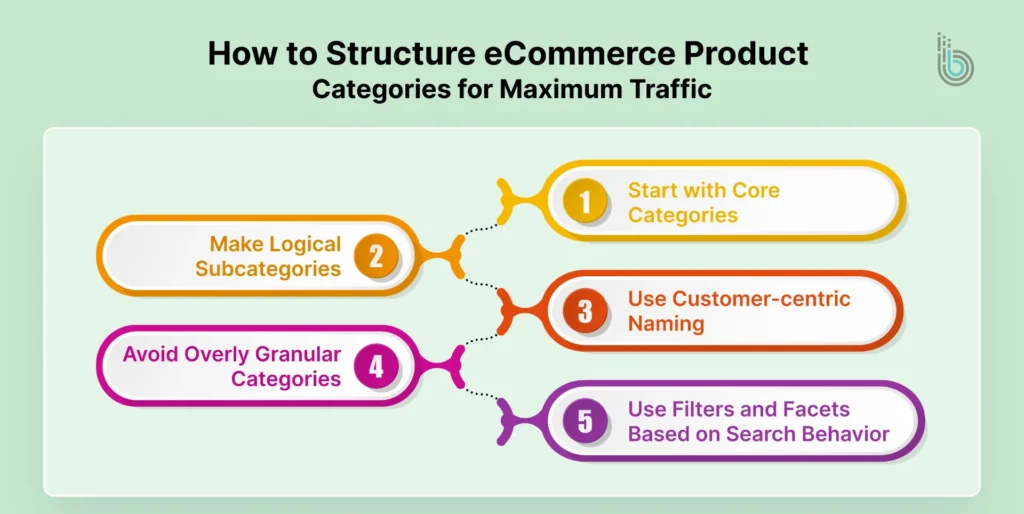
How to Structure eCommerce Product Categories for Maximum Traffic
When eCommerce product categories are clear and predictable, shoppers browse quickly, and search engine indexing improves. That’s how product categorization delivers steady organic traffic.
Start with Core Categories
Begin with the few “big buckets” that match how people shop. Popular categories include electronics, fashion, beauty, home, and grocery. This keeps your eCommerce category hierarchy simple and prevents clutter from the beginning.
Make Logical Subcategories
Build a clear eCommerce category structure that flows naturally:
Electronics → Headphones → Wireless
This improves category-based product listing pages and helps users browse without getting stuck.
Use Customer-centric Naming
Category names should match real search phrases found through keyword research. Shoppers search for wireless earbuds, not audio solutions. Use familiar language so that the online store product taxonomy is strong.
Avoid Overly Granular Categories
Too many small categories dilute visibility and weaken rankings. If a category won’t have enough products, it should be considered as a filter, not a standalone page. This is where store category optimization matters most.
Use Filters and Facets Based on Search Behavior
Let shoppers narrow results the way they think: brand, size, color, price, features, compatibility. Smart category filtering in eCommerce boosts discovery and supports online product segmentation without bloating your navigation.
Simply put, to create the best product taxonomy for eCommerce sites, keep it simple at the top, detailed through filters, and built around how customers search and shop. If you want this structure implemented correctly, opt for B2C eCommerce development services to build a store that attracts traffic.
Tools & Techniques to Analyze Category Traffic
Below are some popular ways and tools for analyzing category traffic for an eCommerce store.
Google Analytics 4 (GA4) for Category Page Performance
Track visits, engagement, and conversions on your eCommerce collection pages. Focus on metrics like landing page sessions, bounce rate, and revenue per category-based product listing page. It will reveal which product categories attract buyers versus casual browsers.
Google Search Console for Search Visibility and Clicks
Use Search Console to see which category URLs get impressions, clicks, and rankings. It also shows the exact queries driving traffic. It is one of the fastest ways to spot weak pages in your eCommerce category hierarchy and fix them with better content or structure.
Heatmaps and Session Recordings to Catch Friction Points
Tools like Hotjar or Microsoft Clarity help you see where users hesitate, rage-click, or abandon the page. It is very useful for improving category filtering in eCommerce, sorting options, and mobile layout. Small UX fixes often lift traffic and conversions together.
Search Terms Reports to Find Category Gaps
Review onsite search terms to learn what shoppers expect to find. If people search “wireless earbuds” but there’s no clear category path, that’s a taxonomy issue. These gaps are a direct signal to improve product catalog organization and eCommerce category mapping.
Competitor Category Analysis to Validate Demand
Study how top stores name categories, build subcategories, and structure filters. Look for patterns in their navigation categories and how they handle product grouping for online stores. This will help you borrow proven logic and apply it to your own product taxonomy for eCommerce sites.
In short, GA4 and Search Console track how your eCommerce category pages perform, which queries bring traffic, and where rankings are slipping. Heatmaps, onsite search terms, and competitor analysis spot drop-offs, fix category gaps, and strengthen your product taxonomy for better discovery.
Case Study: Billingham Bags’ Category Rebuild That Increased Traffic
Billingham Bags, a premium camera bag retailer, is a good example of how improving eCommerce Product Categories can boost traffic and sales. In 2024, the brand completed a full rebuild of its store structure to solve long-standing discovery and SEO issues.
The challenge
Their product architecture was messy. Different sizes and colors were listed as separate products. This made the catalog harder to browse, weakened category SEO, and confused shoppers who just wanted “one bag” with options.
What they changed
Restructured the catalog: Variants were grouped under a single Product Detail Page (PDP), allowing users to pick a size or color without jumping between listings.
Added smarter filtering: Navigation filters were built around bag size and bag type, enabling faster, more accurate category filtering in eCommerce.
Cleaned up navigation: The store layout and visual hierarchy were redesigned to feel clearer and more intentional, with SEO baked into the eCommerce category structure.
Results
25% increase in sales
14% improvement in conversion rates
14% improvement in Google Lighthouse scores, especially in SEO and loading speed
Billingham Bags proved that when product categorization is done around how people browse, traffic comes naturally and sales boost as a result.
Structure Your eCommerce Store with the Right Categories Today!
B2C traffic won’t come from adding more products. You should rather focus on setting clearer paths to the right products. eCommerce product categories work like high-intent landing pages that match how people search, compare, and shop. Categories like electronics, fashion, grocery, beauty, home, pets, and wellness win because they capture broad demand and constant search interest.
When these pages are built well, they attract buyers early in the journey and keep them moving deeper into the store. A clean eCommerce category hierarchy, customer-first naming, and smart category filtering in eCommerce make products easier to find and easier for Google to index. This improves discoverability, reduces bounce, and lifts rankings over time.
And to know what’s working, monitor category traffic through GA4, Search Console, heatmaps, and onsite search data. With the right product categorization strategy, traffic will be more stable, and conversions follow naturally.
FAQs on eCommerce Product Categories
Q1. What are the categories of products in eCommerce?
eCommerce product categories are the main groups used to organize items in an online store. Common examples include electronics, fashion, beauty, grocery, home & living, pet supplies, and health & wellness. These categories help shoppers browse faster and help Google understand your catalog. A clear eCommerce category structure improves both traffic and discovery.
Q2. Which category is best for eCommerce?
There’s no single “best” category for every store. The best eCommerce category is the one with steady demand, strong search intent, and repeat purchases for your audience. Electronics, fashion, beauty, grocery, and wellness often drive high traffic, but competition is also high. The right choice depends on your margin, sourcing, and ability to stand out.
Q3. How do I categorize my products?
Start with broad core categories, then divide them into logical subcategories based on how people shop. Use customer-friendly names that match real search terms, not internal labels. Keep the eCommerce category hierarchy clean and avoid creating tiny categories with only a few products. Use filters like size, brand, and price to handle variation.
Q4. How to choose a product category?
Pick a category based on buyer intent, search volume, and how easy it is to build a strong product range. Check what shoppers search for, what competitors rank for, and what your store can realistically fulfill. A good product categorization strategy also considers how items will be grouped and filtered. If the category feels easy to browse, it will usually perform better.