

Quick Summary
- This guide provides a complete roadmap for migrating from Magento to Shopify, covering every step from planning to post-launch optimization.
- We explain why businesses migrate and outline an 8-step manual migration process: backup, export data to CSV, import to Shopify, design, configure settings and apps, handle URL redirects, and migrate content.
- Understand migration costs, including Shopify plans, premium themes, payment processing fees, and app subscriptions that replace Magento extensions.
- Get solutions to 6 common challenges: preventing data loss, preserving SEO rankings, managing password resets, mapping product variants, replacing features, and optimizing performance.
Magento is an excellent platform for online stores. In fact, it is one of the best eCommerce development platforms. But rising maintenance costs, complex updates, or scalability concerns may prompt you to consider a switch. Enter Shopify.
You can migrate from Magento to Shopify to simplify operations, reduce technical overhead, and improve user experience, but only if done right. A poorly executed migration risks search rankings, customer data, and sales.
Our eCommerce experts have compiled this guide to help you migrate from Magento to Shopify. From pre-migration audits to post-launch optimization, this process will ensure a smooth transition. Let’s begin.
Why Migrate from Adobe Commerce (Magento) to Shopify?
Magento has long been a powerful eCommerce platform. Yet, evolving business needs may make Shopify a better fit. Reports indicate that migrating from Adobe Commerce (Magento) to Shopify reduces Total Cost of Ownership (TCO) by 29%. Here are a few more reasons why businesses switch:
- Lower operational costs: Magento requires ongoing server maintenance, security patches, and developer time. Shopify charges a flat monthly fee and handles everything behind the scenes.
- Easier to manage: Your team can update products, manage orders, and run promotions without touching code. Magento demands technical knowledge even for basic tasks.
- Faster deployment: New features and improvements roll out automatically. You do not wait for months to patch security holes or add functionality.
- Better scalability: Shopify grows with your business. During peak seasons, the platform handles traffic spikes without crashing or slowing down.
- Powerful app ecosystem: If you need email marketing, advanced analytics, or custom workflows, Shopify offers thousands of apps. Many integrate within minutes.
- Superior SEO features: Shopify comes with native SEO tools, automatic XML sitemaps, and clean URL structures that help your website rank better.
Do operational ease, cost rates, or growth matter to your business? You may then benefit from migrating to Shopify.
For businesses evaluating this shift more closely, it also helps to understand how the migration journey typically unfolds from planning to execution across different scenarios, which is covered in our Shopify migration guide.
Magento vs. Shopify: Major Differences
Business owners often find Magento harder to manage or less flexible compared to Shopify. Reviewing a detailed Magento vs Shopify comparison can help clarify which platform better suits their needs. Here are a few major differences:
| Feature | Magento | Shopify |
|---|---|---|
| Hosting & Setup | Self-hosted, you manage servers. | Fully hosted, Shopify manages everything. |
| Monthly Cost | $0-$5000+ (hosting + maintenance). | $39-$399/month (all-in). |
| Customization | Unlimited, very technical. | Powerful but structured. |
| Team Requirements | Developers needed for updates. | A non-technical team can run the store. |
| Security | Your responsibility. | Shopify handles compliance & patches. |
| Downtime Risk | High if misconfigured. | Minimal, 99.9% uptime. |
| Learning Curve | Steep for new users. | Beginner-friendly. |
| Multi-store Support | Multi-store setup, complex. | Shopify Markets, streamlined. |
| URL Structure | Fully customizable. | Standard format (less flexible). |
| Product Attributes | Advanced, layered attributes. | Variants + tags + metafields. |
What to Consider Before Magento to Shopify Migration?
Migrating your eCommerce store is a major decision. Hastening it can lead to data loss, broken search rankings, or disrupted sales. Before making the switch, evaluate these critical factors:
- Data Migration Issues: Product listings, customer data, and order history must be transferred without errors or corruption.
- URL Structure (for Search Rankings): Improper redirects can tank rankings; audit existing URLs and plan 301 redirects carefully.
- Custom Functionality: Does Shopify support your Magento-specific features, or will you need app replacements?
- Design and Theme Adaptation: Your store’s look and user experience may require adjustments to align with Shopify’s framework.
- Third-Party Integrations: Payment gateways, CRMs, and marketing tools must be reconnected easily.
A well-planned migration ensures business continuity, preserves search ranking equity, and maximizes Shopify’s advantages. You may consider engaging our Magento development services to transition from Magento to Shopify.
Magento to Shopify Migration Process
Switching from Magento to Shopify is easy, but you need to plan and list in advance. This is to help you avoid data loss, search ranking drops, or functionality gaps. Here’s a structured approach.
Pre-migration Planning
Before migrating your website to Shopify, you need to plan the process well. This phase is to plan out your entire migration strategy and identify roadblocks before they occur.
Steps for Pre-planning:
- Complete Store Audit: Catalog all products, categories, customer data, and order history. Identify custom features that need to be rebuilt.
- Check Technical Requirements: Compare Magento features with Shopify’s ecosystem. See if you need apps or custom development.
- Choose a Migration Strategy: You can choose between a manual export and an automated option.
- Set a Timeline: Allocate time for data transfer, design adjustments, and testing. Plan the launch during low-traffic periods to minimize disruption.
- Backup Everything: Secure a full backup of your Magento store (database, files, and media) as a fail-safe.
- Choose a Shopify Plan: Shopify comes with several packages, starting with Basic at $29 per month. Select the option that best matches your store size.
Pre-migration planning prevents data loss and ensures a smooth transition. Plus, you can start using Shopify features from day one.
Data Migration
Data migration is the backbone of your Magento-to-Shopify transition. It involves moving products, customers, orders, and other essential information to your new store.
When done correctly, it preserves business continuity. On the other hand, when executed poorly, it can cause inventory errors, loss of customer information, and operational problems.
Major Steps for Data Migration:
- Important Data Transfer: Move products, customers, orders, and SEO metadata.
- Automation Tools: Use apps like Cart2Cart for bulk, error-free transfers.
- Validation Checks: Ensure no duplicates, missing images, or corrupted entries.
- Customer Data Security: Preserve login credentials and purchase history.
- Post-Migration Review: Verify all data appears correctly in the Shopify admin.
You can manually export data to a CSV/Excel file or use the built-in import tools in Shopify. You can automate the whole process using third-party apps and extensions as well.
Design and Theme Setup
Moving from Magento to Shopify is not just about moving data. It is an opportunity to refresh the complete design of your store while also maintaining brand consistency.
The theme-based structure of Shopify is very customizable, but it requires careful planning to get an out-of-the-box customer experience.
How to Set Up Theme and Design in Shopify during Migration?
- Pick a free, premium, or custom-built Shopify theme.
- Check for brand consistency, replicate colors, fonts, and layouts from Magento.
- Ensure responsive design for all devices.
- Modify the Shopify Liquid code for unique design elements.
- Compress images, lazy-load media, and minimize scripts.
- Test the navigation, filters, and mobile experience.
A well-planned design transition doesn’t hamper brand recognition with Shopify’s modern capabilities. It creates a store that is both familiar to customers and optimized for conversions.
Functionality and Integrations
Take care of the features and integrations that power your business. While Shopify offers native functionality, some Magento customizations may require strategic rebuilding.
Most Required Features After Migration:
- Checkout & Payments: Reconnect gateways and test fraud prevention tools.
- Product Management: Rebuild custom product types (bundles, configurable items).
- Customer Features: Migrate loyalty programs, wishlists, and account portals.
- Third-party Apps: Replace Magento extensions with Shopify equivalents.
- API & Automation: Use Shopify Flow for business rule automation.
You may use Shopify Flow to automate many Magento-like business rules without coding.
Search Optimization and Redirects
Migrating from Magento to Shopify without proper SEO planning can erase years of hard-earned search rankings.
Steps for Optimizing SEO During Magento to Shopify Migration:
- URL Mapping: Maintain or properly redirect old Magento URLs.
- 301 Redirects: Preserve SEO rankings for high-traffic pages.
- Metadata Transfer: Migrate titles, descriptions, and alt text accurately.
- Sitemap Submission: Update and submit to Google Search Console.
- Broken Link Monitoring: Use tools like Screaming Frog for post-launch monitoring.
Create a redirect fallback plan. Use a catch-all rule to route unmatched URLs to relevant categories rather than 404 pages.
Testing and Launch
The final phase of your Magento-to-Shopify migration requires rigorous testing to prevent any major errors. It is not just about checking links. It is about validating every customer touchpoint in actual conditions, both before and after launch.
Key Highlights
- End-to-End Testing: Validate checkout, accounts, and integrations.
- Staged Rollout: Start with 5% traffic to catch issues early.
- Performance Checks: Test speed under load and mobile usability.
- 24/7 Monitoring: Track errors, sales, and user behavior post-launch.
Create a rollback playbook that outlines how to revert to Magento quickly in the event of critical failures. This safety net reduces team stress during launch. How to Migrate From Magento to Shopify?
Manual migration is the best approach for those looking for complete control over the process and outcomes. However, this DIY process is better suited to small and mid-sized businesses. Larger businesses will benefit from professional help.
First, we assume you have set up a Shopify store. After that, you can go about migrating the data from Magento to Shopify. Here’s the manual process.
Step 1: Backup Your Magento Store
Before starting any core process, it’s important to back up your store. If there is an issue midway, you can revert the changes.
Then, select the backup type, enter the backup name, and put the store in maintenance mode (if required).
Go to the Magento admin panel and navigate to System > Backups.
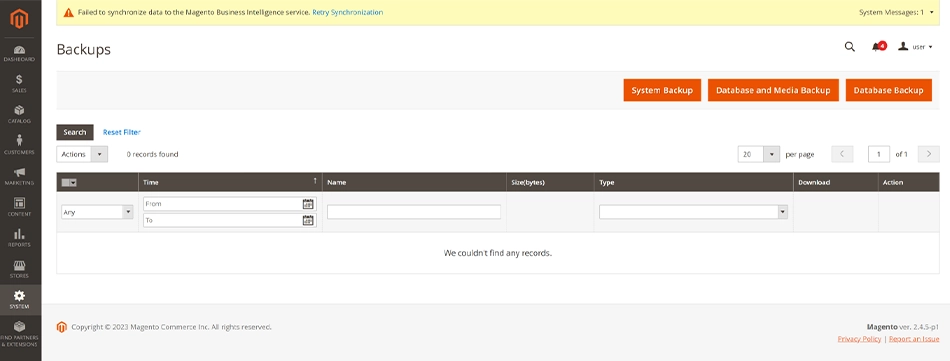
There are three types of backups available. With System Backup, you can save the store in its entirety, which includes the database and the source code. Database and Media Backup involves saving the database and media folder content. The theme won’t be backed up in this process. Finally, there is Database Backup, which saves only the database of your store.
Step 2: Export Magento Data
With Magento, you can export the products, pricing, customer data, addresses, and stock sources. These entities will be exported one at a time to separate files.
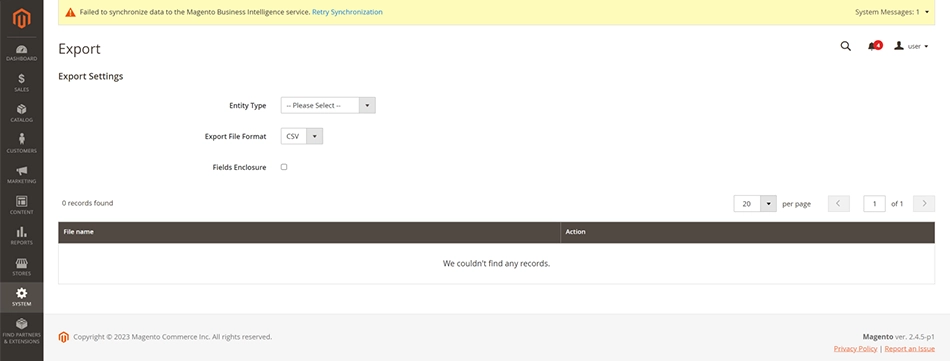
- Go to the Magento admin panel and navigate to System > Export.
- Select the “Entity Type” and “Export File Format” (CSV will be ideal for export).
- Enable the “Fields Enclosure” checkbox.
- Set Entity attributes, if needed. You may filter the data for a more focused export.
- After you are done selecting the data, click ‘Continue’ to start the data export process.
Once the data export is done, download the CSV file.

Step 3: Import Data to Shopify
Now that the data is summarized in a CSV file, it’ll be easy to import into Shopify. Here’s how.
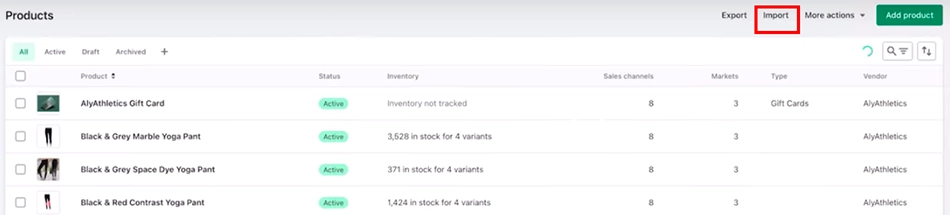
- Adjust your current CSV file to match the template style of your Shopify store.
- Go to the Shopify admin panel and navigate to ‘Products’.
- On top of the screen, click ‘Import’ and select the .csv file for your products and data.

- Do you want to publish the new products to all sales channels? In the case of multichannel eCommerce. If yes, select the checkbox.
- Preview the products and click ‘Upload and continue’.
Step 4: Import Your Data to Shopify
This is where migration apps save you hours of manual work. Three main options exist:
Option A: Automated Migration Apps (Easiest)
Tools like LitExtension and Matrixify automate the entire process.
How does it work?
Install the app. > Connect your Magento store credentials. > Select data to migrate. > Choose import options. > Schedule migration.
Most apps come with free demo migrations. Try this first to verify your data looks correct before doing the full import.
Option B: Manual Import via CSV
For small stores, you can manually:
- Export data as CSV files.
- Reformat to match Shopify column requirements.
- Upload via Shopify Admin > Products > Import.
This method is more time-consuming and requires attention to detail. Mistakes are easy to make, and fixing them afterward should be hard.
Option C: API-Driven Migration (Most Reliable)
For large stores with thousands of products or custom logic, API-driven migration ensures data integrity.
This requires developer knowledge. You will map Magento data to the Shopify API, change data as needed, and handle errors.
| ? Our recommendation: Use LitExtension or Cart2Cart for most stores. They automate repetitive work and include support if issues arise. |
Step 5: Design Your Shopify Store
Magento themes are not compatible with Shopify. You need a new theme and visual design. The steps for that are:
- Select a theme:
Visit the Shopify Theme Store and browse free and premium options. Look for themes that match your industry and product type.
- Test before purchasing:
Shopify lets you preview themes in your store before buying. Test at least 3 options.
- Customize your theme:
- Add your logo, brand colors, and fonts.
- Update the header and footer with your company info.
- Customize product pages and collection layouts.
- Set up your homepage with compelling copy.
- Install payment methods and shipping carriers.
- Optimize for mobile:
Over 60% of eCommerce traffic comes from mobile. Ensure your theme looks great on phones and tablets. Use Google Lighthouse or PageSpeed Insights to check page speed.
| ? Pro tip: If you need a custom design that matches your Magento store exactly, hire a Shopify Expert. Budget $2,000-$5,000 for professional design work. |
Step 6: Configure Settings & Install Apps
The basics of your store need careful setup before launch.
Payment methods:
- Enable Shopify Payments (recommended: no transaction fees beyond credit card processing).
- Add PayPal, Apple Pay, Google Pay, or other payment gateways.
- Test transactions with test credit cards.
Shipping configuration:
- Set shipping zones (domestic, international, regional rates).
- Choose carrier services (FedEx, UPS, USPS, DHL, custom).
- Test shipping calculations for various orders.
Taxes:
- Configure tax rates by region.
- Set up tax-exempt customer groups if needed.
Install essential apps:
- Email marketing: Klaviyo, Mailchimp, or Omnisend.
- Analytics: Google Analytics 4, Hotjar, Heap.
- Customer support: Zendesk, Gorgias.
- Inventory management: TrackStock, Stocky.
- Reviews: Judge.me, Loox, Yotpo.
Test each app thoroughly. Poor app setup causes slow store performance and confuses customers.
Step 7: Handle Your URLs & Redirects (Critical for SEO)
This step protects your search rankings and keeps customer bookmarks working.
The problem: Magento URLs look different than Shopify URLs.
| Magento example:yourstore.com/catalog/product/view/id/123/category/45 Shopify example:yourstore.com/products/product-name |
The solution: 301 redirects inform search engines that the content has moved permanently. Traffic and ranking power follow.
How to implement redirects?
- Map all Magento product URLs to new Shopify URLs.
- Create a CSV file with old URLs in column A, new URLs in column B.
- Use the Shopify Redirects option (Settings > Apps & Integrations > URL Redirects).
- Upload the CSV file.
Update internal links:
- Navigation menus
- Footer links
- Product cross-sells
- Blog post links
- Email templates
Submit your sitemap:
Log in to Google Search Console and submit your new XML sitemap. Google re-crawls your site faster when you notify it.
Monitor for 30 days:
Check Google Search Console for crawl errors and 404 errors. Fix any broken redirects immediately.
Step 8: Migrate Content (Blogs, Pages, Reviews)
Many merchants forget this step and lose SEO value.
Blog content:
- Export blog posts from Magento.
- Manually recreate in Shopify’s blog editor (or use a migration app).
- Preserve publication dates, author info, and tags.
- Update internal links within posts.
- Redirect old blog URLs to new ones.
Recreate CMS pages in the Shopify Pages section. Preserve original URLs via redirects. A few mandatory (most used) pages are:
- About Us
- Privacy Policy
- Terms & Conditions
- Shipping Policy
- Contact Page
- FAQ
If you have existing product reviews, migrate them using third-party tools or manually add top reviews via Shopify’s Bulk Edit feature.
Lastly, ensure you conduct rigorous testing of every feature, import, customization, and edit in the new store.
Magento to Shopify Migration Costs
The cost to migrate your online store from Magento to Shopify depends on your store’s complexity, data volume, and customization requirements. Here is a look at the potential expenses:
Shopify Plans and Pricing
Unlike Magento’s self-hosted model, Shopify operates on fixed monthly subscriptions.
- Basic ($29/mo): Small stores with <1,000 products.
- Shopify ($79/mo): Growing businesses needing reporting.
- Advanced ($299/mo): High-volume stores with 3rd-party shipping.
- Shopify Plus ($2,300/mo): Enterprise-level solutions.
Shopify Themes
Shopify offers free themes, but most businesses invest in premium options or a custom Shopify theme. Costs vary based on customization options (Liquid coding vs. drag-and-drop), mobile responsiveness, and third-party app compatibility.
Shopify Payments
Shopify waives additional transaction fees if you use Shopify Payments (powered by Stripe). Otherwise, expect:
- 0.5–2% per transaction (external gateways).
- Currency conversion fees (1–3% for international sales).
- Chargeback fees ($15–25 per dispute).
Apps and Integrations
While the Shopify app store offers 8,000+ tools, costs add up quickly with different types of apps. These are must-have apps, custom API development, and app stacking risk (Some Magento features require multiple Shopify apps).
Shopify even beats Magento on maintenance, but may cost more in app subscriptions.
Common Magento to Shopify Migration Challenges and How to Solve Them?
Here are the most common Magento to Shopify migration challenges and their solutions:
Data Loss During Migration
What happens:
If migration isn’t planned carefully, you can lose 20-30% of customer data or product information.
Why does it happen:
- Bad data in Magento (duplicates, missing fields).
- Incorrect file format during export.
- Incomplete mapping of product attributes.
Solution:
- Clean your Magento data before export (remove duplicates, fix broken URLs).
- Use a demo migration first to spot issues.
- Manually verify 10-20 random products after import.
Keep your Magento store live during the migration. Do not delete it until you confirm the migration is complete.
SEO Ranking Drops
What happens:
Your organic traffic drops after launch. Rankings fall for important keywords.
Why does it happen:
- Broken or missing 301 redirects.
- Changed URL structures without proper mapping.
- Missing metadata (titles, descriptions, alt text).
- Removed content pages.
Solution:
- Plan redirects before migration (create redirect map).
- Implement 301 redirects for every changed URL.
- Copy all SEO metadata to Shopify.
- Keep all CMS pages and blogs; don’t remove content.
- Submit the updated sitemap to Google Search Console.
- Monitor Search Console for 30 days post-launch.
Expect a temporary traffic dip (2-4 weeks); it recovers with proper redirects.
Customer Password Issues
What happens:
After the migration, customers cannot log in with their old passwords.
Why does it happen:
Magento and Shopify use different password encryption. Shopify’s architecture prevents importing encrypted passwords for security reasons.
Solution:
- Tell customers via email that passwords must be reset.
- Use Shopify’s “Forgot Password” email templates.
- Send password reset instructions 1 week before launch.
- Send reminder emails on launch day.
- Keep the Magento store accessible for 1-2 weeks (let old passwords work temporarily).
- Monitor customer support emails for password reset issues.
Password issues are very common after migration. You can use OTP-based login, email, and other options to avoid losing customer interest.
Product Variants Mixup
What happens:
Magento’s configurable products with multiple layers do not map cleanly to Shopify variants.
Why does it happen:
Magento allows unlimited attribute layers (size, color, material). Shopify limits variants to 3 options per product.
Solution:
- Map Magento attributes to Shopify variants before migration.
- Example: Magento “Brand” attribute, Shopify “brand” tag.
- Example: Magento “Color” attribute Shopify product variant.
- Test product pages after migration to verify variant selection works.
- Use metafields to store additional attributes that do not fit within standard variants.
A separate listing of the product is always recommended if there are more issues during migration.
Missing Features After Migration
What happens:
Custom features available in Magento are not supported in Shopify.
Why does it happen:
Magento allows unlimited custom extensions. Shopify has a set app ecosystem. Not everything ports directly.
Solution:
- Before migration, list all custom features (custom shipping rules, checkout modifications, pricing logic).
- Check if Shopify apps replicate functionality.
- Budget for custom development if apps do not exist.
- Prioritize essential features; skip “nice to have” features that Magento had.
Lastly, we recommend using the Shopify scripting and flow capabilities for custom logic.
Slow Website Performance
What happens:
Your Shopify store is slower than your Magento store.
Why does it happen:
- Too many apps installed (each slows page load)
- Unoptimized images
- Bulky theme
- Poor app configuration
Solution:
- Install only necessary apps; audit quarterly.
- Optimize images to 100KB or smaller.
- Use Shopify’s built-in image optimization.
- Choose a lightweight theme.
- Enable Shopify’s native caching.
- Use a CDN like Cloudflare (free).
- Test speed regularly: pagespeed.web.dev.
That’s it. Those were the major issues that most companies face after migration. You can always visit the official website and visit Reddit threads to get answers to your queries.
Final Thoughts
Switching from Magento to Shopify can streamline operations, reduce technical overhead, and improve scalability. But of course, success hinges on careful planning. With the right approach, you can ensure a smooth transition that preserves search rankings, customer experience, and business continuity.
Shopify’s user-friendly platform offers long-term efficiency gains, but the real key lies in meticulous execution. Make sure you prioritize data integrity, design consistency, and functionality.
So, ready to make the switch? Connect with our experts today to learn how our eCommerce website migration service can ensure a seamless transition for your business.
FAQs on Magento to Shopify Migration
1. Will I lose my Magento store during the migration?

No. Use automated migration tools such as Cart2Cart (supports zero-downtime migration). They migrate data while your store stays live. Switch DNS only after all data syncs and testing completes.
2. Can I migrate my blog content or CMS pages?
Yes, you can migrate blog content and CMS pages from Magento to Shopify, though it is not fully automated, unlike product data. Blog posts typically require manual recreation or specialized third-party apps for migration because they do not map directly to the Shopify structure.
3. What’s the biggest challenge in migrating?
Data relationships are the most head-scratching issue. Ensuring that product variants, customer orders, and discounts transfer accurately is important.
4. What happens to my Magento store post-migration?
Keep it running in read-only mode for 30–60 days as a backup. Redirect all traffic to Shopify after confirming stability.
5. Can I migrate my customer passwords to Shopify?
No, Shopify encrypts passwords differently. Customers must reset passwords via email after migration. Consider using a password migration app, such as Datadog, to ease this process.
6. What can not be migrated from Magento to Shopify?
Some Magento-specific features won’t transfer directly, including custom extensions, complex promo rules, and password-protected customer accounts. These require rebuilding or replacing the Shopify app.