
Quick Summary
- Understand open-source, SaaS, and headless eCommerce architectures before selecting a platform for your startup.
- Compare WooCommerce, Spree Commerce, Joomla, Shopify, BigCommerce, Squarespace, Salesforce Commerce Cloud, Adobe Commerce, Snipcart, etc.
- Evaluate platforms based on usability, integrations, inventory management, SEO, analytics, and customization capabilities.
- Prioritize scalability, security, mobile responsiveness, customer support, and migration options for long-term growth.
- Compare total ownership costs, technical requirements, and features to choose your ideal platform.
The global startup ecosystem is thriving significantly and will continue to do so in the future as well. With 6 out of 10 working-age internet users ordering something online every week, more and more eCommerce startups are coming up each year.
The eCommerce industry holds a considerable share in the startup ecosystem. But it’s shocking to know that many eCommerce startups do not survive long enough to see success. According to Failory, the eCommerce success rate is less than 20%. Some of the top reasons behind their failure are insufficient marketing and poor user experience.
But we don’t want to scare you away from the startup world; we just want to make sure you have access to the right strategies and tools. With a solid eCommerce marketing strategy and a user-centric platform, your business can be in that 20% success rate.
Whether you build in-house or partner with an agency for eCommerce website development services, choosing the right foundation comes first. In this guide, we walk you through the main platform types, our top startup picks, and the key factors to weigh before launching.
Types of eCommerce Platforms
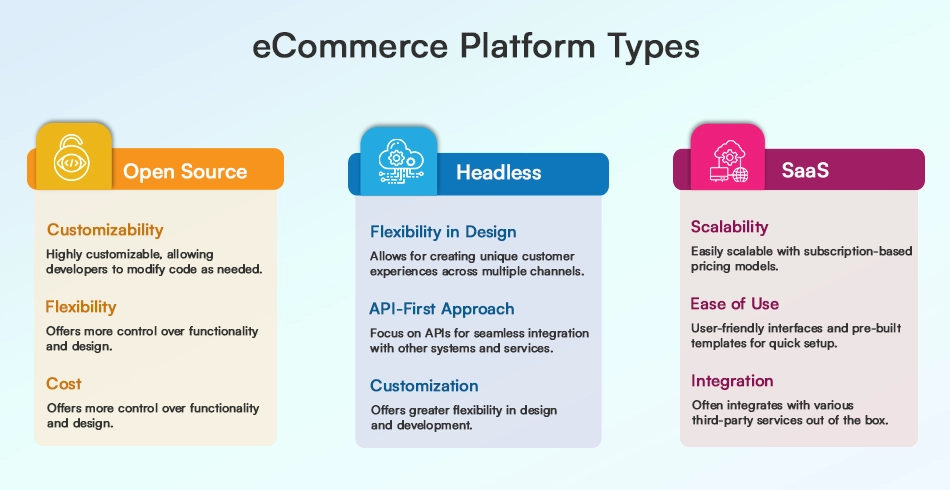
When finding a suitable platform for eCommerce development, you will encounter multiple types of platforms. However, the majority of eCommerce businesses prefer these 3 types: open source, SaaS, and headless.
Each platform type is suitable for different kinds of businesses and offers unique features. So, let’s explore each option in detail:
1. Open Source
As the name suggests, open source eCommerce platforms are free to access, and you can modify every aspect of the source code.
Open source platforms are typically more popular among businesses that want full control over their website. However, modifying the source code will require some coding knowledge, so if you need help with this, you can hire dedicated eCommerce developers from our team to build and maintain the site.
With open-source software, your team owns server patching and vulnerability management. Following eCommerce security essentials, such as SSL encryption, regular plugin audits, and PCI compliance, protects customer data from breaches.
2. SaaS
Unlike open source, SaaS (Software as a Service) removes the complexity of developing an eCommerce store from scratch. With SaaS eCommerce platforms, you can create an online store, get hosting and updates, customize features as per your preference, and choose from predefined eCommerce website packages. All you need to do is pay a monthly subscription fee to the platform.
As the code, security, and hosting are managed by the SaaS platform, it becomes an easy-to-use option. On the downside, these types of platforms can lock your business into certain features. You don’t get as great flexibility as open source platforms offer.
3. Headless
Headless eCommerce is completely different from the traditional development approach. It allows the decoupling of front-end and back-end technologies, so you can ensure great flexibility to create a smooth customer experience.
Headless eCommerce platforms separate your storefront presentation from backend logic. This gives brands total freedom to craft unique user journeys through custom eCommerce website design services without touching core checkout or inventory systems. Keep in mind that headless builds require higher upfront budgets and technical upkeep.
Top eCommerce Platforms for Startups
| Platform Type | Platform | Key Features | Best For |
|---|---|---|---|
| Open Source | WooCommerce | WordPress integration, customizable themes, inventory management, extensive plugins | Startups using WordPress that need flexibility and control |
| Spree Commerce | Headless architecture, API integrations, multi-brand support, multiple currencies | Startups building customized, multi-channel shopping experiences | |
| Joomla | eCommerce extensions, multilingual support, media management, flexible customization | Content-driven startups needing an extensible CMS | |
| SaaS | Shopify | Drag-and-drop builder, professional themes, payment tools, inventory, analytics, app marketplace | Startups seeking an easy-to-manage online store |
| BigCommerce | Scalable catalog management, B2B tools, marketplace integrations, abandoned cart recovery | Growing startups with complex product and sales requirements | |
| Squarespace | Mobile-friendly templates, visual website builder, built-in SEO, marketing, and checkout tools | Startups prioritizing design and simple store management | |
| Headless | Salesforce Commerce Cloud | Flexible APIs, AI-powered personalization, PWA tools, advanced integrations | Startups planning complex, personalized commerce experiences |
| Adobe Commerce | Multi-store management, advanced merchandising, custom integrations, B2B and B2C capabilities | Startups with complex customization and scalability requirements | |
| Snipcart | JavaScript-based cart, payment and shipping integrations, discounts, subscriptions | Developers adding eCommerce functionality to existing websites |
Now that you understand the three main architectures, you can narrow down your shortlist. When comparing top eCommerce platforms, look closely at pricing tiers, built-in features, and scalability across each category below:
1. Open Source
If you want to launch your online store without breaking the bank, then open source eCommerce is the perfect choice. Let’s explore some top options:
WooCommerce
WooCommerce is a powerful plugin that transforms WordPress websites into fully functional eCommerce stores. Its key advantages are:
- Seamless integration with WordPress
- Free core plugin with extensive customization options
- Vast library of free and paid themes
- Robust inventory management tools
- Built-in security features
While some open-source platforms require technical expertise, WooCommerce is known for its user-friendly interface and gentle learning curve. It’s also optimized for speed, ensuring smooth performance for your online store.
Spree Commerce
Spree Commerce offers a versatile solution for businesses seeking unlimited customization potential. Some of its notable features include:
- Compatibility with various storefronts
- Pre-built integrations (Next.js Commerce, Javascript/TypeScript SDK, Vue Storefront 2)
- Support for multiple brands, languages, and currencies
- Advanced product recommendation and personalization tools
- Seamless social media integration
- Streamlined return merchandise authorization process
This platform is ideal for businesses looking to create unique shopping experiences across different markets and channels.
Joomla
Joomla combines the power of a content management system with robust eCommerce capabilities. Its key highlights include:
- High scalability for growing businesses
- Strong community support and regular updates
- eCommerce extensions like VirtueMart, HikaShop, and J2Store
- Integrated media manager for efficient file organization
- Multi-language and multi-currency support
- Access to over 6,000 extensions for added functionality
Joomla’s flexibility and extensive customization options make it a solid choice for businesses of all sizes.
2. SaaS
While open-source platforms offer you cost-effectiveness, SaaS platforms simplify the setup of your business. Here are some leading SaaS eCommerce options:
Shopify
Shopify stands out as a leading SaaS platform, renowned for its powerful eCommerce capabilities. It provides a comprehensive suite of tools to create and manage an online store seamlessly across various sales channels. Key features include:
- Hundreds of professional templates
- Drag-and-drop store builder
- Payment processing and shipping integrations
- Abandoned cart recovery
- Marketing tools like email and SMS
- Inventory management
- Detailed analytics and reporting
Moreover, Shopify ensures continuous support with its 24/7 customer service and a vibrant app marketplace boasting over 6,000 apps to enhance your store’s functionality.
BigCommerce
BigCommerce delivers an enterprise-level solution with strong B2B features, ideal for established mid-market to large businesses. Its main advantages include:
- Scalability to handle extensive catalogs and sales volumes
- Built-in B2B functionalities such as customer groups and price lists
- Integration with major online marketplaces
- Abandoned cart recovery and email marketing tools
- A variety of apps for accounting, shipping, POS, and more
BigCommerce also offers excellent support and design services, adding value beyond its robust SaaS platform.
Squarespace
Squarespace is a well-loved website builder that includes an integrated eCommerce platform, making it a go-to choice for entrepreneurs. Notable features are:
- An intuitive drag-and-drop website builder for effortless customization
- Beautifully designed templates optimized for mobile responsiveness
- Comprehensive eCommerce functionality supporting product listings, inventory management, and secure checkout
- Built-in marketing tools and SEO features to boost traffic and sales
- Reliable hosting and customer support
With Squarespace, managing your inventory, adding product descriptions, uploading high-quality images, and setting up customer accounts is straightforward and efficient.
3. Headless
If you emphasize innovation and control of the store more than anything, then headless if the best option for you. The following are some popular headless eCommerce platforms:
Salesforce Commerce Cloud
Developed by Salesforce, Commerce Cloud is a premier headless eCommerce platform. It harnesses the power of AI and offers customizable APIs, enabling seamless customization of both the front end and back end. Key features include:
- A robust inventory management system.
- Enhanced security features with a web application firewall, security monitoring, and a headless content delivery network.
- The PWA kit facilitates the creation of mobile-first stores, making it user-friendly for digital commerce developers.
- AI-powered tools that monitor customer behavior to gather critical insights, boosting both conversion rates and engagement.
- High scalability and compatibility with advanced integrations, including various marketplaces and AR/VR technologies.
Commerce Cloud adapts to complex brand workflows with AI-driven personalization and flexible APIs. Startups scaling on this ecosystem often rely on Salesforce development services to connect storefronts seamlessly with Salesforce CRM, marketing clouds, and custom ERP pipelines.
Adobe Commerce
Previously known as Magento, Adobe Commerce is an open-source, headless eCommerce platform tailored for both B2B and B2C sectors, featuring cloud-based solutions. It supports brands across different sizes and sectors, offering:
- Marketing capabilities such as email campaigns, targeted promotions, and reminders for abandoned carts.
- The ability to manage multiple storefronts and customize advanced product options.
- Centralized data handling, advanced search functionality, and enhanced merchandising capabilities.
- Custom integrations with CRM, ERP, CMS, and other marketing and management systems.
- Forecasting tools that provide insights into market trends, business performance, and sales metrics.
Moreover, Adobe Commerce benefits from a vast community of developers who have created over 5,000 extensions available in its marketplace. For more info, you can explore our guide on Adobe Commerce’s features and benefits.
SnipCart
Snipcart offers a developer-centric, headless e-commerce solution that integrates a customizable shopping cart into any website using minimal coding. Its main features include:
- Compatibility with most payment gateways and shipping carriers.
- Quick cart deployment is achievable with simple HTML and JavaScript.
- Tools to manage promotions, discount codes, and subscriptions.
- Calculations for real-time shipping rates and taxes.
Additionally, Snipcart includes functionalities to manage abandoned carts, providing businesses with strategies to reduce potential sales losses.
What to Consider When Choosing an eCommerce Platform for a Startup?
As you can see, there are plenty of eCommerce platforms available on the market. But to choose the best one among these, you need to consider the following factors:
Ease of Use
Your primary goal is to create an eCommerce store without unnecessary complications. Therefore, it’s essential to choose a user-friendly platform, especially for beginners. The platform should have an intuitive interface and not require extensive technical knowledge.
Look for platforms that offer demos or trial versions. This allows you to get a feel for the platform and understand its features before committing. If the features are straightforward to grasp, it’s a good sign that the platform is suitable for you.
Third-Party Tools Integration
In the modern web development world, the ability to integrate third-party tools is a significant advantage. For eCommerce, seamless integration with third-party tools is essential for enhancing the functionality of your store.
Some platforms allow you to add advanced features without needing additional technical expertise. This capability can greatly enhance your store’s performance and customer experience.
Inventory Management
Selling physical goods makes stock accuracy critical from your first order. Strong eCommerce inventory management tools help your startup prevent overselling, track stock across suppliers, and forecast restocks accurately as demand grows.
Make sure the platform offers comprehensive tools for tracking stock levels, managing orders, and forecasting demand. If the details are unclear, don’t hesitate to contact customer support for more information. As your store grows, handling inventory, orders, and day-to-day operations becomes more complex, which is why it’s important to have a clear process in place.
SEO-Friendly
Having a great product and an attractive store won’t matter if customers can’t find you online. eCommerce SEO (Search Engine Optimization) is critical for driving traffic to your store.
An SEO-friendly platform will provide tools for optimizing keywords, adding backlinks, and optimizing images for search engines. These features are essential for improving your store’s visibility on search engines, which in turn can increase traffic and sales.
Insights
Understanding your store’s traffic and customer behavior is vital for making informed business decisions. The best eCommerce platforms offer detailed insights and analytics.
These insights include information about traffic sources, demographic data, average time spent on the site, and click-through rates. Such data can help you identify areas for improvement and tailor your marketing strategies more effectively.
- Ease of Use: Check for a beginner-friendly interface, simple setup, and free trials or demos.
- Third-Party Integrations: Ensure compatibility with payment gateways, shipping providers, CRM, and marketing tools.
- Inventory Management: Look for stock tracking, order management, and demand forecasting features.
- SEO-Friendly Features: Check for customizable URLs, meta tags, image optimization, and SEO tools.
- Analytics and Insights: Ensure access to traffic, sales, customer behavior, and conversion reports.
- Scalability: Choose a platform that can handle growing traffic, products, and orders.
- Pricing and Total Costs: Compare subscription fees, hosting, transaction charges, extensions, and maintenance costs.
- Security: Check for SSL, secure payment processing, data protection, and regular security updates.
- Mobile Responsiveness: Ensure your store offers a smooth shopping experience across smartphones and tablets.
- Customer Support: Evaluate support availability, documentation, community resources, and technical assistance.
- Customization: Check whether you can modify store design, features, and checkout to match business needs.
- Migration Options: Confirm that products, customer records, orders, and SEO data can be migrated if needed.
Conclusion
Your startup’s long-term scalability depends heavily on picking the right foundation early. If you want help weighing total ownership costs, app ecosystems, and growth limits, our eCommerce consulting services can guide your decision. Contact BrainSpate today to build or scale your store.
FAQs on eCommerce Platforms for Startups
1. Can I migrate my store from one platform to another if I need to?

Yes, most eCommerce platforms offer migration tools or services to help you move your store. Ensure your new platform supports your current data and functionalities for a smooth transition.
2. How can I leverage social media integrations to boost sales on my eCommerce store?
Integrate social media buttons for sharing products, use social login options to streamline checkout, and run targeted ads on platforms where your audience is active to drive traffic and conversions.
3. How important is scalability in choosing an eCommerce platform for a startup?
Scalability is crucial as your startup grows. Choose a platform that can handle increased traffic, products, and transactions without compromising speed or user experience, ensuring long-term growth without frequent platform changes.