
Quick Summary
- A Shopify integration connects ERP, CRM, payment, and shipping systems through apps, APIs, or middleware.
- New Shopify apps must use the GraphQL Admin API; REST is now legacy.
- The right approach depends on order volume, data complexity, and available in-house technical skills.
- Pricing varies by model: subscription, per-seat, usage-based, per-resolution, or custom development investment.
- Most failures trace back to poor data quality, peak-load API limits, or treating integration as a one-time task.
A Shopify integration connects your store to the systems that run the rest of your business, including ERP, CRM, payment, shipping, and marketing platforms. It keeps orders, inventory, customer, and product data moving between systems without manual data entry.
This Shopify integration guide covers the main ways to connect Shopify with other systems, from prebuilt apps and custom API integrations to middleware platforms. You’ll also learn how to choose the right approach, plan an integration, manage implementation costs, avoid common pitfalls, and maintain a reliable connected store.
What Is Shopify Integration and How Does It Work?
Shopify integrations typically use APIs, webhooks, prebuilt apps, custom development, or middleware to exchange data between Shopify and external systems. The right combination depends on the systems you’re connecting, the complexity of your workflows, the amount of data being processed, and the level of customization you need.
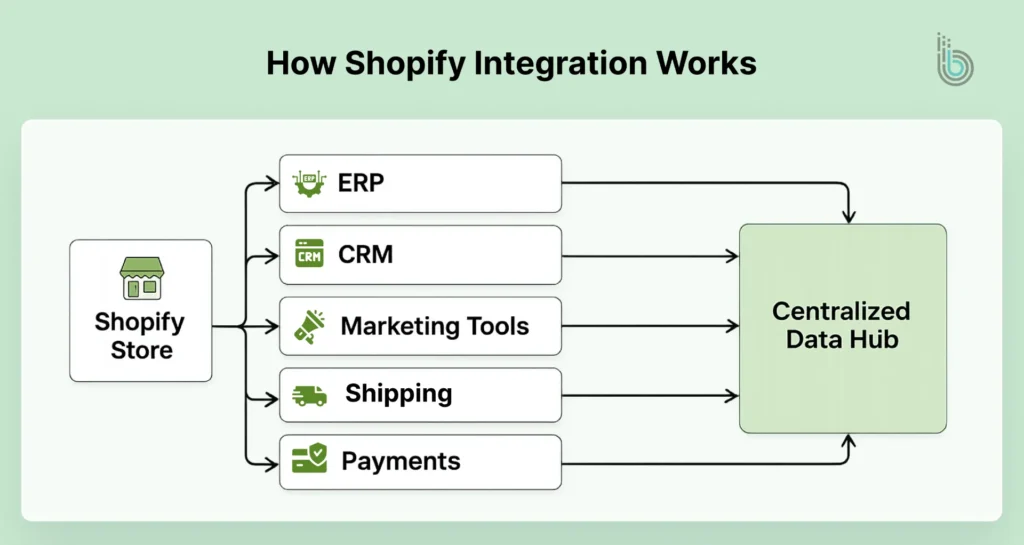
How Does Shopify Integration Work?
Shopify integration works through five core methods: APIs, webhooks, prebuilt apps, custom builds, and middleware. Each moves data between Shopify and external systems differently, and most integrations use more than one method.
Shopify APIs
Shopify’s Admin API provides programmatic access to store data such as products, orders, customers, and inventory. For new app development, Shopify requires the GraphQL Admin API, while the REST Admin API is now considered legacy. Developers should use GraphQL for new integrations and plan for API version changes as Shopify updates its platform.
Webhooks
Webhooks notify an external system when a specific event occurs in Shopify, such as an order being created, a product being updated, or inventory changing. Instead of repeatedly checking Shopify for new data, the receiving system can process the event when Shopify sends the notification. This reduces unnecessary API requests and helps integrations respond to store activity faster.
Prebuilt Apps
Prebuilt apps from the Shopify App Store connect Shopify to third-party systems through configuration rather than custom development. They work well for standard workflows such as email marketing, reviews, shipping, accounting, and customer support where an existing app already supports the required functionality.
Before installing an app, check whether another installed app already performs the same function. Overlapping apps can increase costs, create conflicting workflows, and add unnecessary storefront or backend complexity.
Custom Integrations
Custom integrations connect Shopify with another system using APIs, webhooks, and business-specific logic that a prebuilt app cannot support. They are useful when you need custom data mapping, unique workflows, legacy system connectivity, or precise control over when and how data is exchanged.
Custom development provides greater control, but it also creates an ongoing maintenance responsibility as Shopify and the connected systems introduce API changes.
Middleware and iPaaS
Middleware and iPaaS platforms sit between Shopify and other business systems, allowing data to be routed, transformed, and synchronized through configurable workflows. They are useful when Shopify needs to communicate with multiple systems and a fully custom integration would require more development and maintenance.
Middleware is particularly useful when different systems require different data formats or when one event in Shopify needs to trigger actions across several platforms.
Which method fits depends on what you’re connecting to, covered next by integration type.
Why Integrations Matter as You Scale
If you are a startup or a small business, you may find it easy to manage tasks manually. As you scale, you would need a solution to manage inventory, customers, and a huge amount of data. Shopify integration eliminates the manual tasks, which also helps to reduce errors. It centralizes your data, making it accessible in real time across all systems. Businesses can unlock real-time data for personalization and forecasting.
Shopify B2B integration, primarily available at Shopify Plus, helps businesses to unify wholesale and direct-to-customer (D2C) sales on one platform. One can manage wholesale, omnichannel sales, and internal expansion from a single backend. It syncs the inventory, pricing, and customer data with external ERP/CRM systems. You can personalize B2B buying experiences, including custom catalogs, company-specific ordering rules, and payment terms. It also provides support for B2B features like purchase order (PO) number capturing and custom shipping methods.
The Most Common Types of Shopify Integrations
Shopify integrations fall into a handful of categories based on what system they connect to. Below is a Shopify integrations overview, covering what each type does and which tools handle it.
ERP and Inventory Integrations
ERP integrations connect Shopify to the system that manages stock, pricing, and financials, so a sale on Shopify updates inventory and accounting in one move instead of two. Businesses integrate retail systems with Shopify in a few ways: NetSuite integration and SAP Business One support large-scale operations, while Access Dimensions suits mid-market retailers that need accounting and stock management in one platform.
Key Benefits:
- Stock levels stay accurate across every sales channel, preventing overselling
- Orders route to fulfillment and accounting without manual re-entry
- One system of record for product, pricing, and financial data
CRM and Customer Data Integrations
Connecting a CRM with Shopify centralizes purchase history and behavior so marketing and sales teams work from the same customer record instead of guessing. Salesforce integration, HubSpot integration, and Zoho CRM integrations are the standard choices for Shopify CRM software; LeadConnector, HighLevel’s CRM layer, is common among agencies running Shopify stores for multiple clients.
Key Benefits:
- Personalized offers and campaigns built on actual purchase behavior
- One customer view across support, sales, and marketing
- Higher repeat-purchase rate from targeted follow-up
Marketing and Automation Tools
Marketing integrations trigger campaigns based on store activity: an abandoned cart, a first purchase, or a win-back window. Privy, OptiMonk, and Klaviyo integrations handle email and SMS; Meta and Google integrations feed the same behavioral data into ad retargeting.
This is Shopify automation integration in practice: the event happens once in Shopify, and every downstream campaign fires without manual setup.
Key Benefits:
- Abandoned carts and win-back flows run without manual triggering
- Ad audiences update automatically as customer behavior changes
- Campaign performance ties directly back to order data
Customer Support & AI
Support integrations pull order history, shipping status, and customer data directly into the helpdesk, so agents answer without switching tabs.
Gorgias and Zendesk are the two most-used platforms, and setting up a Zendesk integration alongside Gorgias covers most support use cases, with Shopify Inbox as a free native option for basic live chat. AI agents inside Gorgias and Tidio now resolve routine tickets, such as order status or return requests, without an agent touching them.
Key Benefits:
- Order and shipping data available inside every ticket without any lookup
- AI agents resolve routine queries, cutting ticket volume that reaches humans
- Faster response times improve post-purchase satisfaction
Payments and Checkout
Shopify payment processing runs through Shopify Payments natively, supporting Apple Pay, Google Pay, and Shop Pay, or through external gateways like Stripe, PayPal, and Authorize.net where Shopify Payments isn’t available. Shopify Checkout handles the transaction itself regardless of which processor sits behind it.
Key Benefits:
- Shop Pay’s saved information speeds up repeat checkouts
- Shopify Payments avoids added third-party transaction fees
- PCI compliance and tokenization are built in
Shipping, Fulfillment, and 3PL
Shipping integrations connect Shopify to carriers (FedEx, UPS, USPS, DHL) or 3PLs (ShipBob, ShipRocket, Amazon MCF) so orders route to fulfillment automatically instead of through manual label creation.
Key Benefits:
- Orders reach the warehouse the moment they’re placed, cutting fulfillment time
- Bulk carrier rates through 3PLs lower per-order shipping cost
- Peak-season volume scales without adding warehouse staff
Marketplaces and Multi-Channel Integrations
Marketplace integrations, like an Amazon integration and an Etsy integration, sync product listings, inventory, and orders between Shopify and channels like Amazon, Walmart, eBay, Etsy, and social storefronts (TikTok Shop, Instagram Shopping), all managed from one dashboard.
Key Benefits:
- Inventory updates across every channel at once, preventing stockouts
- One dashboard replaces logging into each marketplace separately
- Consistent pricing and product data across every channel a customer sees
Analytics, BI, and Data Warehouse Integrations
These integrations pull order, marketing, and customer data into a single reporting layer, usually a data warehouse or BI tool, so teams stop pulling numbers from five separate dashboards.
Key Benefits:
- Marketing spend and revenue attribution live in one report
- Historical data enables demand forecasting and inventory planning
- Manual reporting work is replaced by automated dashboards
Each of these solves a specific problem, and it’s worth understanding on its own. Together, they change how the whole store runs.
Key Benefits of Shopify Integration
Individually, each integration solves one problem. But the actual value of Shopify integration shows up in how the systems behave as a connected whole.
Operational Efficiency & Automation
With task automation, teams need fewer manual handoffs and fewer instances of re-keying the same order or customer record across three different tools. That reclaimed time moves from data entry to actual decision-making.
Improved Data Accuracy & Reliability
Beyond any single system being correct, integration prevents systems from disagreeing. Without it, a customer’s status can differ across support, CRM, and billing at the same moment, and nobody knows which one is right.
Enhanced Customer Experience
The customer never sees the systems behind the store, only whether the experience feels like one connected brand or several disconnected tools stitched together. Integration makes browsing, checkout, and support feel continuous.
Simplified Multi-channel Selling
Launching a new sales channel becomes a configuration task, not a rebuild, since the integration layer already exists. The operational benefits of multi-channel selling are covered in the Marketplaces section above.
Data-driven Decision Making
Integration lets decisions in one department react to live data from another, instead of each team working off its own delayed report. For e.g., marketing adjusting spend based on real-time stock levels, or inventory planning shifting based on an active campaign.
Scalability for High Volume
An integrated stack absorbs order-volume spikes without breaking, and adding another system later doesn’t require rewiring what’s already in place. Growth becomes additive instead of a rebuild every time volume jumps.
These benefits only materialize with the right setup, which is what the right integration approach determines.
Choosing the Right Shopify Integration Approach
Picking the right way to connect your Shopify store isn’t just a tech choice; it affects how your business runs and grows. You can use apps, build your own connections, or use tools to link different systems. Each option has its pros and cons, and the best one depends on how complex your business is and what you need your data to do. Knowing the differences up front helps you avoid headaches later and ensures your setup will grow with your business.
Native Apps Vs Custom API Integration vs Middleware
| Approach | Best for | Pros | Cons |
|---|---|---|---|
| Native Apps | Quick results with standard needs | Low build effort and easy setup | Limited flexibility, not scalable |
| Custom API Integration | Unique data rules, complex logic, and maximum control | Maximum control, scalable architecture | Requires technical skills, higher development costs |
| Middleware | Multiple systems to connect with less custom code | Centralized monitoring, faster iteration | Requires testing and recurring costs |
Key Questions to Ask Before Deciding
Before you decide on a Shopify integration, you need to assess your business’s data volumes and real-time needs. It is important to evaluate the business requirements before you opt for Shopify integrations.
Volume and Performance
- What is the peak volume of orders per day?
- How much real-time synchronization do you require?
- What is the maximum acceptable failure tolerance?
- What is the latency tolerance?
Data Domains
- Which entities need to be in sync?
- Which system is the source of truth?
- How complex is data mapping?
- Does foundational data need to be synchronized?
Internal Capabilities
- Do you have an internal team of developers?
- Do you need an agency or partner?
- Who will maintain the integration?
- What is the project budget?
Planning Your Shopify Integration Project
Planning determines how reliably an integration will operate after launch. Before development begins, define the business outcomes, systems involved, data requirements, ownership rules, and priorities so the integration is built around clear requirements rather than individual API connections.
Map Business Goals and Use Cases First
Define what the integration needs to do before picking a tool. “Automate order processing” isn’t a use case; “sync order status to the 3PL within five minutes of payment” is. A specific use case tells you when the project is actually done, instead of expanding indefinitely.
Inventory Current Systems and Data
List every system currently touching order, customer, or product data, and where each one gets that data from today. This step is where you usually find the same customer sitting in three systems under three different email addresses, which is a more common reason integrations fail than any API limitation.
Design Data Models and Mapping
Decide how a product, order, or customer is represented in each connected system, and which system wins when two disagree on the same field. Write this mapping down. Undocumented mapping is why integrations break quietly the first time someone renames a field.
Define Integration Flows and Priorities
Not every sync needs to be real-time or ready on day one. Rank flows by what breaks the business if delayed: order and inventory sync first, since gaps there cause overselling or lost sales, everything else after.
Security, Compliance, and Governance Basics
Assign one owner per data domain before launch, not after something goes wrong. Set access scopes, log what changed and who changed it, and put a review cadence on the calendar. Skipping this feels fine right up until it isn’t.
With the plan settled, the next step is putting it into motion, which is where actual implementation begins.
How to Integrate Third-Party Systems With Shopify
Before any of this, two decisions should already be made: your requirements and success criteria (from Planning Your Shopify Integration Project) and your integration method, app, custom API, or middleware (from Choosing the Right Shopify Integration Approach). What follows is execution, once those two calls are settled.
1. Map Your Data
Confirm field-level mapping and source-of-truth rules before building anything. If this wasn’t finalized during planning, it gets finalized now, not mid-build.
2. Solution Design and Architecture
Decide the direction data flows (one-way or two-way), what triggers each sync, and what happens if the receiving system is down when Shopify sends an update. This is where most integrations become resilient or fragile, and it happens before a single line of code.
3. Environment Setup and API Configuration
Set up a Shopify Partner development store as a sandbox. Generate API credentials, create an access token, and grant only the scopes the integration actually needs. Broader access than necessary is a security gap, not a convenience.
4. Build the Connection
Write the logic that handles each endpoint (products, customers, orders) and, separately, the logic that handles what happens when a call fails. Retry rules and error handling take as long to build as the happy path and matter more once the integration is live.
5. Test Everything
Run end-to-end tests in the sandbox with realistic data volumes, not five sample records. Check error logs and confirm your queries stay under Shopify’s GraphQL rate limit: 1,000 points per app per store, refilling at 50 points per second, with mutations costing 10 points against that budget. A test pass that never approaches the limit hasn’t tested the real failure mode.
6. Monitor Performance
Set up alerts for failed syncs and data mismatches before launch, not after the first one goes unnoticed. Review sync accuracy on a set schedule rather than waiting for a customer to report the problem first.
A live integration still costs money to run, which is the next thing worth planning for.
Shopify Integration Pricing Models
What you pay for a Shopify integration depends entirely on the pricing model behind the tool, not just the tool itself. Five models cover almost everything you’ll run into.
Monthly SaaS Subscriptions
A flat monthly fee regardless of usage, the standard model for most Shopify apps (Mailchimp, Sellbrite). Many offer a free tier with a low order or contact cap, then jump to a paid plan once you cross it, so check the cap before assuming “free” stays free.
Per-Seat Pricing (Help Desks)
Cost scales with the number of agents using the tool, common for helpdesk platforms like Gorgias and Zendesk. This model gets expensive fast for support teams that grow headcount before they grow automation, worth flagging to whoever owns the support budget.
Usage or Volume-Based Fees
Price tracks a metric like order volume, API calls, or connected channels rather than seats. This scales naturally with the business, but it also means a good sales month quietly increases your software bill, which is easy to miss until the invoice arrives.
Per-Resolution Model (AI Tools)
Increasingly common for AI-driven support tools: you pay per ticket the AI actually resolves, not a flat platform fee. eesel AI, for example, charges per ticket handled with no seat fees, so cost tracks real support volume instead of team size.
Custom Development Investment
Building directly against Shopify’s API, or hiring a partner to do it, has no listed price. Cost depends on scope, complexity, and whether you’re paying hourly or per project, and it’s the only model here where the price is a negotiation, not a plan page.
What you pay is one part of the equation; how well it holds up under real use is the other.
Best Practices for Reliable, Scalable Shopify Integrations
Reliability isn’t about preventing failure. APIs go down regardless of how well you build. It’s about how the integration behaves when that happens and whether it can grow without a rebuild every time volume jumps.
Design for Failure From Day One
APIs go down, webhooks get missed, and third-party services time out mid-sync. Build the integration to queue, retry, and alert when this happens, instead of assuming the connection stays up.
Protect API Access
Grant each integration only the scopes it needs, never broad access “to be safe.” Rotate credentials on a schedule and revoke access the moment an app or vendor relationship ends. A forgotten token from a tool you stopped using two years ago is still a live door into your store’s data.
Handle Failed Events
A failed sync shouldn’t just vanish into a log nobody checks. Route failures to a queue that can be reprocessed, and decide in advance which failures retry automatically and which need a human to review.
Keep Performance and Storefront UX in Mind
Cache customer, inventory, and product data instead of calling external systems on every page load. Keep heavy JavaScript off the storefront and lazy-load anything non-critical. An integration that slows the site down is costing sales somewhere else on the page.
Start Small, Then Iterate
Launch with the one or two flows that matter most, not every possible sync at once. Add scope based on what actually breaks or what the business asks for next, not what looked good on the planning doc.
Even with these in place, a few mistakes still trip up most integrations, worth knowing before you build.
Common Shopify Integration Pitfalls (and How to Avoid Them)
Most integration failures aren’t dramatic outages. They’re quiet: a sync that’s been silently wrong for three weeks before anyone notices the numbers don’t match.
Poor Data Quality and Mismatched Models
Bad data doesn’t usually throw an error; it just syncs anyway, leaving you with duplicate customer records, mismatched SKUs, or orders assigned to the wrong warehouse. By the time someone catches it manually, the bad data has already spread to every connected system. Validate at the point of entry, not after it’s already synced everywhere.
Lack of True Automation
Some integrations only move data into one place for a person to act on; they don’t complete the action itself. A support tool might show an agent the order status while the agent still processes every refund by hand. If the goal was reducing manual work, check what the integration actually executes on its own, not just what it displays.
Peak-Load Failures
An integration that runs fine at normal volume can break during a flash sale or Black Friday spike, when a burst of orders hits Shopify’s API rate limit at once, and requests start queuing or getting throttled. Build backoff and retry logic before the first high-traffic event, not after checkout syncs start falling behind during one.
Treating Integration as an Ongoing Responsibility, Not a One-Time Build
Shopify releases a new API version every quarter, and each version is supported for a minimum of 12 months before retirement. An integration built once and never revisited will eventually call a deprecated field or endpoint and fail without warning. Someone needs to own watching the Shopify developer changelog, not just the initial build.
Knowing these pitfalls is one thing, avoiding them without hindsight is another, and that’s exactly when it’s worth bringing in Shopify integration services built to handle them.
When to Bring in a Shopify Integration Partner
Not every Shopify integration can or should be handled in-house. As complexity increases, the risk of errors, delays, and inefficiencies grows. Knowing when to bring in an experienced integration partner can save time, reduce risk, and ensure your systems are built to scale effectively.
Signs You Should Not DIY
If your Shopify store handles huge volumes of data or you have multiple stores, hiring a Shopify integration partner becomes important. Shopify API integration partner can be hired for B2B/B2C hybrids or critical ERP or finance integrations where data errors or downtime can be costly. If your internal team lacks time or expertise with Shopify APIs, middleware, or enterprise systems, hiring the best Shopify integration company becomes relevant.
What to Look for in An Integration Agency
When selecting assistance for eCommerce integration, you need to hire a strategic partner, and not just a service provider. Look for an experienced company with deep expertise in Shopify, along with ERPs, CRMs, WMS, and marketing stacks in your industry. The right agency will be able to offer discovery, architecture, implementation, testing, launch, and long-term support as a cohesive service, and not just one-off development.
BrainSpate’s Shopify Integration Capabilities
If you are looking for a specialized Shopify integration company, your search ends here. As a leading Shopify integration company, BrainSpate offers secure, scalable, and high-performance architecture designed to help your business grow. Book a consultation with our Shopify integration experts to discuss your requirements.
Conclusion
Shopify integration comes down to three decisions: which systems need to talk to each other, which method fits your budget and complexity, and who keeps it running after launch. Get those right, and the store stops being standalone and starts running as one connected operation.
Start with whatever’s actually costing you time or money, whether that’s manual order entry, a flooded support inbox, or inventory that’s wrong on half your channels. Apps cover most standard needs. Once volume or custom logic outgrows what an app can handle, bring in a Shopify integrator rather than debugging it live on your own store.
FAQs
1. What types of systems can I integrate with Shopify?

ERP, CRM, marketing automation, payment gateways, shipping and 3PL, marketplaces, and analytics platforms are the most common categories.
2. Should I use apps, custom API integration, or middleware for my Shopify integration?
Use a prebuilt app when an existing tool already supports your workflow. Choose custom API integration when you need business-specific logic, custom data mapping, or connectivity with a system that does not have a suitable app. Use middleware when multiple systems need to exchange data and you need configurable routing or transformation between them.
3. Does Shopify still support REST API?
Shopify’s REST Admin API is now considered legacy. Since April 1, 2025, new public apps submitted to the Shopify App Store must use the GraphQL Admin API. Existing integrations may still use REST where supported, but new development should follow Shopify’s GraphQL API direction.
4. Does Shopify support third-party API integrations?
Yes. Shopify provides APIs and webhooks that allow apps and external systems to exchange data with the store. Integrations can use these capabilities to work with data such as products, customers, orders, and inventory, subject to authentication, access scopes, API limits, and the capabilities of the connected system.
5. When do I need a custom Shopify integration?
When your workflow includes business rules no app supports, when you’re connecting to a legacy or proprietary system, or when you need exact control over how and when data moves. If a prebuilt app already covers the need, custom development adds cost without adding value.
6. How much does Shopify integration cost?
There is no standard Shopify integration cost. Simple app-based integrations may require little or no development work, while middleware and custom integrations can involve software subscriptions, development, testing, and ongoing maintenance costs. The total investment depends on the number of systems, data complexity, workflow requirements, and level of customization.
7. How do I know if my store is ready for ERP integration?
Readiness is about process pain, not a fixed order volume. If manual order or inventory entry is consuming measurable staff hours each week, or if Shopify and your accounting system regularly show different numbers for the same SKU, it’s time.
8. What data should your Shopify integration sync?
Most Shopify integrations sync five data types:
- Product data: SKUs, pricing, descriptions, variants
- Customer data: contact info, purchase history, segments
- Order data: status, line items, fulfillment details
- Inventory data: stock levels across locations and channels
- Payment data: transaction status and refunds, handled only through PCI-compliant systems
9. Can I integrate QuickBooks and Etsy with Shopify?
Yes. QuickBooks syncs through dedicated accounting apps, and Etsy connects through Shopify’s marketplace integrations, both without custom development for standard setups.
10. Will third-party integrations slow down my Shopify store?
Only if they’re poorly optimized or redundant. Regularly audit installed apps and remove those with overlapping functionality to prevent this, not by avoiding integrations altogether.
11. How long does a typical Shopify integration project take?
A single app integration can go live in a day. A custom API or ERP integration typically takes four to twelve weeks, depending on data complexity and how many systems are involved.
12. Do I need a developer or agency for Shopify API integration?
Simple app-based integrations don’t require one. Custom API work, multi-system middleware, or ERP integrations usually do, since mistakes there are expensive to undo.