
Quick Summary
- Build a B2B website that clearly guides users toward conversion actions.
- Improve usability through structured navigation, user-centric UX layouts, and mobile-first design.
- Increase trust using real proof like testimonials, case studies, and certifications.
- Improve visibility and speed through SEO, performance, and accessibility practices.
- Optimize results continuously using testing, analytics, and user behavior insights.
A B2B website is no longer just a digital brochure. It serves as a research hub, credibility builder, and lead-generation engine throughout a complex buying journey. Your prospective B2B clients are actively assessing their needs, so your website should clearly guide them toward the next step with confidence.
That is why following proven b2b website design best practices is critical. Strong design goes beyond appearance. Even small usability issues can create friction, reduce engagement, and impact lead quality.
This guide outlines the key ingredients for building a website that drives and sustains your B2B business’s growth. Below is a quick overview of these principles.
B2B Web Design Best Practices at a Glance
To simplify implementation, the quick-reference table below summarizes core B2B website design best practices and explains their roles in building a high-performing website.
| B2B Web Design Area | Key Components | Primary Objective |
|---|---|---|
| Strategic Branding & Industry Alignment | Audience definition, branding consistency, accessibility standards | Create relevance, trust, and brand recognition |
| Streamlined Navigation & Layout | Intuitive menus, breadcrumbs, hover states, persistent CTAs, clickable logo | Help users find information and take action quickly |
| Visual Design & User Experience | Consistent visuals, white space, minimalism, accessibility-focused UX | Improve readability, engagement, and usability |
| Mobile-First Responsiveness | Responsive layouts, tap-friendly elements, simplified forms | Deliver a seamless experience across devices |
| Conversion Focus & CTAs | Strong CTAs, lead magnets, progressive profiling, lead capture tools | Increase inquiries, demos, and conversions |
| Audience-Focused Content & Messaging | Pain-point-driven messaging, outcome-focused headlines, internal linking, thought leadership | Support research and guide buying decisions |
| Trust & Social Proof | Testimonials, client logos, certifications, endorsements, case studies | Build credibility and reduce purchase hesitation |
| Performance & SEO Essentials | Page speed, schema markup, heading structure, alt text, keyword optimization | Improve visibility, accessibility, and search rankings |
| Ongoing Testing & Optimization | A/B testing, behavior analysis, reusable templates, design systems | Continuously improve user experience and conversion performance |
Use this summary as your website design checklist. Next, we’ll take a closer look at each best practice, with additional guidance available in our B2B Web Design Guide.
Proven B2B Web Design Best Practices Explained in Detail
A successful B2B website is built on more than just strong visuals; it is the result of consistent monitoring, adjustment, refinement, and improvement. These b2b website design best practices are designed to reduce friction, improve usability, and drive conversions.
Strategic Branding & Industry Alignment
- Audience & Brand Strategy: Begin with clear goals and a defined audience. Map out target-personas and conversion goals (quotes, demo requests, etc.) so the design effectively guides each audience segment. For example, make services labeled as “For Engineers” or “For Doctors” to remove the guesswork from your potential client’s thought process.
| Did You Know? Segmented campaigns generate 760% more revenue than one-size-fits-all marketing by targeting specific audience needs. |
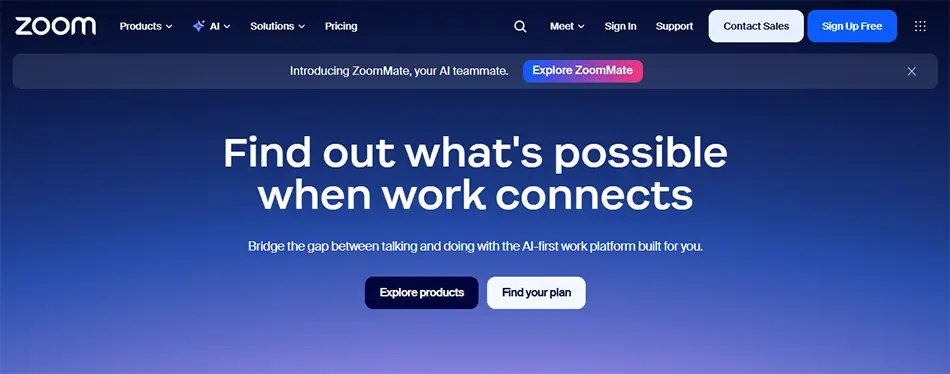
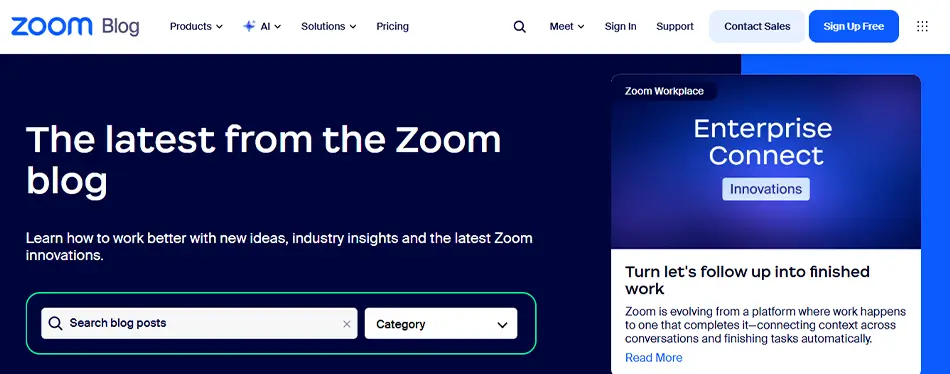
- Consistent Branding: Use unified colors, fonts, logos, and tone across your website to ensure brand identity, recall, and trust with your clients. Consistency isn’t just cosmetic: firms with uniform branding see more conversions. Recent research indicates that consistent brand presence can drive a 10% or more increase in revenue.
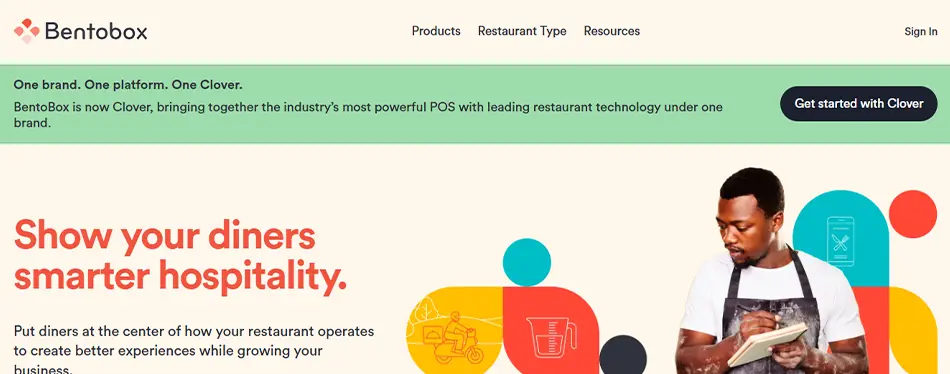
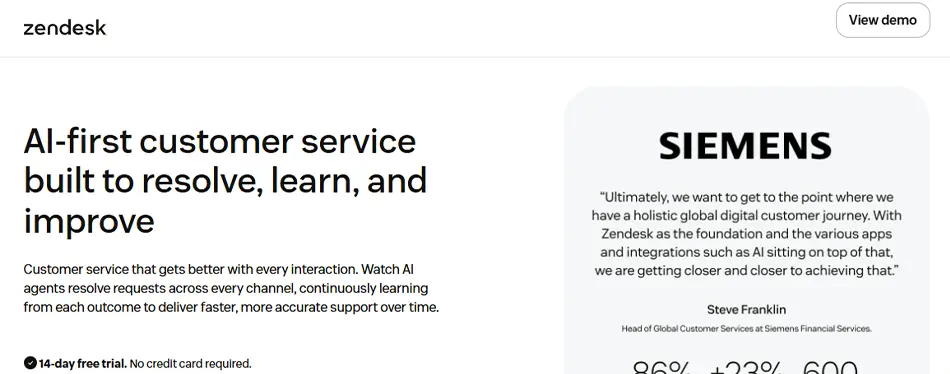
Here’s an example of consistent branding between a homepage and a resources page:
Homepage:
Resource Page:
- Accessibility Standards: Ensure sufficient color contrast, readable fonts, descriptive alt text on images, keyboard-navigable menus and forms, and clear labels. 78% of B2B professionals say digital accessibility improves client satisfaction, but a surprising 28% still encountered legal challenges related to it within a year. Compliance safeguards the company and expands your audience simultaneously, making it a must in b2b website design best practices.
Streamlined Navigation & Layout
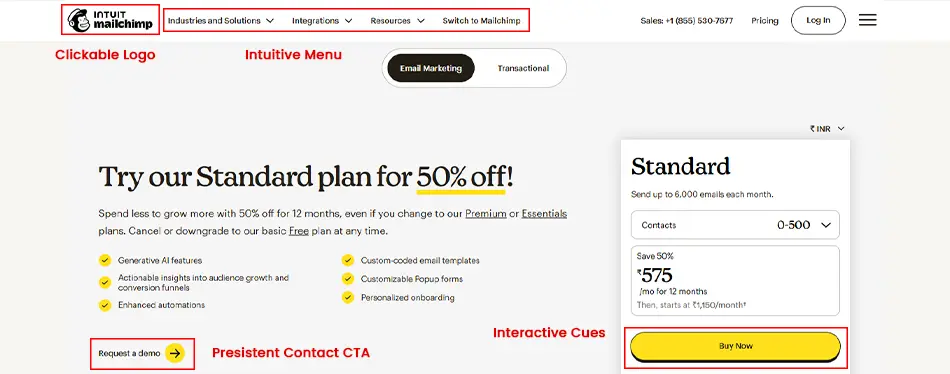
- Intuitive Menus: Keep the header of your B2B store simple and logical, using broad categories (products, services, and solutions) and sensible grouping (by offering or industry). Too many buttons and links tend to overcrowd the page and overlap. After placing the essential elements, consider adding features such as drop-downs or mega-menus if your catalog becomes too complex.
- Clear Headers & Breadcrumbs: Use concise, descriptive headings (H1, H2) on every page so visitors can understand content hierarchy. An example of an effective breadcrumb: Home > Solutions > Manufacturing > Inventory Optimization Software.
- Interactive Cues: Clickable elements, such as links and buttons, must be highlighted on hover. Even a subtle color change or animation indicates that an element is designed to be clicked, influencing users to explore or convert.
- Persistent Contact CTAs: Remove navigation friction by adding a CTA button like “Request a Quote” or “Schedule a Demo” on every page’s header, footer, or sidebar. B2B clients need a way to engage quickly once they’ve made a decision.
- Clickable Logo: In B2B website design best practices, it’s common to link your header logo to your homepage, ensuring your users can always return there with one click.
Visual Design & User Experience
- Uniform Visual Theme: Maintain consistency across
- Color palette (brand and accent colors),
- Typography (fonts, sizes, and text styles),
- Brand voice (tone and messaging), and
- Visual assets (photography, illustrations, icons, diagrams, and infographics)
A cohesive experience strengthens brand recognition and instills confidence in B2B buyers.
- Clutter-Free Minimalism: Your eCommerce web design should have enough room to breathe, keeping layouts clean and focused by removing unnecessary elements. Strategic use of white space improves readability, highlights key messages, and guides users toward important content, CTAs, and conversion points.
- Aspirational Imagery: Use authentic images that resonate with your audience’s needs and goals. For example, an image of a team collaborating, a well-equipped workspace, or a growth-focused dashboard can indicate confidence, success, and positive outcomes.
Here’s an example of a clutter-free UI with aspirational imagery:

- UX Accessibility: Design for inclusivity by aligning with WCAG guidelines (Perceivable, Operable, Understandable, Robust). For example, maintain high contrast for text (a dark background with light text), and use readable font sizes (16px+ for body text on mobile). Implement semantic HTML (proper headings, lists, form labels) so screen readers can interpret the page correctly.
| ? Did You Know? 85% of B2B professionals view digital accessibility as a competitive advantage, while 64% say it has helped drive revenue growth. |
Mobile-First Responsiveness
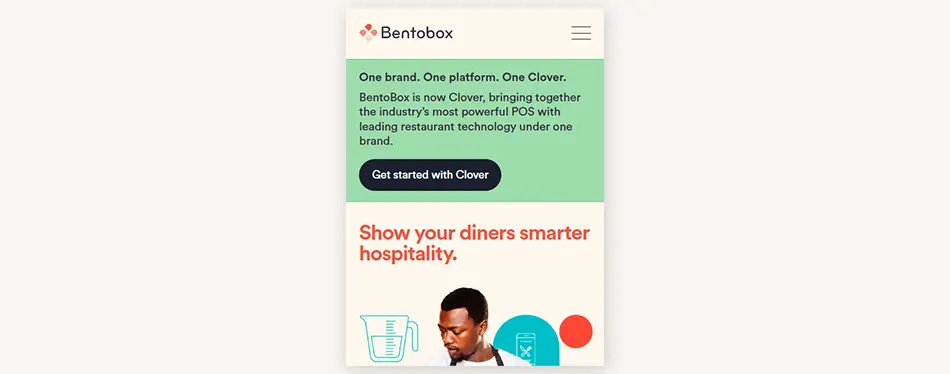
- Mobile-First Design: Build a completely optimized mobile experience. Design layouts, navigation, and content flow that work on narrow screens first. To emphasize, 80% of B2B buyers use mobile devices for work, and over 60% say mobile influenced a recent purchasing decision. This approach ensures your site is intuitive for on-the-go professionals.
- Responsive Layouts: Use flexible grids and media queries, ensuring images resize fluidly and text flows without horizontal scrolling. The goal is a seamless experience whether the user is on a phone, tablet, or desktop.
Mobile View:
Desktop View:
- Tap-Friendly Buttons: Ensure your buttons and links are easy to tap with a thumb, providing ample size and spacing (40x40px touch target). Prevent missed taps to improve CTR and conversions across devices.
- Simplified Mobile Forms: Long, complicated forms are not ideal for mobile users. A few suggestions: Replace text input with dropdowns like MCQs, seamlessly trigger the correctly aligned keyword (for email, number, phone, etc.), split longer forms into multiple short steps, and clearly label fields.
Conversion Focus & CTAs
- High-Contrast CTA Buttons: Make your Call-To-Action stand out with vibrant and high-contrast colors. Here are a few quick-action CTA content examples:
- Get a Quote
- Request Demo
- Talk to an Expert
- Start Your Project
- Get Started
- Start Free Trial
- Download Report
It is advisable to use multiple CTA buttons, as each user wants a different conversion path; just remember to keep them short, impactful, and easy to notice.
- Concise, Actionable Copy: Deliver clear, benefit-driven headlines and CTA content for your busy B2B clients. For higher engagement, directly
- Address pain points (“Struggling with Low-Quality Leads?”),
- Offer lead magnets (“Get a Free Audit”) and
- Showcase results (“Increase Revenue by 30%“).
- Progressive Profiling: Your B2B web design should gather user information gradually, asking for information in every step of the conversion pathway. For example, ask for a name and email during the initial website visit, then ask for company details and requirements when they click to download a report/portfolio.
- Streamlined Lead Capture: Embed lead capture into natural content flows. For example, place a contact form next to a product description or a case study. Use specific form headers (“Get Pricing Details” instead of generic “Submit”) to set expectations. Integrate marketing tools, such as chatbots or scheduling widgets, to let leads engage on their own terms and at their convenience.
- Track Meaningful User Activity: Monitor how users progress toward conversions on your B2B website. For precise tracking, use analytics and heatmaps to spot successful CTAs and drop-off points. This B2B website design best practice helps refine content and conversion pathways for higher ROI.
Audience-Focused Content & Messaging
- Pain Points Solution: Use headline copy that reflects the audience’s problems and promised outcomes. For example, instead of “Our Warehouse Automation Features…” try “Reduce Downtime by 30% with Warehouse Automation.”
- Outcome-Focused Headlines: Your headings should clearly indicate a direct benefit or solution. “Automate Reporting and Stop Manual Errors” reads much better than “Our Reporting Software” for B2B clients.

- Thought Leadership Hubs: A resource center or blog section is always useful because B2B buyers research extensively, and 88% say they trust a brand more when it provides helpful, educational content. This B2B web design best practice positions your brand as a thought leader.
- Internal Linking Strategy: Guide your B2B buyer’s journey with internal links, making it easy for them to explore, find proof of performance, and convert. For example, a blog about “Improving Sales Productivity” can link to a CRM platform page, a case study showing sales growth, and a consultation booking page.
- Social Sharing Integration: Add social share buttons to articles or case studies so visitors can easily share them on LinkedIn or X (Twitter). Some websites allow users to highlight a quote and instantly share it on X, automatically including the text and a link back to the original page. Active social links help expand reach and strengthen authority.
Unlike B2C purchases, where a single consumer typically makes an individual, emotion-driven decision, B2B buying cycles are fundamentally more complex and layered. A typical enterprise purchase involves a multi-stakeholder “buying committee” of around 6 to 10 decision-makers, each bringing distinct priorities, evaluation criteria, biases, and veto power.
If you browse community discussions on Reddit about B2B buying friction, you will observe a recurring theme among frustrated buyers: Most websites fail to surface the right information for the right stakeholder at the right time, making it far too difficult to extract the specific data points required to pitch a solution internally.
A technical lead looks for API documentation and security compliance; a financial controller requires clear pricing tiers or ROI calculators; and an executive needs high-level case studies proving industry success. When web design fails to cater to these different personas simultaneously, friction occurs, and the deals stall.
Building Trust & Social Proof
- Client Logos & Testimonials: Seeing a recognizable company logo or a peer’s endorsement instantly boosts credibility for B2B buyers. Showcase client logos, testimonials, case studies, and success statements or direct numbers.

- Certifications & Awards: Highlight awards, industry certifications, and security compliance to validate reliability. Badges like “ISO 9001 Certified” or “Clutch Rating” help build trust among B2B buyers.
- Analyst & Expert Endorsements: B2B decision-makers value outside opinions: 75% say they trust brands more if they’re affiliated with respected industry experts. Mention high-authority partnerships or reports (with permission) like Gartner, Forrester, AWS, etc. For example, “Recognized as a Top Vendor by…” or “Proud Partner of…”.
- Case Studies & Proof Points: Create concise case studies highlighting impact in a quantifiable way, for example, time saved, ROI, efficiency gains, etc. Use real data to provide evidence and build trust with your B2B buyers.
- Social Proof & Sharing: If applicable, display reviews and star ratings, such as “Rated 4.5/5,” on XYZ. Include LinkedIn and X (Twitter) follow/share buttons, and encourage customers to share your content to enhance brand credibility and visibility.
Performance & SEO Essentials
- Optimize Page Speed: Fast loading should be your top priority, as smooth, quick-loading pages improve user satisfaction and search rankings alike. Compress images, enable browser caching, use a CDN, and remove unnecessary scripts.
| Did You Know? Even a one-second delay in mobile page load time can reduce conversion rates by as much as 20%. |
- Code Minification & Deferred Loading: Minify HTML, CSS, and JavaScript to remove unnecessary code and reduce file sizes. Use lazy loading so images and other heavy assets load only when users reach them. Combined with automated optimization tools, these techniques reduce page weight and help pages render faster.
- Structured Headings: Follow a logical heading structure with one clear H1, supported by H2s for key sections and H3s for subtopics. A well-organized hierarchy makes content easier to scan, improves accessibility, and helps search engines understand page context more effectively.
- Schema Markup: Add structured data (JSON-LD) to key pages to help search engines better understand your content. Schema markup for products, articles, FAQs, and business information can improve visibility in search results and increase the likelihood of attracting qualified clicks.
- Descriptive Alt Text: Add descriptive alt text to every image so users and search engines can understand its context. Specific image descriptions improve accessibility, strengthen image SEO, and create additional opportunities to integrate relevant keywords naturally.
- Solution-Oriented Keywords: Use keyword research to identify terms your audience is already searching. Incorporate these target keywords naturally into your headings, content, and metadata to align with SEO, buyer intent, and website value offerings.
- File & Image Compression: Compress and properly size images using modern formats such as WebP or AVIF to reduce file sizes without compromising quality. Combined with asset compression, this improves page speed, enhances user experience, and supports stronger search performance.
Ongoing Testing & Optimization
- A/B Testing: Regularly test individual page elements, such as CTA copy, form fields, or button design, to identify what drives better results. For example, switching a generic “Learn More” to “Save 15% Today” might yield clear improvements. Even small but structured, data-backed changes can deliver a 10-22% increase in conversions, according to research.
- Visitor Behavior Analysis: Analyze visitor behavior using analytics, heatmaps, and session recordings to uncover friction points and drop-off areas. These insights help refine page layouts, improve navigation, and create a smoother path to conversion.
- Template & Component Development: Create reusable templates and standardized UI components for common page types to maintain consistency and scale improvements efficiently. A shared design system makes updates, testing, and future optimizations faster and easier across the entire website.
Together, these B2B web design best practices form the blueprint for a high-performing website. Next, we’ll summarize the key points for implementing them effectively.
Conclusion
Building a successful B2B website is ultimately about clarity, trust, and intent-driven experience. When applied correctly, b2b website design best practices help transform your site from a simple digital presence into a powerful lead-generation engine that guides buyers seamlessly through their journey.
The real impact comes from consistency, aligning design, content, UX, and SEO into one unified growth-focused experience. By implementing these practices thoughtfully, your B2B website becomes more than just an interface. It transforms into a trust-building system that effectively guides and converts potential leads.
If you’re looking to strengthen your online presence, our eCommerce website design services focus on creating scalable, conversion-driven experiences built for performance and growth.
FAQs
1. What is the Rule of 7 in B2B?

The Rule of 7 in B2B states that a buyer needs around seven meaningful interactions with a brand before making a decision. In the context of b2b website design best practices, this means your website must support repeated engagement through consistent messaging, content, and conversion touchpoints that gradually build trust and familiarity.
2. What are the 7 C’s of website design?
The 7 C’s of website design are Context, Content, Community, Customization, Communication, Connection, and Commerce. These principles ensure a website is structured, user-focused, and conversion-ready.
3. What are the 5 golden rules of web design?
The 5 golden rules of web design are simplicity, clarity, consistency, responsiveness, and speed. They ensure users can easily navigate, understand, and interact with a website without friction.
4. What is the 3-second rule in website design?
The 3-second rule means a website must clearly communicate its value within the first three seconds of landing. If users don’t instantly understand what you offer, they bounce, making it critical to maintain clear messaging and a strong visual hierarchy in B2B website design.
5. Why is mobile-first design important in B2B websites?
Mobile-first design is important because your prospective B2B leads are researching solutions on mobile devices. A mobile-optimized experience ensures faster navigation, better readability, and higher engagement, directly improving lead quality and conversion rates.
6. How do B2B websites build trust and increase conversions?
B2B websites build trust using case studies, testimonials, client logos, certifications, and measurable results. These credibility signals reduce hesitation and guide users toward actions such as demos or inquiries.