
Quick Summary
- Adding music to your Shopify store enhances user experience, builds brand identity, and increases engagement.
- You can integrate audio using Shopify apps and custom HTML/JavaScript code or embed music from platforms like YouTube.
- Best practices include avoiding auto play, offering user controls, and using high-quality, brand-appropriate tracks.
- Choose the right method based on your technical skills, store theme, and the type of audio you want to share.
Adding music to your Shopify store gives your shoppers a pleasant experience while they browse products. It makes your website more enjoyable for visitors, helps create a mood, tells your brand’s story, and can even encourage visitors to browse longer.
Music is a valuable addition to any website, whether it’s a musician sharing their latest track or a business establishing its brand tone. Using professional Shopify integration services ensures your audio player connects smoothly with your storefront and creates a harmonious experience for shoppers. But the question is, how do you add it?
In this blog, we’ll discuss the best ways to add music to your store without slowing it down or overwhelming your customers. Let’s dive in!
Why Add Music to Your Shopify Store?
The appearance of an online store can completely shape visitors’ opinions about the brand. Music is an additional element that helps create such an impression. Like colors and images, sounds play an important role in telling your story, making it more vivid for the audience and fostering a deeper connection. It:
Makes the Shopping Experience More Enjoyable
The right ambient music sets a better mood for your store and makes it feel more welcoming. Calm, peaceful tunes create a perfect atmosphere of tranquility, while fast tempos inject a sense of energy. This encourages people to browse your store with confidence and explore what you offer.
Builds a Strong Brand Image
Every brand has a personality, and music helps express it. If your business makes handmade candles, gentle acoustic music might suit your warm style, while streetwear brands may prefer something bold and contemporary. The music you choose becomes an extension of your eCommerce branding, just like your logo or color scheme.
Encourages Visitors to Stay Longer
People tend to stay longer if they enjoy the site’s atmosphere, and pairing ambient audio with intuitive eCommerce website design services helps keep visitors engaged on product pages and inspires them to explore other categories. The longer they stay, the higher the chance they’ll make a purchase.
Perfect for Music-Focused Stores
If you’re a musician, DJ, or sound producer looking to sell digital products on Shopify, such as downloadable tracks, beats, or sample packs—sound is part of your core product. Letting customers preview your work on-site builds trust, conveys professionalism, and makes your store feel more personal and engaging.
Methods to Add Music to the Shopify Store
If you’re ready to add music to your store, there are several ways to do it. The method you choose depends on the kind of experience you want for your visitors and how much control you need over the sound. Whether you’re adding a single song or a playlist, Shopify offers easy options that require no coding knowledge.
Using Shopify Apps
Shopify offers several ready-made apps for adding background music, while stores that need uninterrupted cross-page playback or custom playlist widgets can also use Shopify app development services.
Here are some of the best options:
- ES Background Music Player: Provides customizable autoplay, looping, and volume control.
- RT: Background Music Player: Offers an easy-to-use interface with seamless audio integration.
- Audio Player by Widgetic: Ideal for artists and businesses wanting to feature specific tracks or albums.
Steps to Install an App:
- Navigate to the Shopify App Store and search for a music player app.
- Select an app that suits your needs and click Install.
- Follow the setup instructions to configure the audio player settings.
- Adjust playback options such as autoplay, looping, and volume control.
- After adding the code in the Liquid file, check the output on the Frontend.
Embedding Music Using Custom Code
For those seeking a more hands-on approach, embedding an audio player using HTML and JavaScript, or customizing your store layout through Shopify theme development services, provides greater design and playback control.
Steps to Add an Audio Player:
- Go to Shopify Admin > Online Store > Themes.
- Click Actions > Edit Code and open the theme. liquid.
- Insert the following HTML snippet where you want the audio player to appear:
<audio controls autoplay loop>
    <source src="your-music-file.mp3" type="audio/mpeg">
    Your browser does not support the audio element.
</audio>
- Save the changes and refresh your store to test the functionality.
Embedding Music from External Platforms
Another effective method is to embed tracks from platforms like Spotify or YouTube, or connect third-party streaming and media widgets.
Spotify
First, generate an embed code for a track or playlist by clicking the Share option and then selecting Embed track.
This will provide you with the code. Paste it into a custom HTML section.
The output will look like this.
YouTube
The process to add music to a Shopify store from YouTube is also similar. To embed a music video, click Share.
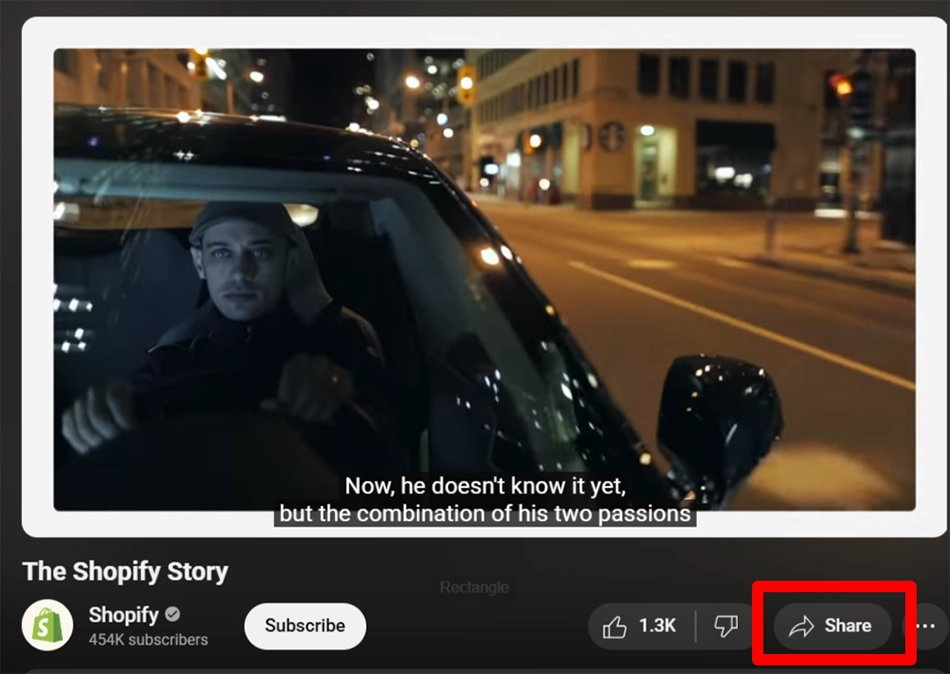
You will see different sharing options; choose Embed. This will give you the embed code. Copy it and paste it into the Liquid file of your store.
Example iFrame Code:
<iframe style="border-radius:12px"
src="https://open.spotify.com/embed/track/25jtUwCQfXwnxENh8Bvoj4?utm_source=generator
" width="100%" height="152" frameBorder="0" allowfullscreen="" allow="autoplay;
clipboard-write; encrypted-media; fullscreen; picture-in-picture" loading="lazy"></iframe>
[Note: The above example is of a Spotify iframe.]
Adding music doesn’t have to be complicated. With the right tools and a clear idea of your brand’s vibe, you can create a smooth and enjoyable experience for your customers. Try different methods to see what works best for your store, and always keep your visitors in mind when deciding how and when the music should play.
Best Practices for Giving a Harmonious Experience on Shopify
Music can make your store feel more inviting, but only if it’s used the right way. Done poorly, it can distract or even drive visitors away. Here are some key points to ensure the music enhances the shopping experience rather than distracts from it.
- Keep Volume at a Comfortable Level: Loud music can surprise visitors, especially if it plays automatically. If you’re using autoplay, make sure the volume is low and soft. Better yet, let users control whether the music plays at all.
- Choose Music That Matches Your Brand: Your store’s sound should fit the overall mood of your products and design. Calming tunes might work well for a wellness store, while something fun and upbeat fits better with fashion or lifestyle brands. Make sure the tone of the music supports your message.
- Avoid Disrupting the User Experience: If the music restarts every time a customer switches pages or delays page rendering, it can quickly become annoying. Use lightweight widgets and follow Shopify speed optimization practices so audio plays smoothly across your store without hurting load times.
- Give Visitors Control: Always provide a visible play/pause or mute button. Some people shop in quiet places, like at work or late at night, and may prefer to browse in silence. Let them decide how they want to experience your site.
- Test It on Different Devices: Make sure your audio player works cleanly on desktops, tablets, and phones. Because mobile browsers usually block autoplay to preserve usability on mobile-friendly eCommerce websites, always verify how your audio controls appear and behave on smaller screens.
- Use Legal and Licensed Music: Don’t use copyrighted music without permission from the owners. Plenty of available tracks are royalty-free, or you can use your original work. It saves you from any legal battle and keeps your store professional.
Applying these simple tips will help you maximize the benefits of music in your Shopify store. Music should complement the experience, so choosing the right tracks will create a polished yet customer-friendly atmosphere.
Conclusion
Integrating music into a Shopify store is a great way to influence the mood of visitors. More than just background noise, music can create ambiance, reflect your brand, and add a personal touch to the shopping experience. Use apps, embedded audio, or custom coding to include music, but ensure it fits your store’s style.
Keep it simple, give control to your customers, and test everything to ensure it runs smoothly. When done right, music can elevate an ordinary store into something more exciting and memorable.
Want to embed a custom audio player without affecting storefront performance? You can hire Shopify developers to implement and test your audio integration seamlessly.
FAQs on Adding Music to Shopify
1. Which audio file types can I upload and play on Shopify?

Shopify supports common audio formats like MP3, WAV, and OGG. These work best for embedding players on product pages or blogs. For wider compatibility, MP3 is the most reliable choice.
2. How do I get the link to my uploaded audio file for embedding?
After uploading your audio file to Shopify’s Files section (Settings > Files), click on the file name to copy its direct URL. This link can be used in HTML embed codes or audio player apps.
3. Can I make an audio play automatically when someone opens my page?
While possible with HTML autoplay attributes, most browsers block automatic audio playback to improve user experience. It’s better to let visitors click play manually to avoid annoying them.