
Quick Summary
- SSL certificates secure Shopify stores by encrypting customer data, protecting transactions, and building trust through HTTPS and visible browser security indicators.
- The SSL Pending Shopify status usually appears when Shopify is verifying your domain or waiting for DNS propagation to complete.
- Most SSL issues arise from incorrect DNS records, misconfigured third-party domains, or conflicts with services like Cloudflare.
- Proper domain setup, correct DNS settings, and allowing time for propagation are the fastest ways to resolve SSL activation delays.
Customers always expect that every page of your Shopify store will be secure before they share their personal or payment information. That’s why Shopify automatically provides a Secure Sockets Layer (SSL) certificate for your store, encrypting data and ensuring safe connections.
However, during domain setup or migration, many merchants encounter a message saying “SSL pending Shopify”. This usually means Shopify is still verifying your domain or waiting for DNS propagation to complete.
In most cases, this issue resolves automatically within a few hours. However, incorrect DNS records, domain verification problems, or third-party services like Cloudflare can delay SSL activation; ongoing Shopify maintenance and support services can quickly diagnose and fix these issues to keep your storefront secure.
A Quick Overview of SSL Certificates
Shopify automatically issues SSL certificates for all stores and connected domains. Once your domain is verified and DNS records are configured correctly, Shopify automatically enables HTTPS without manual installation.
SSL certificates (now based on modern TLS encryption) encrypt data exchanged between a website and its visitors, forming the foundation of eCommerce security across online stores, login pages, and any checkout flow that handles user data.
Key Features of SSL Certificates
- Data Encryption: Secures credit card details, passwords, and personal information.
- Trust Indicators: Displays padlock icons and “HTTPS” in the browser address bar.
- Search Visibility Boost: Google prioritizes SSL-secured sites in search rankings.
- Compliance: Meets PCI DSS requirements for online checkouts and payment gateways connected through Shopify integration services.
Types of SSL Certificates
Shopify automatically issues Domain Validated (DV) TLS certificates across all standard plans as well as enterprise storefronts built with Shopify Plus development services, so merchants never have to manually install or renew certificates.
- Domain Validated (DV)
- Organization Validated (OV)
- Extended Validation (EV)
- Wildcard SSL
Benefits of Having an SSL Certificate on Your Shopify Store
- Customer Trust & Credibility: Indicates to customers that your Shopify store is safe. Builds the trust needed for them to enter payment details and finish their purchase.
- Protection of Sensitive Data: Encrypts login credentials, credit card details, and customer addresses to strengthen your store’s eCommerce cybersecurity while data travels between the user’s browser and your server.
- Better Search Engine Visibility: Directly supports your Shopify SEO performance, as search engines prioritize websites that serve all pages over encrypted HTTPS connections.
- Regulatory and Payment Compliance: Meets PCI DSS and data protection standards required whenever you integrate a payment gateway in eCommerce sites.
In brief, SSL certificates encrypt data transmitted to and from websites, ensure secure transactions, and build trust with visitors.
What Does “SSL Pending” Mean in Shopify?
An SSL Pending status on the Shopify store indicates that the platform is trying to secure the connection between the site and visitors. Shopify SSL certificates encrypt data in transit and protect customer information throughout the transaction process.
The “SSL pending” Shopify status appears when Shopify has not yet finished verifying your domain or activating the SSL certificate. SSL activation usually works automatically, but it can sometimes take time.
Before the full issuance, a “Not Secure” status tag is displayed on the store, which may readily compromise user trust and search rankings. A swift resolution of this issue provides hassle-free access to the store and strengthens credibility.
Common Reasons for SSL Pending on Shopify
Activating SSL on Shopify is usually straightforward, but there can be blockages. When an SSL certificate is pending, it commonly means domain configuration issues, external security settings, or propagation delays.
It is important to find the problem quickly because it facilitates efficient resolution and, more importantly, keeps the site fully protected. Incorrect DNS records, among other factors, can cause delays in effecting the change. Even overlapping third-party services can create issues.
Several issues may cause your Shopify SSL certificate to remain pending:
1. Domain Verification Issues
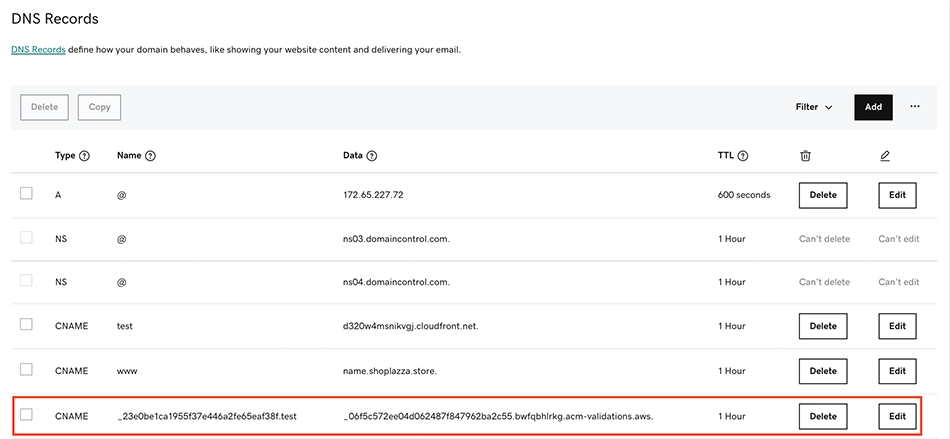
The SSL certificate cannot be issued if your domain is not pointed correctly to Shopify. This usually happens when there is something wrong with the domain’s A record or CNAME settings.
2. DNS Propagation Delays
After changing the domain settings, it takes time for DNS changes to propagate.
Generally, this process can take just a few hours or up to 48 hours, but in some cases it may last longer.
3. Third-Party Domain Configuration Problems
Some domain providers impose CAA or DNS restrictions on SSL certificates. If your domain was previously hosted on another platform, legacy DNS settings left behind before using Shopify migration services may interfere with Shopify’s SSL issuance.
4. Conflicting SSL Certificates
If your domain already has an SSL certificate from a different provider, Shopify may face issues replacing it.
5. Cloudflare or Proxy Server Interference
Inaccurate SSL settings on Cloudflare (“Full” or “Flexible”), for instance, can disrupt Shopify’s ability to implement SSL.
If Cloudflare proxy is enabled, temporarily disable it until SSL is activated on Shopify.
6. Newly Connected Domain
When a new domain is connected to Shopify, the platform needs time to verify ownership and generate the SSL certificate. During this period, the SSL status may show as pending.
SSL certification can be obtained quickly once the domain is correctly configured and any conflicting settings are removed. If you don’t see a reason it’s showing as pending, hire Shopify developers who can help resolve such issues instantly.
How To Enable SSL On Shopify?
In most cases, SSL on Shopify is enabled automatically when you connect a domain to your store. Shopify generates and installs the SSL certificate for Shopify in the background, so you don’t have to configure encryption manually.
This ensures that your store establishes secure connections with visitors and protects sensitive information such as login credentials and payment details.
Step 1. Connect Your Domain to Shopify
The first step is to properly connect your custom domain, or change the URL in Shopify from your default .myshopify.com address in your admin settings.
Once the domain is linked, Shopify automatically begins issuing the SSL certificate. This process works for both Shopify-purchased domains and third-party domains, as long as the DNS settings point correctly to Shopify’s servers.
Step 2. Verify SSL Status in Shopify Admin
To confirm that SSL is active, go to Shopify Admin → Online Store → Domains. Here, Shopify displays the security status for each connected domain. If the certificate is active, you will see a Secure label or a green checkmark next to the domain.
Step 3. Check Your Website in the Browser
Another simple way to verify SSL is by opening your store in a browser. If the certificate is active, your website will load with HTTPS instead of HTTP, and a padlock icon will appear in the address bar. This indicates that the connection between the visitor and your store is encrypted.
Step 4. Resolve “SSL Pending” if It Appears
Sometimes you may see a Shopify SSL pending message. From my experience working with Shopify stores, this usually happens when DNS changes are still propagating or when domain records are not fully configured. When this happens, Shopify is simply validating the domain before activating encryption.
Once verification is complete and the transport layer security-enabled settings are finalized, Shopify automatically activates SSL. If everything is configured correctly, the SSL pending Shopify status disappears, and your store starts serving pages over secure HTTPS connections.
How to Fix SSL Pending on Shopify?
Resolving an SSL Pending status requires a structured approach, as multiple factors can delay certificate activation. Verifying the domain’s connection and modifying DNS records are vital steps in ensuring the storefront’s security.
Shopify automates the SSL configuration, but the process breaks at times (with misconfigured settings or third-party conflicts). Addressing these issues methodically helps restore full encryption and eliminates security warnings.
If your SSL certificate is stuck in “Pending,” follow these step-by-step troubleshooting methods:
Step 1: Verify Domain Connection
Go to Settings > Domains in Shopify and check whether your custom domain is listed correctly.
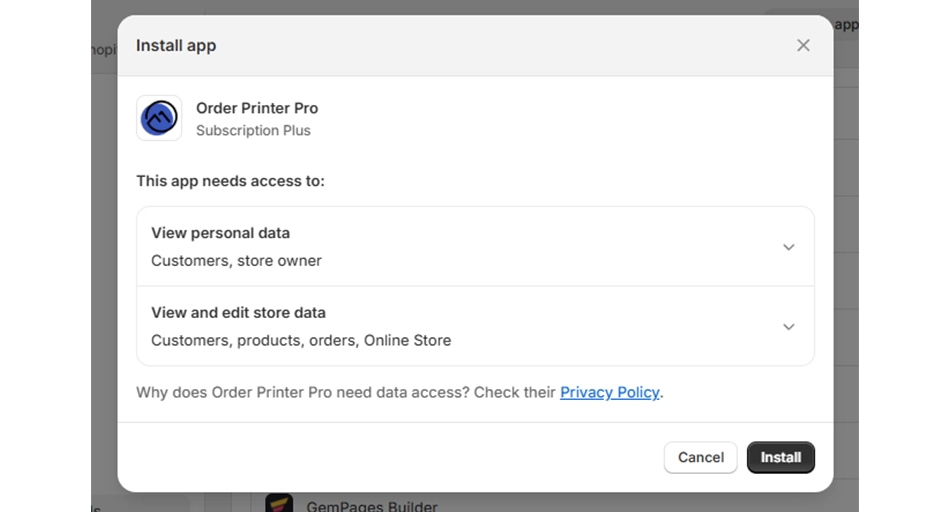
If Shopify shows “Not connected” or “Action required,” follow the on-screen instructions.
Use WhatsMyDNS to verify that DNS changes have propagated.
Step 2: Correct DNS Settings
Ensure your domain has the correct DNS records:
- A Record: 23.227.38.65
- CNAME: shops.myshopify.com
Remove any conflicting records that may interfere with SSL provisioning.
Step 3: Allow Time for DNS Propagation
DNS updates can take 24-48 hours. If changes were made recently, wait and check again.
Step 4: Remove Conflicting SSL Certificates
If your domain has an existing SSL certificate from a previous provider, consider removing it before retrying SSL activation in Shopify.
Step 5: Adjust Cloudflare or Proxy Settings
If you use Cloudflare alongside Shopify speed optimization services, navigate to your SSL/TLS settings and ensure encryption is set to “Full (Strict)” mode rather than “Flexible” mode to prevent redirect loops and SSL conflicts.
Avoid “Flexible” SSL mode, as it can cause conflicts.
Step 6: Contact Shopify Support
In case SSL remains pending after 48 hours, please reach out to the Shopify support team.
Give them information, including the domain name, DNS records, and the troubleshooting steps you have attempted.
A properly configured domain ensures that an SSL certificate is issued without unnecessary delays. By constantly monitoring the settings and giving enough time for propagation, recurring issues can be solved. If problems persist, the Shopify support team can help diagnose and resolve more complex issues to ensure your site remains secure.
And if you want professional services for security and performance, consult with a Shopify development company.
Preventing SSL Issues in the Future
Ensuring uninterrupted SSL certification starts with proper domain configuration and adherence to best practices. Common issues often stem from incorrect DNS settings, conflicting security layers, or misconfigurations in external services.
By proactively managing these elements, store owners can avoid delays in SSL activation and maintain a secure shopping environment. A few strategic adjustments can significantly reduce the likelihood of recurring certificate problems.
To ensure smooth SSL activation and avoid future issues, follow these best practices:
- Use Shopify’s recommended DNS settings when connecting a custom domain.
- Avoid manual SSL installations, as Shopify manages SSL certificates automatically.
- Monitor your store’s security settings regularly to identify and resolve potential issues early.
- Use Cloudflare cautiously, ensuring it is properly configured to work with Shopify.
A secure and properly configured domain strengthens trust, enhances search visibility, and protects customer data. Relying on professional eCommerce website maintenance services ensures routine checks of domain settings, timely resolution of DNS conflicts, and consistent alignment with Shopify’s security guidelines.
Final Thoughts
A fully functional SSL certificate is essential for securing transactions, protecting customer data, and maintaining trust in your Shopify store. While the SSL Pending status is often temporary, unresolved issues can impact site security and user experience.
By ensuring proper DNS configuration, eliminating conflicting security settings, and allowing sufficient time for propagation, merchants can prevent unnecessary delays. Regular monitoring and adherence to Shopify’s guidelines further minimize risks.
If challenges persist, Shopify’s support team can provide expert assistance. A secure website not only enhances credibility but also strengthens customer confidence, fostering long-term business growth. Facing issues with your Shopify store? Contact us today!
FAQs on SSL Pending on Shopify
1. Does Shopify provide free SSL certificates?

Yes. Shopify automatically provides free SSL certificates for all stores and connected domains. Using HTTPS encryption makes your website appear more trustworthy in Google search results while protecting visitor data. This security protocol helps prevent cyber threats and creates a safer browsing experience for your customers.
2. How long does SSL activation take on Shopify?
SSL certificates typically activate within a few hours, but DNS propagation can take up to 48 hours.
3. Can you launch a Shopify site without an SSL certificate?
Shopify automatically issues SSL certificates for all stores, so launching without SSL is not possible. Having SSL is crucial; it protects customer data, verifies your store’s identity, and builds trust for purchases.